Table of Contents
Apple's new Siri AI is a forthcoming conversational assistant powered by Apple Intelligence. Apple says it will understand personal context, take more actions in apps, use online information, and offer a dedicated conversation app. It is important to separate those promised Siri AI capabilities from Apple Intelligence features that are already available on supported devices.
Apple currently says Siri AI is coming in English later this year. Availability can differ by device, language, and region, so an updated iPhone may have Apple Intelligence without yet having the complete Siri AI experience described below. Check Apple's Apple Intelligence and Siri page for the current rollout status.
Siri AI versus today's Apple Intelligence features
| Capability | Status to check | What it does |
|---|---|---|
| More resilient requests and follow-up context | Available with Apple Intelligence on supported systems | Siri can follow a corrected request and understand an immediate follow-up without every detail being repeated. |
| Type to Siri and Apple product knowledge | Available on supported devices and languages | Lets you type requests and ask how to use Apple products. |
| ChatGPT extension | Optional and region-dependent | Can provide broader answers or help compose content when the extension is enabled. |
| Personal Context in Siri AI | Part of the forthcoming Siri AI rollout | Finds relevant information across a user's messages, mail, photos, notes, and other indexed content. |
| More actions in apps | Expands with Siri AI and developer support | Performs supported app actions based on the current request or activity. |
| Dedicated Siri app and conversation history | Forthcoming with Siri AI | Collects conversations, supports continuity across devices, and allows conversations to be pinned. |
This distinction matters because an advertised feature may not appear immediately after you enable Apple Intelligence.
What personal context is designed to do
Personal Context is intended to let Siri find information based on meaning rather than the app where it was stored. A user could ask for a photo from a past trip, an email buried in the inbox, or a detail saved in a note without first opening that app.
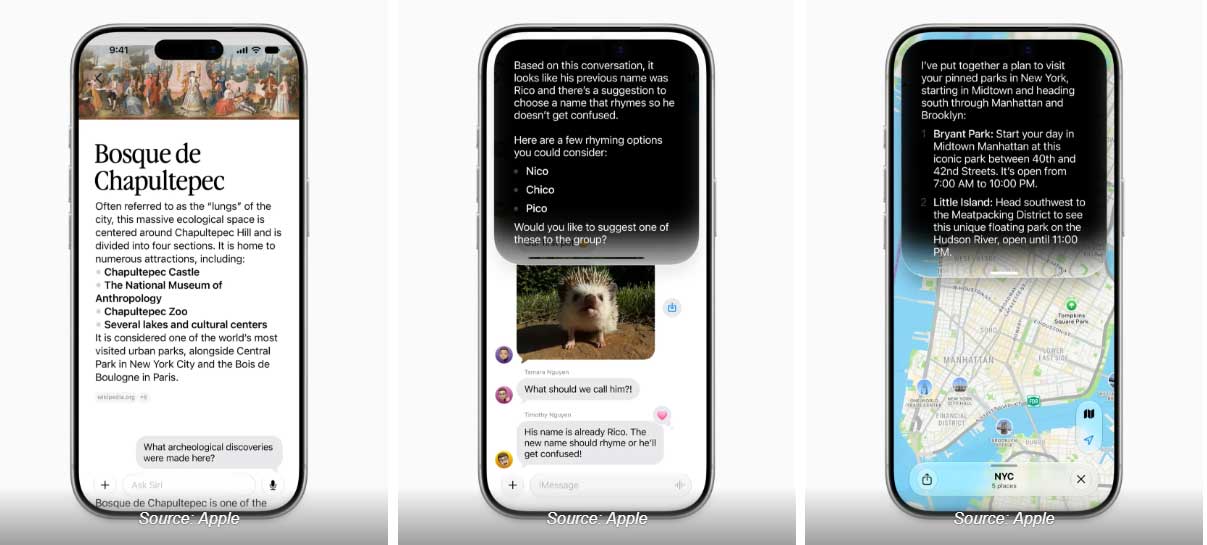
The quality of the answer will still depend on the available information and how clearly the request identifies it. Names shared by several contacts, vague dates, duplicate reservations, or incomplete messages may require clarification. Review a retrieved address, date, booking number, or contact before acting on it.
On-screen awareness and actions in apps
Apple's developer tools support on-screen awareness so an app can identify the entities shown in its interface. That can let a person refer conversationally to the address, message, song, photo, or other item currently on screen. App Intents then expose supported actions to Siri, Spotlight, and Shortcuts.
The result is not unlimited control of every app. What Siri can see or do depends on the operating-system version, the app's integration, the language and region, and the specific action. A third-party app must expose relevant information and actions before Siri can reliably use them.
Visual Intelligence is related but separate
Visual Intelligence helps identify, search, or act on content from a camera view or the screen. Apple describes support through the Camera app on compatible iPhones, on-screen content on Mac and iPad, and objects in view on Apple Vision Pro. It can also use an enabled ChatGPT extension for questions about an image.

Do not treat a visual result as professional medical, legal, financial, or safety advice. Apple notes that generative results can be inaccurate or unexpected. Confirm important identifications and instructions with an appropriate primary source.
Writing Tools are an Apple Intelligence feature
Writing Tools can operate in supported text fields and apps; they are not simply a new voice command inside Siri. Available options can include:
| Tool | Practical use |
|---|---|
| Proofread | Reviews spelling, grammar, and punctuation while letting you inspect changes. |
| Rewrite | Produces another version with a selected tone or instruction. |
| Summarize | Condenses selected text into a summary, key points, list, or table where supported. |
| Compose | Uses the optional ChatGPT extension to draft text from a description. |
Always verify names, figures, dates, citations, and contractual or medical language. A polished sentence can still contain a factual error.
Which iPhones support Apple Intelligence?
Apple's current compatibility list includes iPhone 15 Pro models and iPhone 16 models or later. Apple also specifies supported operating-system versions, adequate free storage, and matching supported device and Siri languages. Requirements can change with new releases; use Apple's How to get Apple Intelligence page rather than assuming any iPhone that runs the latest iOS supports it.
To check the setting, open Settings > Apple Intelligence & Siri. If the option is missing, confirm the exact iPhone model, iOS version, region, device language, and Siri language.
Useful Siri features available now
On a compatible device with Apple Intelligence enabled, Siri can maintain the context of immediate follow-up questions, handle verbal corrections, accept typed requests, and answer many questions about Apple products. Apple's Siri and Apple Intelligence guide describes these current controls.
For example, a user can ask a sports question, follow with “When do they play next?”, and then ask to add that event to the calendar. This is conversational context within the current exchange, not the same as the forthcoming Personal Context feature that searches a person's stored information.
How Apple describes privacy
Apple says on-device processing is the foundation of Apple Intelligence. More complex requests can use Private Cloud Compute, where only data relevant to the request is processed on Apple-silicon servers and is not stored after the request. Apple also says researchers can inspect the software images used by Private Cloud Compute.
That design does not remove the need for user judgment. Review which extensions are enabled, read confirmation prompts before sharing a photo or document, and avoid placing sensitive information into a request unless it is necessary. Apple's Apple Intelligence privacy guide explains the processing model.
What to verify before relying on a Siri AI feature
- Is the feature available now, or labeled as coming later?
- Does the exact iPhone model support Apple Intelligence?
- Are iOS, the device language, and the Siri language supported and up to date?
- Does the app expose the required action through its integration?
- Will Siri ask for confirmation before sending data to an external extension?
- Can you verify the retrieved name, address, date, or amount before using it?
Siri AI may reduce the need to hunt through apps, but rollout status and app support determine what any particular iPhone can do today.
Related Articles
 What's New in Siri on iOS 158 minutes read
 How to Turn Off Siri on iPhone, iPad, Mac, and Apple Watch5 minutes read
 10 Changes the Best Settings That Siri Can Make on iPhone5 minutes read
 How to Turn Off Siri on iPhone, iPad6 minutes read
 How to Block Siri from Automatically Pop-up on Apple Watch4 minutes read
 How to Stop Apple from Storing Siri Recordings on iPhone: Step-by-Step Guide2 minutes read
Reader Comments 0
Sign in with email or Google to join the discussion.