Table of Contents
This updated overview organizes the essential information about You Can Write Notes for Reels Instagram Videos, including practical uses, key features, setup considerations, and common questions.
What This Guide Covers
- Instructions for writing notes in Instagram Reels
Instructions for writing notes in Instagram Reels
When you post a Reels video to Instagram and click the share icon in the right corner of the interface. will display the options interface and you will see the Add note option to write a shared note in Reels.
We enter notes into the Reels video as usual or tag friends' names in the note and customize who can see the note's content. Users can choose to share this Reels video note to your followers that you follow back or close friends.
Once you have selected the object to share the note with in Instagram Reels, click the Share button below to do so.
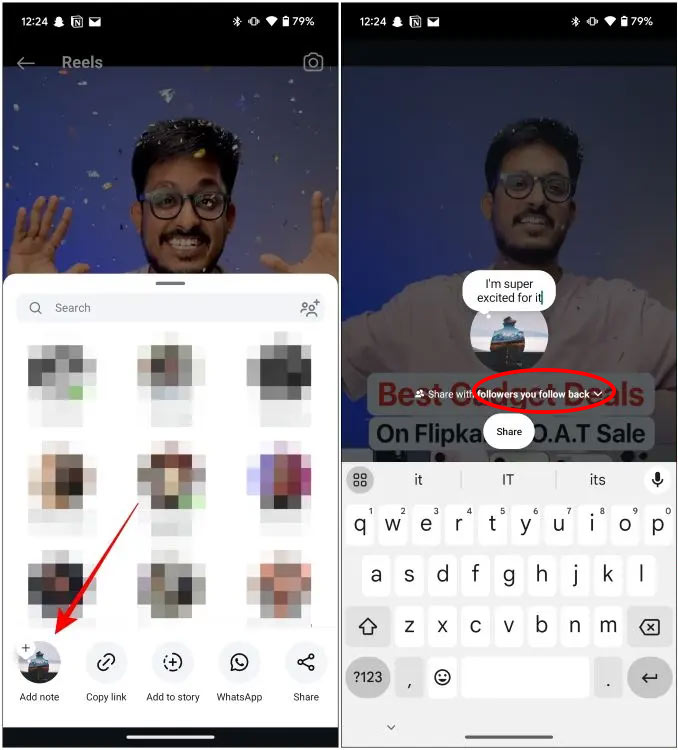
As a result, we will see the note displayed in the Reels video and only the subjects on the list you set will see the content of this note. A new Instagram feature lets you create temporary notes that disappear after three days.

In addition, Instagram will also allow multiple songs to be inserted into Reels with a maximum of 20 songs. You can add your favorite songs to the video, adjust the volume, display time for the songs in the video, etc. to your liking to get a completely new Reels video.
All features are currently being rolled out by Instagram to certain regions and accounts and will quickly roll out globally.
Final Thoughts
Use the instructions and checks above in order, verify the result after each major step, and keep a backup whenever the process changes important files or system settings.
FAQ
What is Write notes in Instagram Reels used for?
Instructions for writing notes in Instagram Reels When you post a Reels video to Instagram and click the share icon in the right corner of the interface.
Who should consider Write notes in Instagram Reels?
It is most useful for readers who need the features, workflow, or problem-solving approach described in this guide.
What should I check before using it?
Review compatibility, current software requirements, privacy or security settings, costs, and any limitations that could affect your workflow.
Related Articles
 Instructions for Pinning Reels Instagram Videos: Key Facts4 minutes read
 How to Delete Multiple Instagram Reels Videos at Once with a Few Simple Steps3 minutes read
 Instagram Will Allow Reels Up to 3 Minutes Long4 minutes read
 How to Hide Reels Instagram Suggested Videos3 minutes read
 How to Post Reels Instagram Video to Instagram Story3 minutes read
 How to Use the Instagram Reels Video Editing Tool: Step-by-Step Guide4 minutes read
Reader Comments 0
Sign in with email or Google to join the discussion.