Table of Contents
This guide provides a clear, practical overview of "Windows 11 Suddenly Blocks Google Chrome Due to Microsoft Security". It organizes the most useful details, explains important considerations, and highlights the steps or choices that matter most.
Users report Chrome automatically closing or freezing after launching, and not being able to reopen. While Microsoft Edge works fine, Chrome is completely disabled. The issue has been primarily reported on Windows 11, but can also appear on Windows 10 and macOS.
On the official Microsoft user forum, member Peter Priestley1 (presumably from an educational institution) describes:
"Since last night, my students have been noticing that Chrome is being blocked by Microsoft Family Safety. This happens to all versions of Chrome - old and new - even though they were released around the same time as the patch for the old vulnerability . "
The post has received 122 upvotes at the time of writing.
Many solutions have been tried (deleting cookies, resetting appdata) and have failed, proving that the security feature is extremely strict but at the same time inconvenient for users. A temporary solution is to rename the chrome.exe file to another name (e.g. chrome1.exe).
Official Fix Guide Chrome Community Admin Ellen T confirms the cause and offers a solution:
- Go to https://familysafety.microsoft.com or the Family Safety app
- Select child account
- Do ONE of two things:
- Disable "Filter inappropriate websites" in Edge tab
- Go to Windows tab → Apps & Games → unblock Chrome "
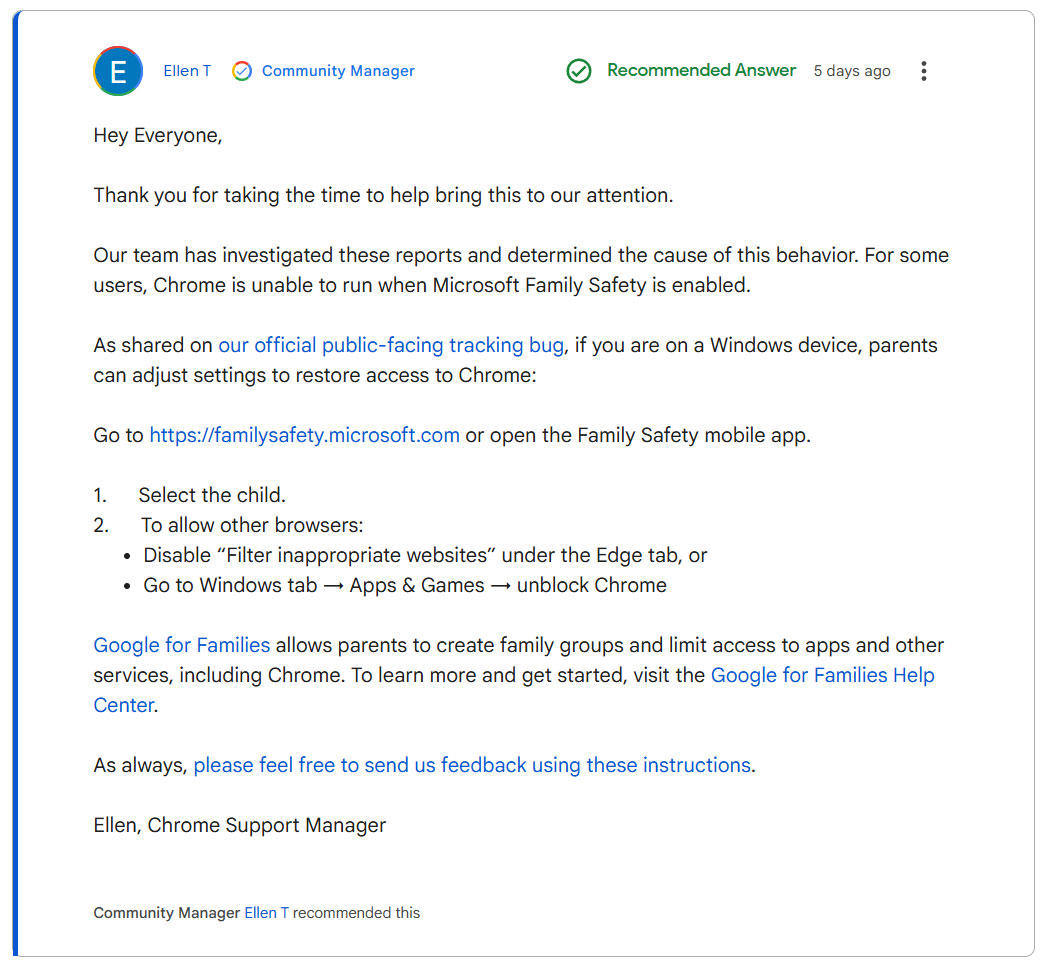
Fred SR. (Chrome community senior member) said that Microsoft has also confirmed similar guidance.
FAQ
What does this guide cover?
This guide explains Windows 11 suddenly blocks Google Chrome due to Microsoft security, including the main steps, important details, and practical considerations.
Who is this guide for?
It is designed for readers who want a clear, practical overview and a reliable process they can follow without unnecessary complexity.
What should you check before getting started?
Review the requirements, confirm that your software or device is up to date, and save any important data before changing settings.
Related Articles
 How to Fix Microsoft Family Safety Blocking Google Chrome on Windows4 minutes read
 Google Wants to Block Unsafe, Potentially Risky Download Files on Chrome5 minutes read
 Google Chrome Can Be up to 20% Faster Thanks to Microsoft3 minutes read
 Google Chrome Uses Windows 10's New Security Feature to3 minutes read
 How to Enable Site Isolation Security Feature on Chrome4 minutes read
 Google Chrome Will Block Unsafe Downloads on HTTPS Websites3 minutes read
Reader Comments 0
Sign in with email or Google to join the discussion.