Table of Contents
In the Windows 11 Photos app, sign in to your personal OneDrive account and search for what you remember seeing, such as “picnic in a park” or “dog on a beach.” On supported Copilot+ PCs, improved Windows Search can also match descriptions against indexed pictures.
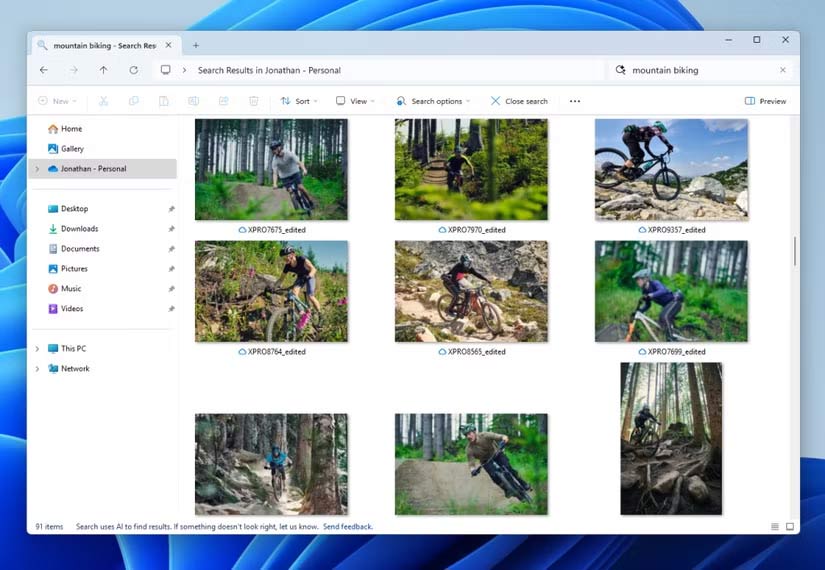
Try a descriptive search
- Open Photos and check that the pictures from your personal OneDrive account appear.
- Enter a short description in the search box and review the matches. If it misses a picture, try one distinctive object, a date, or part of the file name.
- On a supported Copilot+ PC, try a descriptive search from File Explorer as well. Start from the folder or OneDrive location you want to search.
If results are missing
Check that you’re signed in with the account that owns the photos. Work or school accounts may offer a different set of search features. If a local image is missing on a Copilot+ PC, check that its folder is indexed and allow time for indexing after changing locations.
For current account and device requirements, see Microsoft’s Windows Photos guide and Windows Search documentation. The feature searches photos in Microsoft’s apps and storage.
Related Articles
 Why OneDrive Can't Replace Google Photos on Your Phone
 How to transfer photos from OneDrive to Google Drive
 8 awesome search engines hidden in Google Photos
 How to store photos online with Google Photos and OneDrive
 22 tips to help you master Google Photos
 10 Google Photos Tips and Tricks You Shouldn't Miss
Reader Comments 0
Sign in with email or Google to join the discussion.