Table of Contents
Overview
This guide explains USB Wi-Fi in clear, practical terms. It covers the key concepts, recommended steps, common limitations, and useful checks so you can make a better-informed decision.
When you use a laptop, especially a desktop computer for work, the Wi-Fi connection is suddenly lost, unstable and intermittent, causing you to interrupt your work. This makes you very uncomfortable, affecting your activities and work. A device that can support Wi-Fi reception for computers to overcome all those situations is USB Wi-Fi. Let's explore what USB Wi-Fi is with this guide In this guide!
What Is USB Wi-Fi?
USB Wi-Fi is a device used to receive/transmit Wi-Fi signals on computers and laptops using a USB port. The device is designed with a USB connection port to the computer. The device is commonly used for desktop computers because desktop computers cannot receive Wi-Fi signals, so they need a USB Wi-Fi to receive signals. Besides, it is also used for laptops. Because some old computers have broken Wi-Fi signal reception function, USB Wi-Fi is needed. Receive signals from 1-port/4-port Wi-Fi modem/Wi-Fi router.
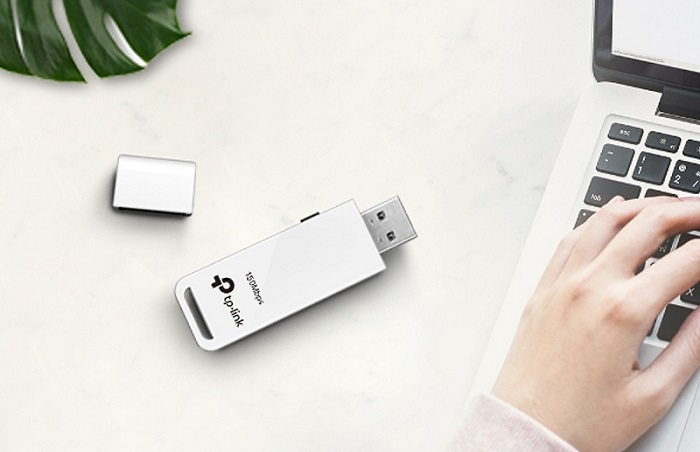
Structure of USB Wi-Fi
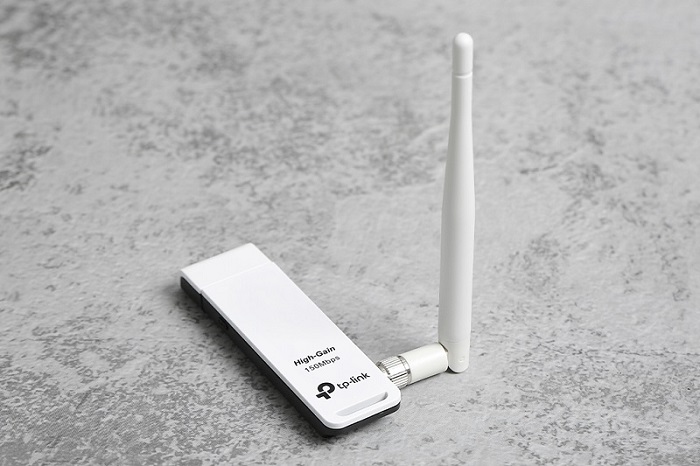
Includes 3 main components:
- USB connection port: Plug directly into the computer via USB 2.0 port
- Need to broadcast Wi-Fi: The outside looks like a miniature antenna
- Microchip: This part is inside, so to see it, you have to remove the outer plastic shell. The microchip is like a super small computer motherboard. One thing to note is that the microchip must be carefully preserved, if it gets wet, it cannot be repaired.
Besides, you can also find USB Wi-Fi without receiving and transmitting antenna. Users should not choose to buy this type because the receiving and transmitting ability is quite poor. It cannot be compared to the type of USB with antenna. Moreover, its price is almost as expensive as USB Wi-Fi with antenna. However, the signal reception is not half as good. Users can verify by placing the Wi-Fi modem in a closed room. Thick walls will make the signal reception weaker or blocked.
Advantages: When the desktop computer is equipped with this device, the user does not need a LAN cable to connect to the Internet. After a few small steps, the installation is complete. Some types of USB Wi-Fi require additional driver installation, note that only when the driver is installed can it be used. If the user does not know how to install the driver, find a tool that automatically finds the driver for USB Wi-Fi.
The function of USB Wi-Fi is to receive Wi-Fi signals from Wi-Fi transmitting devices. Then broadcast to other devices for sharing.
Currently, the price of USB Wi-Fi on the market is quite diverse. You can easily buy it for a few hundred thousand dong at computer component stores.
Why use USB Wi-Fi?
Desktop computers usually do not have integrated Wi-Fi cards and it is convenient to receive Wi-Fi signals with a USB Wi-Fi which will be very useful.
You can use Usb Wi-Fi when the desktop computer cannot catch Wi-Fi signal and need to use USB Wi-Fi to receive signal. So you will not need to pull the wire and use the network cable to connect to the internet. In addition, you can also use it for laptops when the machine is too old and the Wi-Fi card of the machine is damaged with USB Wi-Fi device is very necessary.
Using USB Wi-Fi is essential for working, studying or performing other activities online without being affected. Users will be more comfortable with stable Wi-Fi, all work will go smoothly.
In case your laptop's Wi-Fi card is broken and you don't want to replace it because the cost is quite high and can affect your computer. The simple answer is that you just need to use USB Wi-Fi to get a more stable Wi-Fi signal. Especially easy to receive Wi-Fi signal easily in any situation.
Which is the best USB Wi-Fi to choose today?
After learning what USB Wi-Fi is, you already know clearly about the structure and functions that they bring. To be able to find and buy the best USB Wi-Fi products, ensuring your use, come to this guide. Not only is the design compact, convenient but also highly flexible, at the same time supporting the most effective and stable Wi-Fi connection.
So we have just provided information about USB Wi-Fi. Through this, we hope you understand what USB Wi-Fi is, the uses of the device and when to use it. Hope you have the best experience with USB Wi-Fi.
Key Takeaways
Use the guidance above as a practical reference for USB Wi-Fi. Check compatibility, follow the steps carefully, and verify important details with official documentation when software, security, accounts, health, or purchases are involved.
FAQ
What is USB Wi-Fi used for?
USB Wi-Fi is used for the purposes described in this guide. Its practical value depends on your goals, device, workflow, and required features.
What are the main benefits and limitations of USB Wi-Fi?
The benefits may include convenience, performance, or greater control, while limitations can involve cost, compatibility, complexity, or security.
How do I decide whether USB Wi-Fi is right for me?
Compare its requirements, limitations, cost, compatibility, and real-world value with your own priorities before making a decision.
Related Articles
 The Best Wi-Fi Transmitter, Wi-Fi Modem, Worth Buying for You11 minutes read
 Wi-Fi 5, Wi-Fi 6 vs. Wi-Fi 6E: Key Differences7 minutes read
 What Is Wi-fi 7? Top 5 Wi-fi 7 Transmitters Worth Buying7 minutes read
 10 Best Best 4G Wi-Fi Transmitters Today8 minutes read
 Top 10 Good, Cheap, Genuine, Top Wi-Fi Routers in 2023: Expert Selection Guide15 minutes read
 What Is Wi-Fi 6E? How Is Wi-Fi 6E Different from Wi-Fi 6?3 minutes read
Reader Comments 0
Sign in with email or Google to join the discussion.