Gamma AI is considered the perfect solution to help you create impressive presentations but do not have much time. So, what is Gamma AI? Let's find out in the article below.
1. What Is Gamma AI?
Gamma AI is an intelligent online platform that helps users create professional presentations quickly and easily. Simply put, Gamma AI is a virtual slide designer and is always ready to serve you 24/7.
2. Outstanding Features of Gamma AI
Create presentation slides automatically
Gamma AI PPT is considered a powerful assistant for office workers. When users enter content and choose a style, Gamma will automatically perform everything from organizing logical information, creating vivid illustrations to designing professional layouts.
High quality natural language processing
AI Gamma with natural language processing (NLP) brings a whole new creative experience.
Users can ask Gamma AI to generate content in a specific style, tone, and topic such as humorous, fun blog posts or serious science articles or humorous, fun blog posts, etc. to create valuable and personalized content.
Integrate various tools
Gamma AI PowerPoint has cross-platform connectivity that allows users to easily sync and share their presentations with various applications such as Microsoft Office 365, Google Slides or Google Docs.
This feature makes it easy to access, edit, and update your presentations anytime, anywhere.
Data collection and analysis
Gamma AI automatically collects data on views, shares, and other interactions on the content you create, helping you measure campaign performance, understand user behavior, and optimize content for better results.
Create professional images, charts, infographics
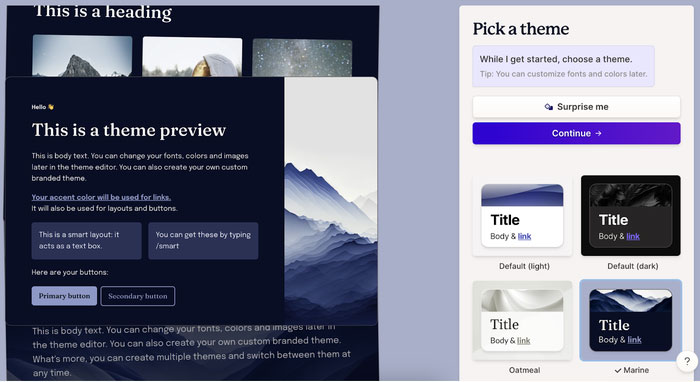
Gamma AI has the ability to automatically generate diverse images, charts, and infographics, helping you turn ideas into visual images quickly and professionally.
Support collaboration features
With Gamma AI PowerPoint, teamwork is now simpler and more efficient than ever.
Gamma AI's powerful sharing and collaboration features allow you to share documents, presentation slides with colleagues and edit and update together in real-time, making teamwork simpler and more efficient.
3. Advantages and Disadvantages of Gamma AI
Advantages of Gamma AI
- Gamma AI helps users save time and effort when creating complete slide sets.
- Gamma AI generates relevant images, charts, and illustrations, making presentation content more vivid and intuitive, conveying content to viewers and listeners better.
- Gamma AI has a variety of rich, trendy designs.
Disadvantages of Gamma AI
- The accuracy and quality of the slide depends on the clarity and detail of the input information provided by the user.
- Users may have to manually adjust details such as color, font, or layout.
- The use of Gamma AI can raise concerns about information security and intellectual property rights, especially when sharing sensitive data.
4. How to Use Gamma AI
For detailed instructions on how to use Gamma AI to create beautiful presentations that anyone can do, please see the article How to use Gamma AI to create beautiful presentations.





Reader Comments 0
Sign in with email or Google to join the discussion.