Table of Contents
An XML file is a text document written in Extensible Markup Language. XML uses named elements and attributes to represent structured data in a way that software can parse and people can inspect. The .xml extension does not identify one specific app because many programs define their own XML vocabulary.
You can view an XML file in a text editor or browser, but editing it safely requires preserving its structure, character encoding, namespaces, and any rules imposed by the application that created it.
How XML is structured
A small XML document might look like this:
<?xml version="1.0" encoding="UTF-8"?>
<book id="42">
  <title>Plain XML Example</title>
  <author>A. Writer</author>
</book>- The optional XML declaration states the XML version and character encoding.
- The document has one top-level root element, here named book.
- Elements can contain text, attributes, comments, or other elements.
- Names are case-sensitive: <Title> and <title> are different names.
- Reserved characters such as < and & must be escaped when they are data rather than markup.
Unlike HTML, XML does not provide a fixed collection of presentation tags. A designer creates element names for a particular data model. An XML schema or DTD may define which elements, attributes, and values are permitted.
Well-formed and valid XML
Well-formed XML follows the core syntax rules: it has one root element, tags are properly nested and closed, attribute values are quoted, and reserved characters are escaped. Valid XML is well formed and also satisfies a declared schema or DTD.
A file can therefore be readable XML but still be rejected by an application because a required element is missing, a value has the wrong type, or the document uses the wrong namespace.
What XML files are used for
- Application and build configuration
- Data exchange between systems
- RSS and Atom feeds
- Android layout and resource files
- Web-service messages in XML-based protocols
- Vector graphics such as SVG
- Open document packages such as DOCX, XLSX, PPTX, ODT, and ODP, which contain multiple files including XML documents
These uses are not interchangeable. An SVG file, an Android resource, and a product feed can all be XML while following completely different rules.
How to open an XML file
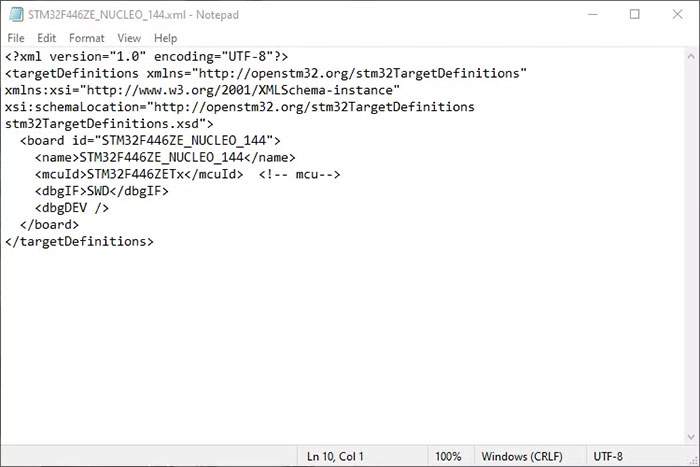
Use a text or code editor
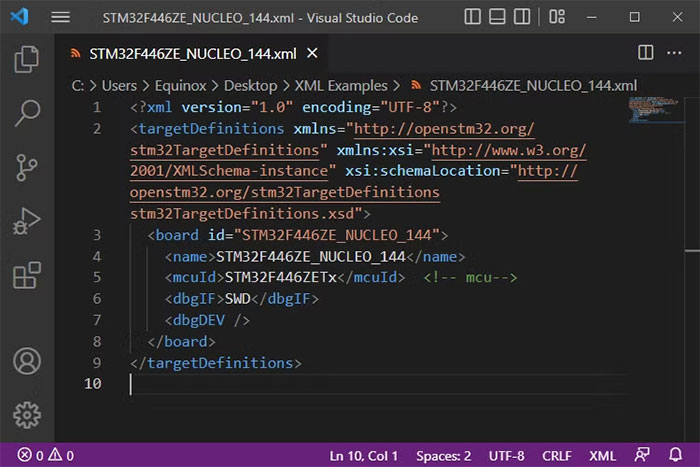
Notepad, TextEdit in plain-text mode, Visual Studio Code, Notepad++, Sublime Text, and other text editors can open XML. A code editor adds syntax highlighting, automatic indentation, tag matching, and often schema validation, which makes nested documents easier to understand.
Use a web browser for viewing
Current browsers can display many XML documents and may show a collapsible tree. A browser does not understand the business meaning of custom elements and is not a full XML editor. If the page reports a parsing error, note the line and column and inspect that area in a code editor.
Use the application that owns the data
If the XML belongs to an accounting tool, development project, device backup, or another product, open or import it through that product when possible. The application may enforce rules that a general editor cannot see.
How to edit XML without breaking it
- Make a backup of the original file.
- Open it in an editor that shows the current encoding and line endings.
- Preserve the root element, namespaces, and required attributes.
- Escape special characters rather than pasting raw markup into text values.
- Format or indent a copy if that will not affect an application that treats whitespace as significant.
- Validate the saved file and test it in the application that consumes it.
Do not use a word processor that inserts smart quotes or rich-text markup. Also avoid changing the XML declaration to UTF-8 without actually saving the bytes as UTF-8.
Common XML errors
| Error | Typical cause |
|---|---|
| Mismatched tag | An opening element and closing element use different names or case |
| Unexpected end of file | A closing tag or quote is missing |
| Invalid character/entity | A raw ampersand, less-than sign, or unsupported control character appears in data |
| Unbound prefix | A namespace prefix is used without a corresponding declaration |
| Encoding error | The declared encoding does not match the file's bytes |
| Schema validation error | The syntax is XML, but the structure or values violate the expected schema |
Can XML be converted to JSON, CSV, or Excel?
It can, but conversion requires a mapping. XML can represent attributes, namespaces, mixed text, repeated elements, and deeply nested structures that do not fit cleanly into a flat CSV table. Before converting, decide how repeated records, missing values, attributes, and nested children should map to rows and columns.
For one structured dataset, a spreadsheet's XML import tool may be enough. For recurring or complex conversions, use a script or application with an explicit mapping and validate the output against sample records.
Handle untrusted XML carefully
XML parsers can expose security risks when external entities or unrestricted DTD processing are enabled. Applications that accept untrusted XML should use current libraries, disable external entity resolution and DTD processing unless specifically required, impose size and nesting limits, and avoid fetching remote resources during parsing. Simply viewing text in an editor is different from feeding it into an application that interprets it.
Related Articles
 Everything You Need to Know About ODP Files - What Are ODP Files?4 minutes read
 All You Need to Know About ZIP Files - What Is a ZIP File?5 minutes read
 How to Quickly Create New Blank Text Files on Windows, Mac and Linux11 minutes read
 What Is a DAT File? How to Open DAT Files, How to Read DAT12 minutes read
 What Is DMG File?7 minutes read
 M3U Is What File? How to Open, Edit and Convert M3U Files8 minutes read
Reader Comments 0
Sign in with email or Google to join the discussion.