VARPA function - Function that calculates variance based on the entire set, including logical values and text in Excel
VARPA function: Function that calculates variance based on the entire set, including logical values and text. Syntax: VARPA (value1, [value2], ...)
The following article introduces you to the VARPA function - one of the functions in the statistical group is very popular in Excel.

Description: The function performs calculation of variance based on the entire population, including logical values and text.
Syntax: VARPA (value1, [value2], .)
Inside:
- value1, [value2], .: The arguments in the whole need to calculate the variance, where value1 is the required argument, the next arguments are optional and contain up to 254 value arguments .
Attention:
- The VARPA function assumes that its arguments are an entire population.
- Arguments can be numbers, names or arrays that contain numbers.
- If the argument is an array or a reference, only values in that array are used.
- When typing logical values and presenting numeric values into function arguments -> these values are still calculated.
- True value is 1 default, false value is 0 default.
- Function error occurs when arguments are text or error values cannot be converted.
- If you do not want to calculate both logical values and text -> use the VARP function .
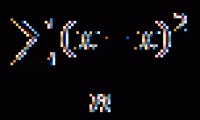
- The equation to calculate the VARA function is:
[frac {{sum {{{left ({x - overline x} right)} ^ 2}}}} {n}]
Inside:
+ x is the sample mean AVERAGE (number1, number2, .)
+ n is the sample size.
For example:
Calculate variance based on the entire set of number values in the following data table:

- In the cell to calculate enter the formula : = VARPA (D6: D10)

- Press Enter -> variance based on the entire set of number values is:

- Here the calculated logical values correspond to its default values.
-Where all numeric values are text or logic -> the function still calculates and returns the result:

Above are instructions and some specific examples when using VARPA function in Excel.
Good luck!
Was this article helpful?
Your feedback helps us improve.
Related Articles
 VAR.P function - Function that calculates variance based on the entire set, ignoring logical values and text in Excel2 minutes read
 VARA - Function that calculates variance based on a sample, including logical values and text in Excel3 minutes read
 VAR.S function - Function that calculates variance based on a sample, ignoring logical values and text in Excel3 minutes read
 VARP function - Functions for calculating variance based on an entire population in Excel3 minutes read
 STDEVPA function - The function of estimating standard deviations based on an entire population including both text and logical values in Excel3 minutes read
 STDEVA function - The function of estimating standard deviations based on a sample including both text and logical values in Excel3 minutes read
Reader Comments 0
Sign in with email or Google to join the discussion.