Table of Contents
This updated guide examines Users Are Not Yet Ready to Give up Windows 7 and organizes the essential facts, background, and practical takeaways in clear American English.
After Windows XP, Windows 7 is Microsoft's most successful operating system ever. The clearest proof that users are not ready to give up this operating system to switch to the new operating system is its current market share.
According to the latest statistics of StatCounter, Windows 10's market share has improved significantly in the past year since it was announced that Windows 7 will die in early 2020.
Specifically, as of December 2019, the market share of Windows 10 has climbed to 65.4%, Windows 7 still accounts for over 26.7%. This chart shows that Windows 7 users have gradually transitioned to Windows 10 but are still very slow, even when the end of support is near.
Market share of Windows 7 has declined but slowly over time. In October 2019, Windows 7's market share was 27.9%, November decreased to 27.4% and by December was 26.7%. In two months, the market share of Windows 7 lost just over 1%, too little compared to the current market share growth rate of Windows 10.
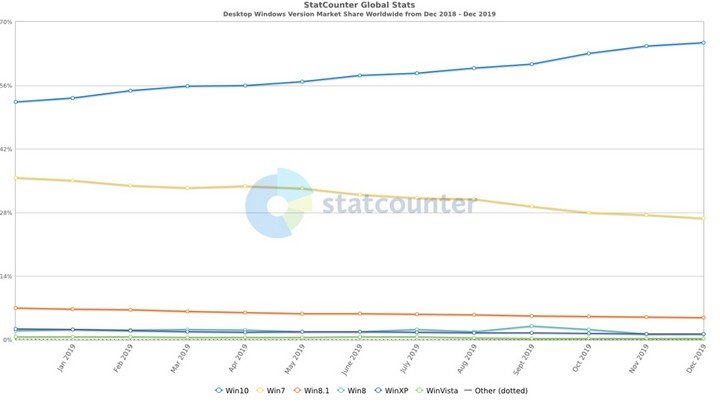
This shows that users are still attached to the version of Windows 7. In the future, the market share of this operating system will certainly continue to decline but will be very slow.
For now, if you don't want to upgrade to Windows 10, businesses can continue to use Windows 7 for at least the next few years by buying Microsoft's extended support package.
- Microsoft sent a 'closed screen' notification to persuade Windows 7 users to upgrade to Windows 10
- Spreading the "hack" tool helps Windows 7 to receive updates even after Microsoft stops supporting
FAQ
What is Users Are Not Yet Ready to Give up Windows 7 about?
It provides a structured overview of windows 7, explains the main context, and highlights practical takeaways for readers.
Why does this topic matter?
Understanding the main concepts helps readers evaluate the issue, avoid common mistakes, and make better-informed decisions.
How should readers use this information?
Use the guidance as a practical starting point, confirm details that may have changed, and follow current product, safety, or security recommendations.
Related Articles
 Steps to Fix 'Getting Windows Ready' Error on Windows 107 minutes read
 How to Fix 7 Ways to Fix 'Getting Windows Ready' Error on Windows8 minutes read
 Users Begin to Flee Windows 104 minutes read
 NVIDIA Releases Game Ready and Studio Drivers for Windows 114 minutes read
 Fix 'the Device Is Not Ready' Error When Running the. Exe File on Windows4 minutes read
 7 Reasons Microsoft Urges Users to Abandon Windows 10 to Switch to Windows 116 minutes read
Reader Comments 0
Sign in with email or Google to join the discussion.