Table of Contents
This guide covers toshiba upgraded SSD solid-state hard drive with practical context and easy-to-follow details. Use it to understand the subject and apply the information confidently.
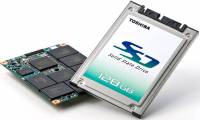
According to Toshiba's latest announcement, the company is continuing to develop SSD solid-state drives using the current NAND flash memory chip. The new generation of SSDs will have 2 series, SG for UMPC, netbook and HG for high-performance laptops like gaming or graphics apps. Both support AES encryption and the TRIM command of Windows 7.
 SSD hard drives will replace traditional HDD drives in the future (Photo: Notebookcheck) .
In particular, the SG Series will have 128 GB capacity using mSATA communication and has the highest reading and writing speeds of 180 MB / sec and 70 MB / sec. The aforementioned 128 GB module also has half the volume and 8 times lighter than a typical 2. 5-inch SSD.
The HG series will have an internal MLC controller and have a read speed of up to 250 MB / sec or 180 MB / sec. Toshiba currently produces 64, 128, 256, 512 GB versions for HG 2. 5 inch and 64, 128, 256 GB series for 1. 8 inch series.
All of these SSDs have the advantage of being compact, low power consumption, and the capacity has begun to grow day by day. But their cost is still a big barrier for consumers.
FAQ
What should I check before following these steps?
Confirm device and software compatibility, save important data, and make sure you have the required permissions, files, and account access.
Why might the process not work?
Common causes include outdated software, missing permissions, incompatible hardware, an unstable connection, or completing a step in the wrong order.
Can I undo the changes if necessary?
That depends on the tool or setting. Use built-in restore options when available, keep a backup, and record the original configuration first.
Related Articles
 Solid-state Drives (Ssds) and Some Things You Should Know7 minutes read
 11 Things to Do When Using SSD Hard Drive on Windows 109 minutes read
 What Are Solid-State Drives (SSDs)?9 minutes read
 Find Out How SSD Drives Work14 minutes read
 The First Laptop Uses a 120 GB Solid-state Drive3 minutes read
 How to Create a RAM Drive on Windows14 minutes read
Reader Comments 0
Sign in with email or Google to join the discussion.