Table of Contents
The best AI voice generator depends on what you are making. ElevenLabs covers the widest range of general voice and audio workflows. Speechify Studio is convenient for voiceover and video production. WellSaid focuses on reviewable business narration, Hume Octave emphasizes expressive prompt-designed voices, and VoiceStudio is an open-source option for users who want local processing.
Do not judge a service from one polished demo. Generate the same script in every candidate, then compare pronunciation, pacing, edit controls, licensing, export format, privacy, and total production time.
Quick comparison
| Tool | Best for | Main strength | Watch for |
|---|---|---|---|
| ElevenLabs | General voice production and API projects | Broad toolset for TTS, voice design, cloning, dubbing, and agents | Feature breadth can make the workflow more complex than a simple narrator needs |
| Speechify Studio | Video, slides, training, and multi-speaker voiceovers | Voice generation combined with visual production tools | Voice quality and control vary by the selected voice and workflow |
| WellSaid | Business and learning-content teams | Pronunciation controls, team review, and consistent approved voices | Less focused on experimental character performance |
| Hume Octave | Expressive characters and voice design from prompts | Natural-language control over voice and delivery | Expressiveness still requires script-by-script testing |
| VoiceStudio | Local, open-source experimentation | Local TTS, cloning, dubbing, dictation, and extensible engines | Active beta with setup and hardware requirements |
1. ElevenLabs: best all-round voice platform
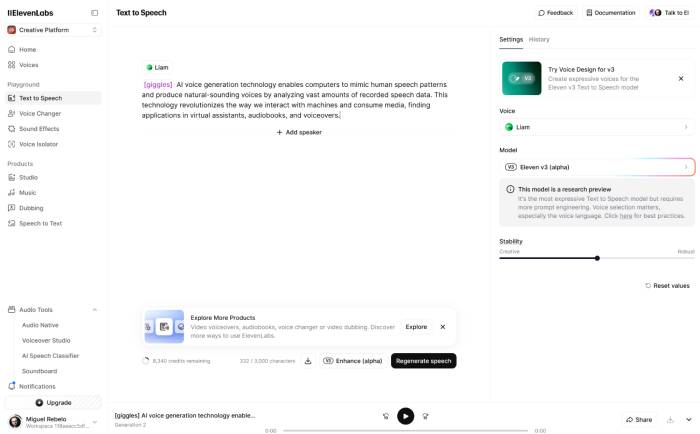
ElevenLabs combines text-to-speech with voice design, permitted voice cloning, dubbing, sound effects, music tools, and conversational voice agents. Its Studio workflow is intended for longer productions, while the API serves applications that need generated speech programmatically.
Why choose it
- You need several audio tools in one account.
- You work in multiple languages or switch between narration and character voices.
- You want a voice library plus the ability to design a new voice from a description.
- You plan to add speech to a product through an API.
Voice Design lets users describe qualities such as accent, age, pacing, tone, and speaking style. Supported models may also respond to performance cues in a script. These controls are useful, but the result can change when the text, language, or model changes. Regenerate a short section rather than accepting an inconsistent passage in a long export.
Check the current ElevenLabs text-to-speech page for supported languages and features. Commercial rights, cloning, project limits, and exports depend on the plan, so read the terms that apply when the audio will be published or sold.
2. Speechify Studio: best for voiceover plus visual production
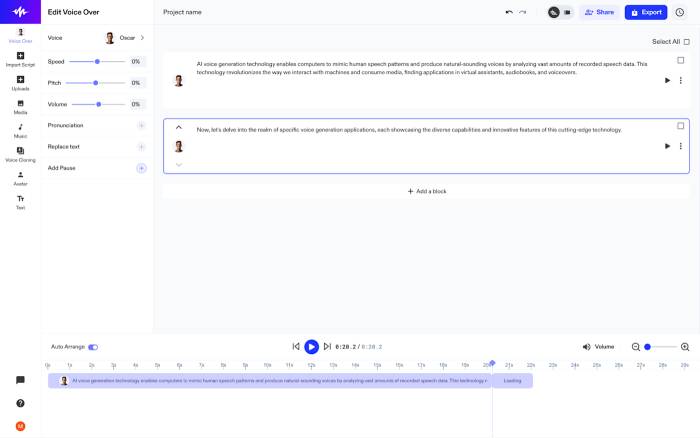
Speechify Studio combines AI voiceover with video, slides, dubbing, and other media tools. It is a practical fit when the goal is a finished training clip, explainer, presentation, or social video rather than an isolated audio file.
Why choose it
- You need multiple speakers in one project.
- You want to adjust voiceover timing alongside visuals.
- You prefer a single production interface for narration, music, and video.
- Your team wants to create explainers without a separate video editor.
Do not assume every voice has the same emotional range or pronunciation accuracy. Test the exact language, accent, numbers, acronyms, brand names, and technical terms in the voice you intend to use. A natural sample on a product page may not reflect a long instructional script.
The official Speechify Studio page lists the current voiceover, video, slides, and dubbing tools. Separate Speechify reading products serve a different purpose, so make sure you are evaluating Studio when you need downloadable production audio.
3. WellSaid: best for controlled business narration
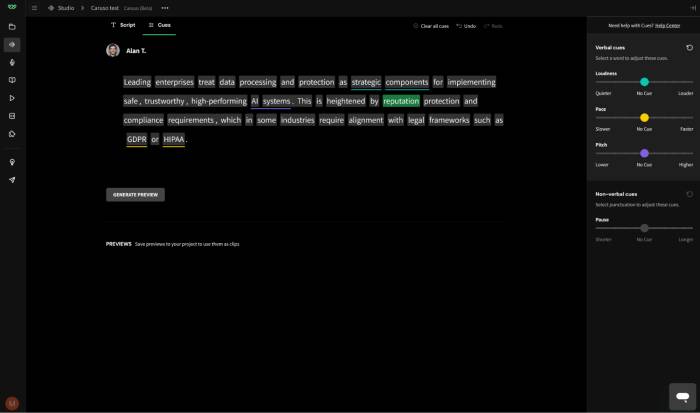
WellSaid is designed around managed voiceover production for teams. Its editor supports pronunciation customization and controls for pace, loudness, tone, and pauses, while workspaces support sharing and review.
Why choose it
- You create recurring training, product, safety, or marketing narration.
- Brand consistency and repeatable pronunciation matter more than extreme character effects.
- Several people need to review scripts and audio.
- You need a documented enterprise procurement and data-review process.
Pronunciation controls are especially valuable for product names, abbreviations, medical or technical vocabulary, and people’s names. Build a shared pronunciation list and listen to every occurrence after a script change.
WellSaid states that its voices are created with licensed, paid actors. Organizations should still review the contract, permitted uses, retention settings, and regional requirements that apply to their account. Current production controls are described on the WellSaid voice API page.
4. Hume Octave: best for expressive, prompt-designed voices
Hume’s Octave text-to-speech system focuses on generating speech that follows the meaning and emotional direction of a script. Users can select a voice, clone a voice with appropriate permission, or describe a new voice in natural language.
Why choose it
- You need character voices rather than neutral corporate narration.
- You want to describe age, accent, vocal texture, personality, or delivery in a prompt.
- The script contains changing emotional beats.
- You are building through a TTS API and want prompt-based control.
Prompt-based voice design is not perfectly deterministic. Save the selected voice, model, script, and settings, and test whether later lines remain consistent with the first sample. The official Hume voice-design guide explains how reusable voices are created in the platform and API.
5. VoiceStudio: best local open-source option
VoiceStudio, formerly OmniVoice Studio, brings text-to-speech, voice cloning, dubbing, dictation, transcription, and audiobook workflows to a desktop application. Its core pipeline can run locally with supported models, and its engine registry allows technically experienced users to try different speech backends.
Why choose it
- Audio should be processed on your own computer where the selected workflow permits.
- You want open-source code and an extensible local setup.
- You can manage model downloads, storage, and GPU or CPU limitations.
- You accept beta software and are willing to troubleshoot it.
Local processing can reduce dependence on a commercial cloud API, but it does not automatically make the entire workflow offline. Model downloads and optional online translation services still use the network. Read Offline AI vs. online AI before choosing a local setup for privacy reasons.
VoiceStudio is an active beta, so verify the current repository, model licenses, operating-system support, and hardware requirements before a production commitment. It is a test platform for capable users, not a guaranteed substitute for a supported business service.
How to test AI voice generators fairly
Use the same short script for every service. Include:
- A normal conversational paragraph.
- A question, an exclamation, and a deliberate pause.
- Names, abbreviations, dates, numbers, and currency.
- One sentence with the emotion or speaking style you need.
- Technical vocabulary from the real project.
- A second language or accent only if the project requires it.
Then score each result on a consistent scale:
| Criterion | What to check |
|---|---|
| Pronunciation | Names, acronyms, numbers, uncommon words, and corrections |
| Natural delivery | Pacing, stress, sentence endings, pauses, and breath-like transitions |
| Control | Whether you can fix one line without regenerating the entire project |
| Consistency | Voice identity and loudness across sections and later sessions |
| Workflow | Script import, multiple speakers, collaboration, versioning, and export |
| Technical output | File formats, sample rate, API options, and synchronization with video |
| Rights and privacy | Commercial license, voice consent, retention, training use, and deletion controls |
| Total cost | Generation, regeneration, storage, API calls, seats, and human review time |
Understanding the speech-to-text, language-model, and text-to-speech layers in how voice AI works also helps identify whether a failure comes from the script, transcription, translation, or voice model.
Write a script that produces better speech
- Use short sentences and punctuation that reflects the intended pauses.
- Write numbers the way they should be spoken when the engine reads them incorrectly.
- Keep one idea per paragraph for easier regeneration.
- Add pronunciation entries for names and recurring technical terms.
- Generate a 15–30 second sample before producing a long file.
- Listen on headphones and the device your audience will use.
- Normalize loudness and remove clicks or awkward gaps during final editing.
Voice cloning, consent, and disclosure
Clone only your own voice or one for which you have explicit, documented permission. Do not imitate a public figure, colleague, customer, or family member to mislead listeners, bypass identity checks, or create false evidence. A product offering a cloning feature does not grant the legal or ethical right to use another person’s identity.
For public, educational, or commercial work, disclose synthetic narration when the context could otherwise mislead the audience. Keep records of consent, the source script, the generated file, and the model or service used. Review platform rules for advertising, political content, impersonation, children, financial services, healthcare, and other sensitive uses.
Choose ElevenLabs when breadth is the priority, Speechify Studio for integrated visual production, WellSaid for a controlled team workflow, Hume Octave for expressive voice design, and VoiceStudio for local experimentation. The winning tool is the one that passes your script test, rights review, and production workflow—not the one with the longest list of voices.
Related Articles
 8 Best AI Voice Maker Tools of 20269 minutes read
 4 Best QR Code Generator Tools for PDF7 minutes read
 Advice on Choosing Suitable Generators for Families7 minutes read
 Generator in Python11 minutes read
 How to Create Your Own AI Voice3 minutes read
 Best AI Tools for Creating Impressive Songs8 minutes read
Reader Comments 0
Sign in with email or Google to join the discussion.