Table of Contents
This guide compares 3 leading Wi-Fi Streaming Software on Laptop Simple, Fast, focusing on useful features, compatibility, ease of use, and overall value.

1. Connectify
https://www. connectify. me/
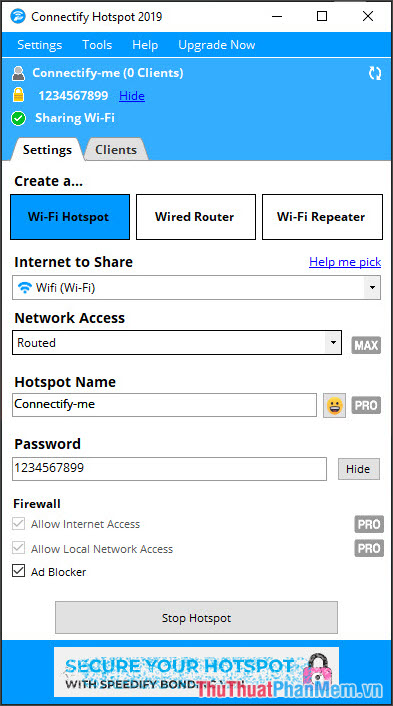
This is a good software to support Wi-Fi on the computer and has many options such as blocking ads, turning the laptop into a versatile hotspot from wired (Ethernet) connection, 3G / 4G connection. However, to use Using the advanced features of this software, you buy the paid version of Hotspot PRO or Hotspot MAX and the free version is limited to them for transmitting Wi-Fi but cannot change the Wi-Fi name.
2. mHotspot
https://mhotspot. com/download/

The free mHotspot compact utility can be easily installed and used without any difficulties. mHotspot supports Windows XP / 7/10, in addition, we can name Wi-Fi network and password to your liking.
Note: during the installation of mHotspot will require us to install some additional software, we need to carefully read the instructions when installing to avoid installing unwanted software on your computer. friend.
3. Maryfi
http://www. maryfi. com/download. php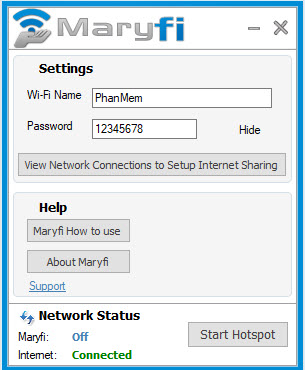
Like mHotspot , Maryfi also provides us the most simple and easy feature to create Wi-Fi access points on the computer. The downside of this software is that it does not allow us to view devices connected to the computer.
With the review of the 3 fastest and easiest Wi-Fi software on laptops in the article, hope you can choose for yourself the best Wi-Fi transmitter software that suits your needs and purposes. Good luck!
FAQ
How should I choose among Wi-Fi Streaming Software on Laptop Simple, Fast?
Compare compatibility, essential features, ease of use, security, support, and total cost rather than choosing only by popularity.
Are free options suitable for everyday use?
Free tools can be sufficient for basic needs, but advanced features, commercial use, or priority support may require a paid plan.
What should I check before installing or using one?
Verify the official source, system requirements, recent updates, privacy practices, and support for your device and file types.
Related Articles
 How to Play Wi-Fi Win 7 - Create a Hotspot on Windows 7 Laptop Simple and4 minutes read
 Wi-Fi 5, Wi-Fi 6 vs. Wi-Fi 6E: Key Differences7 minutes read
 Broadcast Wi-Fi on Laptop with Wi-Fi Sharing Software3 minutes read
 My Wi-Fi Router - Free and Convenient Wi-Fi Broadcasting4 minutes read
 How to Turn on and Turn Off Wi-Fi on Laptop Very Fast4 minutes read
 6 Simple and Effective Tips to Fix Laptop with Lost Wi-Fi4 minutes read
Reader Comments 0
Sign in with email or Google to join the discussion.