Table of Contents
If text is missing or displays incorrectly in AutoCAD, install the exact font referenced by the drawing or map it to an approved substitute. Do not download a so-called “complete AutoCAD font pack” from an unknown archive: fonts are licensed software, and a bulk pack can contain unlicensed files, duplicates or malware. The drawing sender or your organization's CAD library is the safest source.

Identify the missing font type
| Font type | Typical use | Where AutoCAD finds it |
|---|---|---|
| SHX | AutoCAD shape fonts, engineering lettering, custom symbols and some big-font workflows | An AutoCAD support folder listed in Support File Search Path |
| TTF/OTF | Windows or macOS system fonts used by AutoCAD text styles | The operating system's installed-font locations |
| Big Font SHX | Special character sets paired with an SHX text font | AutoCAD support paths; the text style must reference the correct pair |
Open the drawing and note every filename in the missing-SHX warning. Then run the STYLE command and inspect the font assigned to each text style. A font substitution may make text visible while silently changing spacing, line breaks or symbols, so compare against a PDF or screenshot supplied by the author.
Get the correct font safely
- Ask the drawing author to send the required font files and confirm that they may be shared.
- Check the project package, company CAD standards folder and authorized font library.
- Verify the filename and file type exactly; similarly named fonts are not necessarily interchangeable.
- Scan received files according to your organization's security policy.
- Keep a record of the font license and project source.
Avoid broad archives labeled Full Fonts, Unicode Fonts, VNI Fonts or TCVN3 Fonts unless your organization has independently verified every file and its license. Installing hundreds of unrelated fonts does not fix the underlying reference reliably and makes future troubleshooting harder.
Install an SHX font for AutoCAD
1. Find a supported font folder
In AutoCAD, enter OPTIONS, open the Files tab, and expand Support File Search Path. Autodesk's missing-SHX guidance recommends confirming that the SHX file is in a folder AutoCAD searches.
You can use the AutoCAD program's Fonts folder when permitted, but a separate read-only company support folder is often easier to manage across updates. Add that folder to the search path rather than assuming the old example path C:Program FilesAutodeskAutoCAD 2020Fonts applies to every release.
2. Extract only the required file
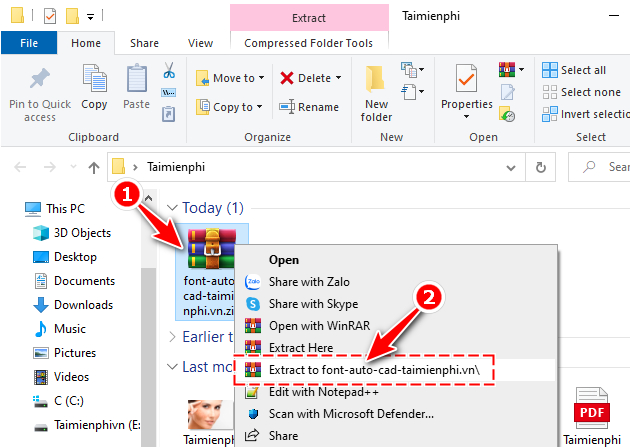
If the sender supplied a compressed archive, extract it with a trusted tool. Select the specific SHX files named by the drawing instead of copying the entire archive.
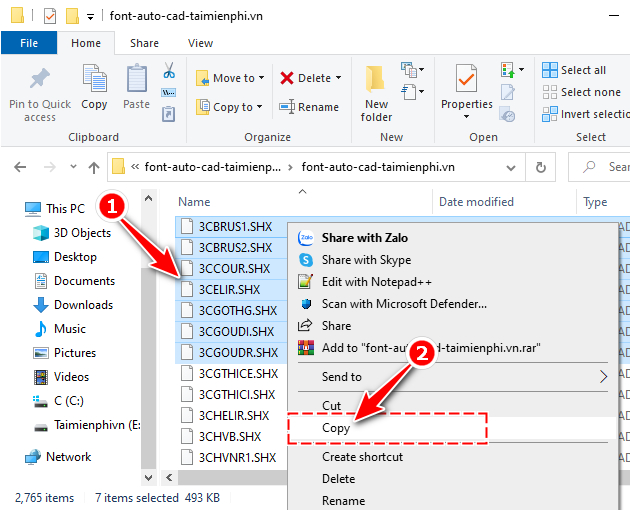
3. Copy the SHX file and restart AutoCAD
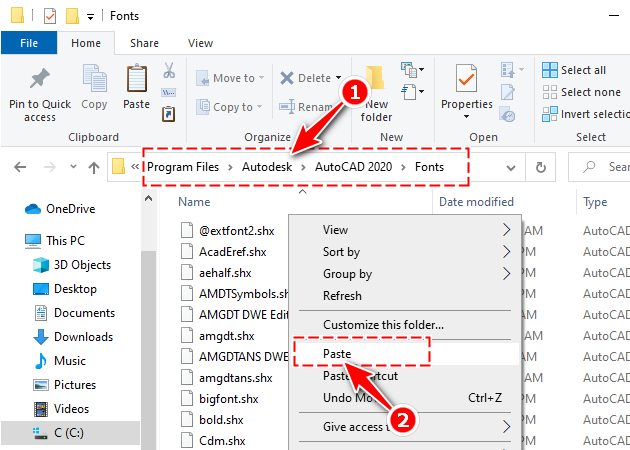
Copy the approved .shx file into the chosen support folder. Administrator permission may be required for a program folder. Close and reopen AutoCAD, then reopen the drawing and confirm that the warning is gone. Autodesk's custom-font installation article describes both the font folder and support-path method.
Install a TTF or OTF font
TrueType and OpenType fonts are installed in the operating system, not merely copied to AutoCAD's SHX folder.
- Close AutoCAD.
- Right-click the approved
.ttfor.otffile and select Install or Install for all users, depending on your permissions. - Approve the operating-system prompt.
- Restart AutoCAD and reopen the drawing.
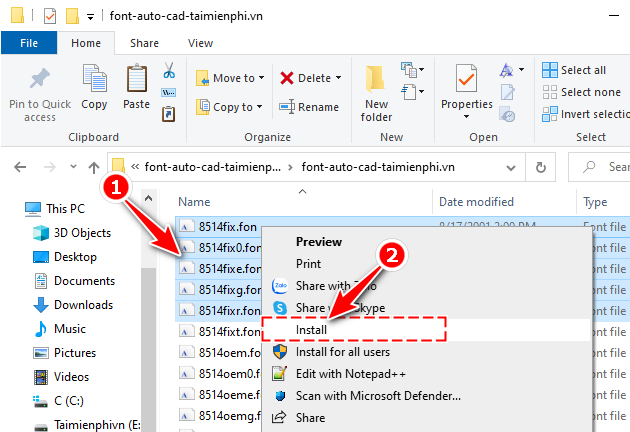
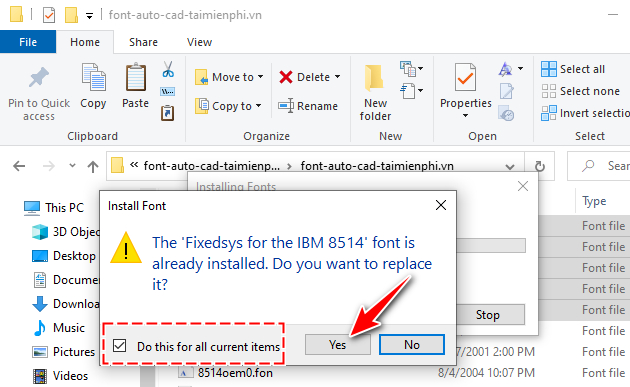
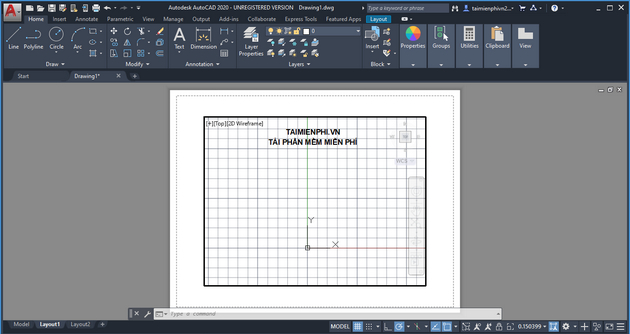
If the font still does not appear, verify that Windows installed it successfully and that the AutoCAD text style points to the same family and style. Autodesk maintains a broader font display troubleshooting guide.
Use a font substitute when the original is unavailable
A substitute can make a drawing readable, but it is not an exact repair. Make a copy first. Use the STYLE command to assign an approved font to the affected text style, or configure AutoCAD's font mapping and alternative-font settings under your CAD standards.
- Check character width, line wrapping and annotation scale.
- Inspect special symbols such as diameter, degree and plus/minus signs.
- Review dimensions, tables, title blocks and plotted PDFs.
- Do not save over the master drawing until the owner accepts the substitution.
If the warning is not actually a font problem
Some SHX files define shapes or custom linetypes rather than text. Installing a random font with a similar name will not restore those objects. Ask the sender for the complete project support files. Custom line patterns may also need a correct support path; see how AutoCAD linetypes and dashed lines are configured.
If you only need to inspect the file, try the options in the DWG viewing guide. When a drawing itself is damaged or an edit was lost, font installation will not help; use the steps for recovering unsaved AutoCAD files.
The reliable fix is a small, verified font set tied to the project—not the largest downloadable pack. Preserve the original drawing, document any substitutions and include authorized dependencies when handing the project to another user.
Related Articles
 Commands in CAD - Summary of the Most Complete AutoCAD Command7 minutes read
 5 Best Autocad Alternatives9 minutes read
 Copyright Autocad 3 Years, Register Now3 minutes read
 45 Autocad Shortcuts Useful4 minutes read
 Autocad 2021: Professional Design Software6 minutes read
 150+ Shortcuts and Commands in Autocad - Use Autocad8 minutes read
Reader Comments 0
Sign in with email or Google to join the discussion.