Table of Contents
This guide covers boolean operators and and or in SQL with practical context and easy-to-follow details. Use it to understand the subject and apply the information confidently.
In this SQL article, we will go to learn the math from AND and the OR operator, how to use and specific examples of them.
AND Operator in SQL
AND allows the use of multiple conditions in the WHERE clause of an SQL statement. As you saw in the previous lesson, we can only use one condition in WHERE, when combined with SELECT. But if you have AND you can add other conditions to make sure you get more accurate data. The retrieved data must satisfy all conditions contained in the WHERE clause at the same time.
Syntax of AND in WHERE:
SELECT cot1, cot2, cotNFROM TEN_BANGWHERE [DIEU_KIEN1] AND [DIEU_KIEN2].AND [DIEU_KIENN];
Example of AND:
In this example we will take ID, TEN and LUONG from the NHANVIEN table, filtering employees with higher wages than 2000 and age less than 29.
This is NHANVIEN table:
The statement will look like this:
SQL> SELECT ID, TEN, LUONG FROM NHANVIEN WHERE LUONG > 2000 AND TUOI < 29;The result will look like this:
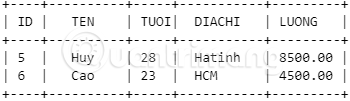
OR Operator in SQL
The OR operator is used to combine multiple conditions in the WHERE clause of the SQL statement. When using OR in WHERE in conjunction with SELECT, the retrieved data only needs to satisfy one of the listed conditions. Did you notice the difference between OR and AND?
Syntax of OR:
SELECT cot1, cot2, cotNFROM TEN_BANGWHERE [DIEU_KIEN1] OR [DIEU_KIEN2].OR [DIEU_KIENN]
You can combine N conditions using OR, and only one of these N conditions is correct, the data will be retrieved.
Example of OR:
We will take the ID, TEN and LUONG from the NHANVIEN table below, provided that LUONG is over 6500 and less than 24 years old.
The statement will be:
SQL> SELECT ID, TEN, LUONG FROM NHANVIEN WHERE LUONG > 6500 OR age < 24;When executing the above command, any record that satisfies the wage conditions higher than 6500 or less than 24 years will be returned in the results table, as shown below:
Now, are you confident to use the AND and OR operators in the WHERE clause? It's straightforward, isn't it?
In the next article, we will learn about a very important command in SQL, which is the UPDATE command.
Next lesson: UPDATE command in SQL
Previous article: WHERE clause in SQL
FAQ
What should I check before following these steps?
Confirm device and software compatibility, save important data, and make sure you have the required permissions, files, and account access.
Why might the process not work?
Common causes include outdated software, missing permissions, incompatible hardware, an unstable connection, or completing a step in the wrong order.
Can I undo the changes if necessary?
That depends on the tool or setting. Use built-in restore options when available, keep a backup, and record the original configuration first.
Related Articles
 Boolean in C: Key Facts7 minutes read
 Boolean Objects in JavaScript3 minutes read
 Operator in Programming C10 minutes read
 Arithmetic Operators: Operator in C ++3 minutes read
 !! == and! ==== What Is the Difference in Javascript?2 minutes read
 Arithmetic Operators in Unix // Linux: C Shell Operators4 minutes read
Reader Comments 0
Sign in with email or Google to join the discussion.