Table of Contents
This guide covers the first lenovo netbook costs $$ 399 with practical context and easy-to-follow details. Use it to understand the subject and apply the information confidently.
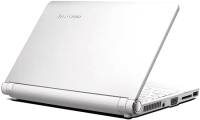
Initially, this netbook was running Microsoft Windows XP operating system. However, Lenovo said S10 running Linpus Linux will be available in other markets. Through the photo gallery below, S10 can be seen with full keyboard, comfortable with the touchpad and left and right mouse buttons. The touchpad will support multi-tap gestures. It has a 10-inch screen, 1024 600-WSVGA resolution and LED backlit for power saving. The system's front speakers also offer a different appearance and promise to produce more standard sound because they are not buried below. The Netbook S10 is full of wireless connections including Bluetooth, 802. 11b / g Wi-Fi and has the perfect Express Card for connecting to a mobile broadband card. It also has LAN connection and VGA output port. In addition, there is a 1. 3 MP webcam, two USB ports, mic and headset, 4-in-1 card reader. In terms of battery life, Lenovo promises to use 3-cell batteries for 3 hours of continuous use and a 6-cell battery for twice the battery life, 6 hours. The IdeaPad S10 comes in white, black and ruby red to choose from.
It is available in the US on September 28, 2008 and can be accessed via lenovo. Com a little earlier. But in the Chinese market, Lenovo launched S10 from September 5 and the Far East is September 10. The S10 9-inch screen will be available in selected markets such as Hong Kong, Taiwan, Russia, Singapore, Malaysia, Vietnam, Mexico, India, France, Turkey, Poland and other countries. Other.
FAQ
What should I check before following these steps?
Confirm device and software compatibility, save important data, and make sure you have the required permissions, files, and account access.
Why might the process not work?
Common causes include outdated software, missing permissions, incompatible hardware, an unstable connection, or completing a step in the wrong order.
Can I undo the changes if necessary?
That depends on the tool or setting. Use built-in restore options when available, keep a backup, and record the original configuration first.
Related Articles
 Revealed Lenovo's First Netbook3 minutes read
 Lenovo Stopped Selling Netbooks Online3 minutes read
 Lenovo Launched IdeaPad S10-2 Netbook3 minutes read
 Lenovo Launched Netbook with 'QuickStart' Technology.2 minutes read
 Lenovo's Tiny Laptop Will Appear in September3 minutes read
 Lenovo U150 Will Replace the Netbook3 minutes read
Reader Comments 0
Sign in with email or Google to join the discussion.