Table of Contents
This guide covers lenovo ideapad s9 - netbook strongly connected with practical context and easy-to-follow details. Use it to understand the subject and apply the information confidently.
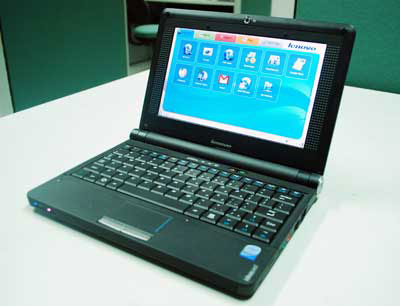 It has a sturdy appearance but is quite compact and suitable for both men and women.
The first netbook of the Lenovo ThinkPads family is 9 inches in size. Still bearing its characteristics, this manufacturer does not place heavy design criteria when S9 has a fairly simple appearance but still shows solidness. There are not many bends on the body. It could even be said that it is quite square. The fairly small keyboard does not create a space between the fingers. Besides, important function keys like: Right Shift, Enter are quite small so it is easy to type wrong. The usual key press material of other laptops is easily worn out after a long time of operation on the keyboard. The small trackpad is difficult to control the mouse instead, the user can use the removable mouse. The top edge between the keyboard and the part is still about 1 cm away, but the manufacturer has not fully utilized it. Two mouse buttons are designed quite small and hard. The operation must create a fairly strong force to press this button.
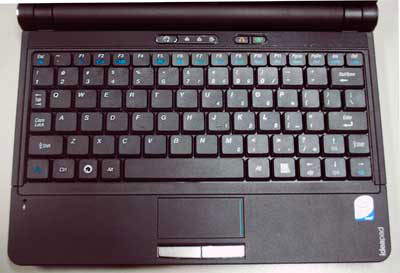 Lenovo S9's keyboard and trackpad are quite narrow.
The machine has an 8. 9-inch LCD screen that supports LED back lit technology, which is limited to glare. The maximum resolution of 1, 024 x 600 pixels allows the web interface or other apps to be displayed entirely on the screen without using the scroll bar. The tilt angles before or after 30 degrees or more make the image blurry. However, the 45-degree viewing angle from the left or right can still see the image clearly. Loudspeakers are located in the front of the body of the body for a relatively small sound and lack of bass. The S9 has strong connectivity among 9-inch netbooks. In addition to Wi-Fi that supports the G, Bluetooth standard, the ExpressCard slot allows expansion of communication via future HSDPA / 3G links. This is one of the first netbooks to integrate ExpresssCard. In addition, Express standard slots for speed are much higher than PCMCIA cards of older laptops. Other signal transmission ports are also available: USB 2. 0, VGA, 4-type universal memory card reader.
 The ExpressCard slot on the side must be compact and faster than PCMCIA.
Configuration is similar to many other netbooks on the market: Intel Atom N270 1. 6 Ghz CPU, 1 GB RAM. Consumers can choose 8 GB SSD hard drive or 160 GB HDD dial for more comfortable storage space. With these components, multitasking with text editor, music and web browsing apps is quite smooth. The integrated graphics chip on the main board provides good support for simple movie or image processing. Testing through Google Maps, S9 can still display the maximum zoom image of the app. It is quite vibrating if using HDD version. Besides, when running for about 30 minutes, the heater is similar to many other netbooks due to the narrow air space. The device can operate continuously for about 2 hours and 30 minutes with 3-cell battery included. The function key turns off Wi-Fi and Bluetooth to save energy when needed. In addition, the product also supports the key to restore the operating system when the system fails. Lenovo Ideapad S9 is currently being sold in Vietnam for about 7 million VND.
FAQ
What should I check before following these steps?
Confirm device and software compatibility, save important data, and make sure you have the required permissions, files, and account access.
Why might the process not work?
Common causes include outdated software, missing permissions, incompatible hardware, an unstable connection, or completing a step in the wrong order.
Can I undo the changes if necessary?
That depends on the tool or setting. Use built-in restore options when available, keep a backup, and record the original configuration first.
Related Articles
 Lenovo Launched IdeaPad S10-2 Netbook3 minutes read
 The First Lenovo Netbook Costs $$ 3994 minutes read
 IdeaPad S20, Lenovo's 12-inch Netbook3 minutes read
 Lenovo IdeaPad S12 Graphics NVIDIA Ion Sold3 minutes read
 Lenovo Introduced G Series Laptops and New IdeaPad Z4 minutes read
 IdeaPad U350 - Super Popular 'Mobile'8 minutes read
Reader Comments 0
Sign in with email or Google to join the discussion.