Table of Contents
This guide provides a practical overview of Best Dell Laptops 2020, including its main features, benefits, limitations, and important considerations.
Dell's best laptops are a great balance between price, performance, durability and beautiful design. Moreover, Dell also offers users a lot of options such as gaming laptops, ultrabooks or even chromebooks. Anyway, you will find the computer product that best suits you.
Below are the 10 best Dell laptops this year.
1. Dell XPS 15 (2020)
The Dell XPS 15 may be a bit expensive for students, but it is one of the best laptops that can be used in design. The XPS 15 has a slim, light and beautiful design, but not so that the performance of the machine is overlooked. It can be said that this is Dell's best laptop in 2020. The great features on the device include: bright display screen up to 500 nit, comfortable typing keyboard, impressive speakers and a super smooth trackpad but.
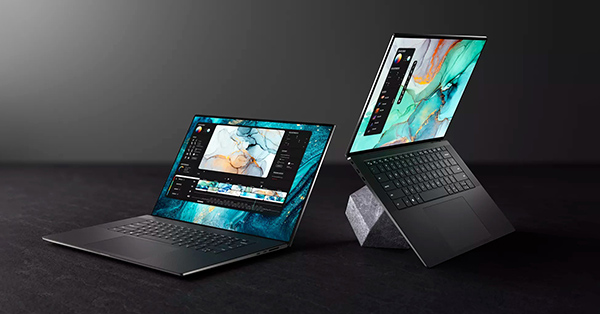 Dell XPS 15 2020
2. Alienware Area-51m
Overall, the Alienware Area-51m is an impressive gaming laptop, a beautiful chassis and a comfortable typing keyboard. But the performance of the device is much more impressive than the outside design. It is arguably the most powerful gaming laptop on the market to date. Terrific performance with high-end processor and graphics, Alienware Area-51m will give you the best gaming experience after stressful working hours.
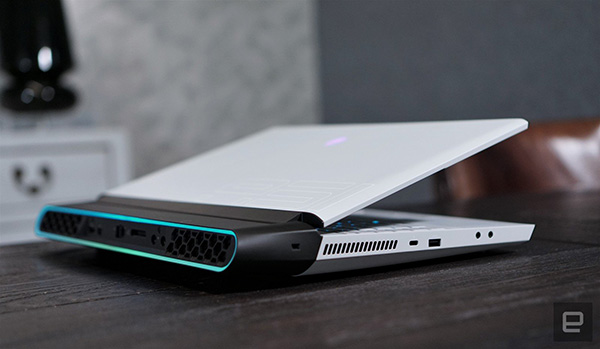 Alienware Area-51m
3. Dell XPS 13 (2020)
The Ultrabook market is getting hotter and bigger every year and every competitor in this war is getting stronger. We are talking about the Dell XPS 13. This is a laptop that has maintained the top position of Dell since its launch a few years ago. This premium device has all-day battery life, stable performance and a design that makes people love it at first sight. The whole chassis is only about 1.27 cm thick, impressive speakers and comes with a price not cheap. However, the XPS 13 really deserves every penny that you spend.
 Dell XPS 13 2020
4. Dell XPS 15 2 in 1
The Dell XPS 15 2 in 1 brings a lot of power in a slim and light design, which is a great combination of laptop and tablet. XPS 15 2 in 1 weighs less than 2kg, 16mm thick, easy to carry on the move. This is a beautiful device. Although it does not own the graphics card as on the XPS 13, it can still play some gentle games without lag.
The ports of the XPS 15 2 in 1 include: 2 Thunderbolt 3 ports, 2 USB-C ports, a headset jack and a microSD port. The device has a very affordable price since its launch.
 Dell XPS 15 2 in 1
5. Dell Latitude 7490
Despite its slightly outdated design, the Dell Latitude 7490 is still capable of becoming one of Dell's best laptops by 2020. It's all thanks to its excellent performance, good battery life, lots of RAM options and capacity. It's not the cheapest computer model, but you definitely won't regret having it.
 Dell Latitude 7490
6. Dell Inspiron 13 7000 2 in 1
The Dell Inspiron 13 7000 is a versatile 2-in-1 machine. This is a high-end device, not only from the outside design but also from the hardware inside. Performance is comparable to the Dell XPS 13 above. Possessing a 4K display, a smart stylus slot helped the machine defeat Microsoft in the idea. However, the excellent display makes the battery drain quite a lot, sounds impressive and is still one of the best Dell laptops on the market.
 Dell Inspiron 13 7000 2 in 1
FAQ
What should I know about Best Dell Laptops 2020?
Focus on the key features, requirements, limitations, and practical use cases explained in this guide.
How do I get the best results with Best Dell Laptops 2020?
Follow the recommended steps, use current software or information, confirm compatibility, and review settings before major changes.
Are there any risks or limitations?
Potential limitations depend on compatibility, data quality, cost, privacy, support, and how the product or method is used.
Related Articles
 How to Install Driver for Dell Laptop, Download Directly6 minutes read
 The Best Budget-Friendly Dell Gaming Laptops Currently Available7 minutes read
 All Dell Laptops Will Use LED Screens4 minutes read
 Dell Unveiled Two Low-cost Laptops at Computex 20143 minutes read
 Dell Is About to Release Studio XPS 15 and 17 Inches3 minutes read
 Steps to Update TPM 1.2 to TPM 2.0 for Dell Laptops, Dell7 minutes read
Reader Comments 0
Sign in with email or Google to join the discussion.