Table of Contents
Dell is a well-known American laptop brand, founded in 1984. Currently, Dell laptops remain among the most popular brands in the laptop market. If you love Dell and are looking for a laptop that's effective for both studying and gaming, these affordable and top-rated Dell gaming laptops will offer many helpful suggestions.
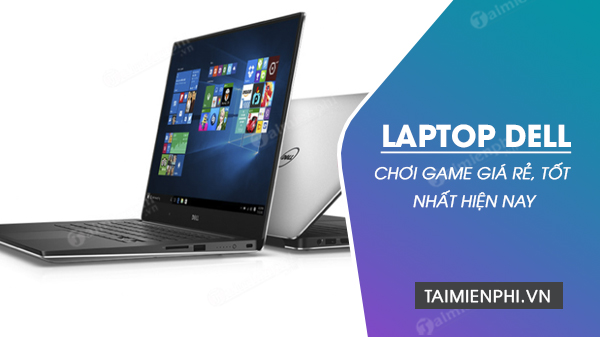
Which Dell laptop is good for gaming? An updated list of the best and most affordable Dell laptops for both studying and gaming currently available
Table of Contents:
1. Dell Laptop Lines.
2. Criteria for Choosing a Dell Gaming Laptop.
3. Suggestions for Affordable Dell Gaming Laptops.
1. Dell Laptop Lines
1.1. Dell XPS
Weighing in at approximately 1.2 - 2.5 kg, the Dell XPS laptop boasts a slim, lightweight, and modern design. A highlight of this series is its IGZO 2 technology, 4K Ultra HD resolution, 11th-generation CPU, and NVIDIA GeForce RTX 3050 graphics card, delivering superb and incredibly detailed images. Video editing and 3D rendering are also incredibly fast.
1.2. Dell Gaming
Weighing approximately 2.5-2.8kg, this Dell gaming laptop boasts a youthful and unconventional design. Equipped with an Intel Gen 11 chip, an AMD Ryzen 7 5800H processor, and a dedicated NVIDIA graphics card, this laptop allows gamers to smoothly play popular games like League of Legends, PUBG, Star Wars: Squadrons, and more.
1.3. Dell Inspiron
Dell Inspiron laptops weigh between 1.4 and 1.9kg and feature anti-glare screen technology, ensuring good color display in all environments. Additionally, the enhanced HD webcam will be useful for your video needs.
1.4. Dell Vostro
The Dell Vostro laptop series weighs approximately 1.7kg and is designed with durability in mind, making it suitable for office workers needing a mid-range machine. One of the standout features of this laptop series is its integrated fingerprint security, and it's equipped with the latest generation Intel processor and integrated Intel Iris Xe Graphics, allowing for faster task execution.
1.5. Dell Latitude
Dell Latitude laptops impress with their elegant and stylish design, and exceptionally long battery life, meeting the needs of those who work and travel simultaneously. Weighing approximately 1.3-2kg, these laptops are incredibly durable thanks to their magnesium alloy casing and sturdy metal frame.
Can Dell laptops be used for gaming? An update on popular Dell laptop models currently available
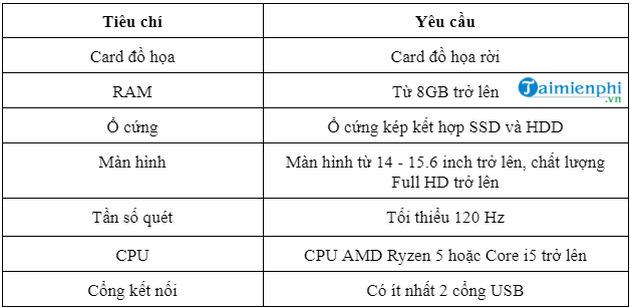
2. Criteria for choosing a Dell gaming laptop
- Graphics card for Dell gaming laptops:
Graphics cards are responsible for processing images and highly complex movements. Choosing a dedicated graphics card will help you smoothly play popular FPS games like PUBG, GTA, or Arena of Valor.
A prime example of a dedicated graphics card in a Dell gaming laptop is the NVIDIA GeForce RTX 3050. When playing FIFA Online 4, you'll see every detail, from tattoos to hairstyles of the players. Furthermore, the wide viewing angle and sharp image quality won't cause eye strain like with other conventional laptops.
- RAM:
8GB of RAM is the minimum required for a laptop to run basic graphic design applications. With this amount of RAM, when playing games you need to close all background applications to avoid lag and stuttering. Gamers can consider choosing 16-32GB of RAM for the best experience.
- Hard drive:
You should choose a Dell laptop with a minimum 512GB SSD, with the option to expand storage for more information and data. A common expansion option is a combination of SSD and HDD, which optimizes performance while saving costs.
- Screen:
Dell laptop screens from 14 to 15.6 inches and above offer wide viewing angles, Full HD (1920 x 1080) resolution, and a minimum refresh rate of 120 Hz, providing a more realistic experience and enhanced frame rate stability, especially when playing 3D games.
- CPU:
Dell laptops with AMD Ryzen 5 CPUs or Dell Core i7 or higher will provide a smooth gaming experience without worrying about lag or stuttering.
- Connection ports:
You should prioritize buying a Dell laptop equipped with at least two USB ports for convenience when connecting a separate mouse and keyboard.
If you study or work in the field of graphic design, in addition to the basic configurations above, you need to choose laptops with graphics cards for a more realistic and sharper visual experience. For more suggestions on suitable laptop models, please refer to our article on graphic design laptops under 15 million VND.
3. Suggested affordable Dell gaming laptop models
Based on the evaluation criteria above, please refer to some good Dell gaming laptop models and Dell laptop prices compiled below.
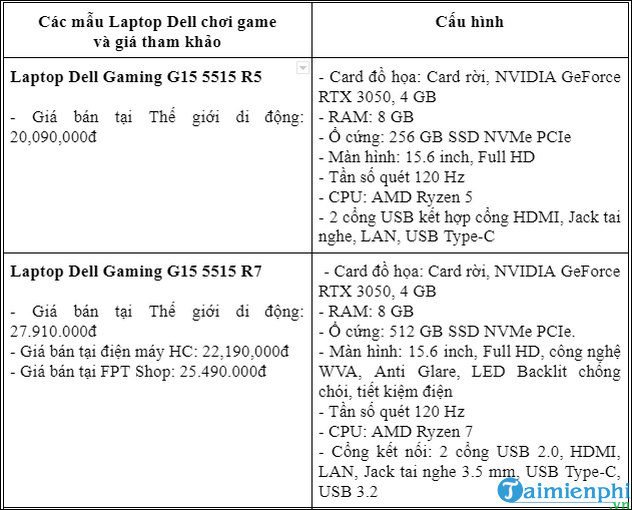
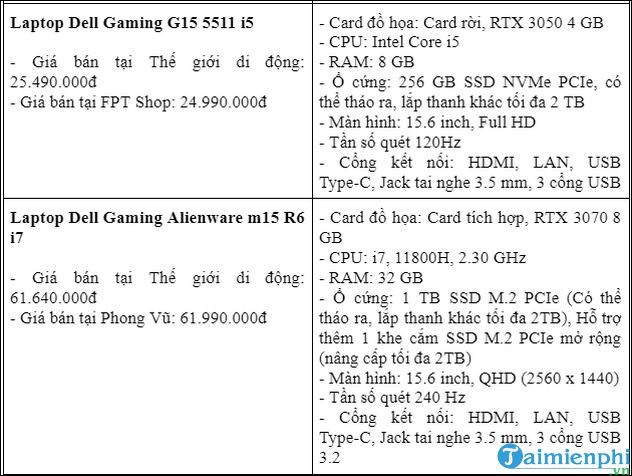
Note: The prices of Dell laptops in this article were updated on November 22, 2022, and may change over time.
Related Articles
 Ces 2020: Dell Launches G5 15 Se, a Mid-range Gaming Laptop3 minutes read
 All Dell Laptops Will Use LED Screens4 minutes read
 The Best Dell Laptops 20205 minutes read
 The Most Popular and Affordable Gaming Laptop Models Currently Available9 minutes read
 Top 7 Best Gaming Laptops in 202111 minutes read
 How to Install Driver for Dell Laptop, Download Directly6 minutes read
Reader Comments 0
Sign in with email or Google to join the discussion.