Table of Contents
This updated guide examines Click: Secure Personal Data on Windows Xp and organizes the essential facts, background, and practical takeaways in clear American English.
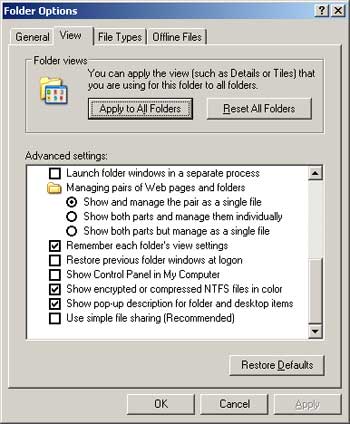
B2: Right click on the 'data-he' folder select Properties , select the Security tab
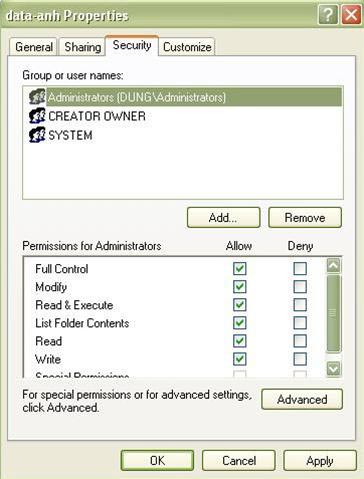
In the Group or user names section , leave only 3 users as shown in the picture, the remaining users click remove to remove. If it says no error for removal, then click Advanced , click on the check box in Inherit from parent the pemission entries that apply to child. then click OK, click Copy in the message that appears. B2: Do the same with the 'data-em' folder You do the same as in the picture and then OK to finish. So, now, we need to log Logoff out and Login to the admin account, and then try to access the 2 folders and see the results as desired. PROGRESS
FAQ
What is Click: Secure Personal Data on Windows Xp about?
It provides a structured overview of click, explains the main context, and highlights practical takeaways for readers.
Why does this topic matter?
Understanding the main concepts helps readers evaluate the issue, avoid common mistakes, and make better-informed decisions.
How should readers use this information?
Use the guidance as a practical starting point, confirm details that may have changed, and follow current product, safety, or security recommendations.
Related Articles
 5 Great Open Source Tools That Keep Your Personal Data Safe9 minutes read
 Instructions for Creating GPG Keys to Encrypt and Secure7 minutes read
 Instructions for Security of Personal Information on the Internet by5 minutes read
 minutes read
 How to Delete Personal User Data in Windows 103 minutes read
 Simple Steps to Secure Your Smart Phone Data6 minutes read
Reader Comments 0
Sign in with email or Google to join the discussion.