Table of Contents
Roku’s Subscriptions menu is designed to reduce the time spent opening one streaming app after another. On supported devices and accounts, it places participating subscription services and a selection of recently added programs in one destination on the Roku home screen.
The feature makes Roku feel closer to content-first interfaces such as Google TV, but it does not merge every catalog, replace individual apps, or turn separate subscriptions into one bill. What appears can vary by device, region, account, and service participation.
What is the Roku Subscriptions menu?
Subscriptions is a home-screen destination introduced as part of the Roku OS 15.1 rollout. If it is available on your device, look for Subscriptions in the menu on the left side of the home screen.
The page groups recognized subscription services in one place. Subscriptions purchased through Roku may appear alongside other supported services associated with your Roku experience, so the screen is broader than a list of packages billed by Roku.
This is different from opening The Roku Channel to watch premium subscriptions purchased through that app. The Subscriptions destination is primarily an organizational and discovery surface; playback still depends on the relevant service, your active plan, and app availability.
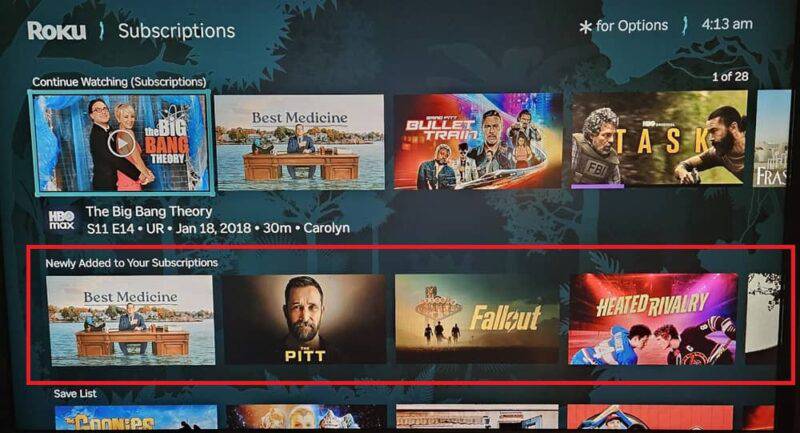
How the “Newly Added” row helps
Normally, checking for new releases means launching each subscribed app and browsing its catalog. In the Subscriptions menu, a Newly Added to Your Subscriptions row can surface recent movies and shows from participating services. Each item identifies the service that carries it, making it easier to decide which app to open.
The number and order of titles will change, so a snapshot from one account should not be treated as a complete catalog. It is also possible that a service or title will be absent even though you subscribe to it. Use the service’s own app when you need its full library, watchlist, profile controls, or account settings.
If picture quality matters when choosing what to watch, compare the device and plan requirements in this guide to streaming services with 4K content.
How to check for Roku OS updates
Roku devices normally check for software updates automatically. If the Subscriptions option is missing, manually check the installed software:
- Press Home on the Roku remote.
- Open Settings.
- Select System, then Software update.
- Select Check Now.
- Allow the device to install any available update and restart if required.
An updated device may still lack the menu because Roku features can roll out gradually or differ by region and model. Restarting the device is reasonable after an update, but repeatedly resetting it will not force an account-level feature rollout.
What the feature does not change
- Billing remains separate: subscriptions not purchased through Roku continue to be managed with their respective providers.
- Apps still matter: the destination does not replace service-specific searches, profiles, downloads, or settings.
- Availability varies: not every streaming service or title is guaranteed to appear.
- The regular app grid remains: you can still launch a service directly when you already know what you want.
The main benefit is faster discovery across participating subscriptions, not a new streaming service. Roku owners who want a broader hardware perspective can also read why a separate streaming device can be useful even with a 4K television.
Related Articles
 Huawei Is Clearly Looking for Ways to Make the Camera on the8 minutes read
 How to Cancel an Office 365 Subscription3 minutes read
 5 Tips to Help You Forget Anything You Want, No Matter How Bad It4 minutes read
 Google One Is Available in Vietnam, Customers Register to Receive 110,000 VND to Google Account3 minutes read
 How to Use the Night Light Feature on Google Pixel4 minutes read
 What Is Google One?8 minutes read
Reader Comments 0
Sign in with email or Google to join the discussion.