Table of Contents
This guide provides a practical overview of iOS 13.6: Unlock Cars with IPhones, Control Software Updates.., including its main features, benefits, limitations, and important considerations.
Electronic key (Car Key)
iOS 13.6 brings support for electronic keys, a feature designed specifically for iPhone and Apple Watch devices to replace physical keys, enabling users to unlock the door as well as boot. motors of cars that support NFC (BMW is Apple's first partner)
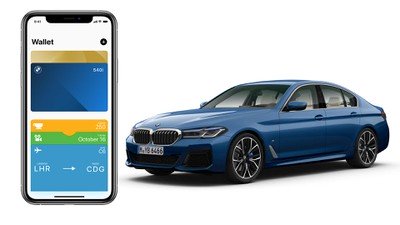
Apple says the key is stored directly on the iPhone, but in case the device is lost, users can still erase the key remotely for security. And yet, iOS 13.6 also lets users send keys through iMessages so others can also use this feature. In addition, with Power Reserve mode, the key can be used up to 5 hours after the iPhone has run out of battery.
Devices that support the electronic key feature include iPhone XR and above, Apple Watch Series 5 and are running iOS 13.6.
New Health Application
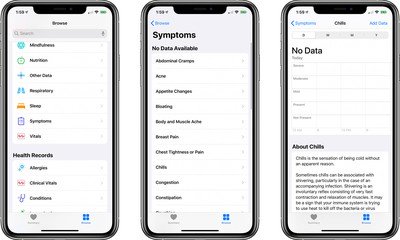
Health app on iOS 13.6 has been added by Apple with the "Symptoms" section, data taken from the Cycle Tracking feature and ECG measurement. Symptoms may include coughing, fever, flu, sore throat, etc. and may be shared data for 3rd party applications.
Turn off auto update
The new update also brings control over downloading and installing software updates on your iPhone / iPad. Users can now choose whether or not to automatically download updates as well as automatically install overnight updates just by turning on / off in the settings.
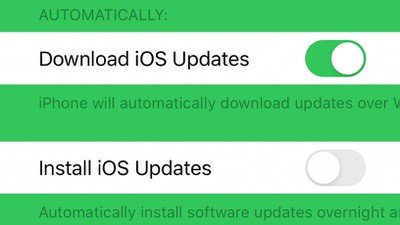
In addition to iOS 13.6, Apple also released iOS 12.4.8 update for older devices. To update to the latest version of iOS, users can access Settings> General settings> Software updates , download and install iOS 13.6 or 12.4.8.
FAQ
What should I know about iOS 13.6: Unlock Cars with IPhones, Control Software Updates..?
Focus on the key features, requirements, limitations, and practical use cases explained in this guide.
How do I get the best results with iOS 13.6: Unlock Cars with IPhones, Control Software Updates..?
Follow the recommended steps, use current software or information, confirm compatibility, and review settings before major changes.
Are there any risks or limitations?
Potential limitations depend on compatibility, data quality, cost, privacy, support, and how the product or method is used.
Related Articles
 An Easy Guide on How to Unlock Your iPhone 76 minutes read
 US Police Scramble to Buy Tools to Unlock All IPhones Despite the Price of up to $30,0004 minutes read
 How to Use Cars 4D + Automotive Screenings and 4D Car Kits6 minutes read
 How to Change Your Habit of Procrastinating on Software Updates Immediately9 minutes read
 The Former Apple Engineer Claims to Be Able to Unlock All IPhones for $15,0003 minutes read
 Unlock iOS 10 Screen Is Much Simpler with 3 Ways6 minutes read
Reader Comments 0
Sign in with email or Google to join the discussion.