Table of Contents
Use this guide to understand Microsoft and the factors that affect it. The information is organized to make the topic easier to apply in practice.
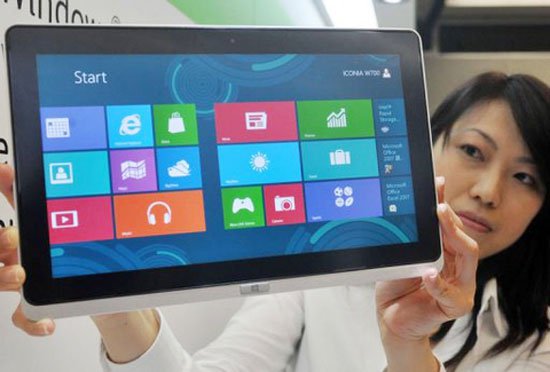 Microsoft is expected to sell 400 million computers running Windows 8 before July next year. (Photo: MSN).
How Microsoft Works
Keith Lorizio, Microsoft's vice president for sales and marketing, said the company plans to sell 400 million computers running Windows 8 before July 2013. The Microsoft representative said that in addition to 400 million computers running Windows 8, the company could sell 600 million other devices running Windows 8 (including upgraded models from Windows 7).
Mr. Lorizio added, Microsoft expects to have 100,000 applications on the Windows Store before January next year. This figure is 30 times higher than the current number, about 3,000 units. The official said that in order for Windows 8 to be successful, they must have a rich app store. Microsoft also said it had " Invested millions of dollars for publishers to release software as soon as possible".
The reason for the important application with the operating system is because the manufacturer can earn profits from advertising in it. According to Microsoft representatives, all ads integrated in the app will not interrupt user operations.
Microsoft said it is organizing many workshops to make the Windows 8 app appealing to developers. All applications will be tested and reviewed carefully before being sold on the Windows Store.
FAQ
What is the main benefit of Microsoft?
The main benefit is a clearer understanding of the topic and a practical way to apply the information covered in this guide.
What should I check before using Microsoft?
Confirm compatibility, review the required settings, protect important data, and use the latest supported version whenever possible.
What should I do if the result is different?
Repeat the steps carefully, verify permissions and version differences, and consult the product's official support documentation for changes not shown in the article.
Related Articles
 Microsoft Has Declared Windows 8.1, but Is Still Waiting Without Upgrading to Windows 102 minutes read
 10 Golden Principles to Help Create a Successful Web Application12 minutes read
 Microsoft Allows Users to Install Windows Store Applications on up to 2000 Devices3 minutes read
 Microsoft Wants 64-bit Applications to Work Reliably on Windows3 minutes read
 7 Features of Windows 11 That Users Should Experience6 minutes read
 14 Free and Useful Applications for Windows Should Be Installed6 minutes read
Reader Comments 0
Sign in with email or Google to join the discussion.