Table of Contents
This updated guide examines Malware Reconciliation Design (Part 1) and organizes the essential facts, background, and practical takeaways in clear American English.
Responsible-use note: Apply security techniques only to systems you own or are explicitly authorized to test.
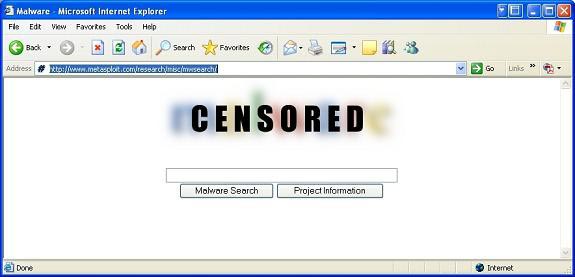
This is the home page, type malware into the search box and press enter. A series of sample mailware is available for download.
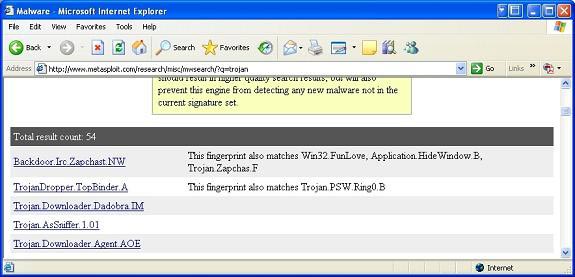
Using the mouse or the scroll key up and down, select the malware you want to use for testing. But remember that you have to make sure you're testing malware in a secure environment: don't do this on a working computer or contain important data. What is next? Now you have the sample malware downloaded safely on a VMware image or a standalone computer. We will begin to review it. Before you start, you should prepare yourself carefully for organized ways of working with appropriate steps. You may encounter many identical malware pieces. You will have to show the difference between them. In addition to hash table conflicts, you can use MD5 hash. Malware often has many different variants. Pointing out the differences between them is not easy if your reverse engineer is not very good. Therefore, using MD5 hash is a very useful solution for you. You can download some utilities that perform the above functions in Windows such as MAP or Malcode Analyst Pack. These utilities were developed from iDefense. The program is very compact but does a lot of work for you. It has the ability to run MD5 checksum procedures to check files and folders, placed in MSI packages. The installation part is quite normal, nothing special. If you right-click on the file or folder under test, more options will appear. 'Hash Files' (ie file hashing algorithm) is one of them. Simply select an option and let the program do its job. See the illustration below for a sample of the output file.
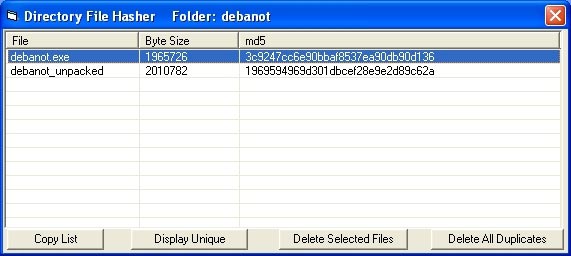
You will see that the content of the 'debanot' folder has an MD5 hash with a value very similar to the value shown. In addition to some other important information like file name, size in bytes, you can rely on MD5 hash running at some part of the malware to analyze, find out the difference between them. You should also consider MAP more carefully. It has many components that help us analyze malware very well. It is also the purpose of writing the program. Ready? Now that you have the malware in hand, use MD5 hash, and proceed to actually crack its crack. You will need an editor like Heaventools. There are many free editors, but specifically here we will make an example with a commercial version. The Malware you download may be different from malware for example. Does it use the Trojan keyword in Metasploit's search engine with a specific icon? Can the icon of winzip or winrar be used often, or is the icon of executing Microsoft Windows aka aka PE format? As mentioned above, there are many steps taken when analyzing malware. Do not always believe in what you see. Everything in the world of malware is not always the same as what they represent outside. Because their main purpose is to deceive users. Learning about reverse engineering, your security knowledge has been greatly improved. Part one please pause here. We will continue to meet again in part two with some other interesting jobs.
Malware counterpart design (part 2)
FAQ
What is Malware Reconciliation Design (Part 1) about?
It provides a structured overview of malware, explains the main context, and highlights practical takeaways for readers.
Why does this topic matter?
Understanding the main concepts helps readers evaluate the issue, avoid common mistakes, and make better-informed decisions.
How should readers use this information?
Use the guidance as a practical starting point, confirm details that may have changed, and follow current product, safety, or security recommendations.
Related Articles
 Malware Reconciliation Design (Part 3)8 minutes read
 Malware Reconciliation Design (Part 4)8 minutes read
 File: Malware Counterpart Design (Part 2)7 minutes read
 Binder and Malware (Part 3)7 minutes read
 Find and Remove Malware with Sysinternals Tools -- Part 18 minutes read
 Find and Remove Malware with Sysinternals Tools -- Part 29 minutes read
Reader Comments 0
Sign in with email or Google to join the discussion.