Table of Contents
Mail in Gmail Also Has an Avatar is easier to understand when the core ideas are paired with practical examples. The sections below explain the topic clearly, highlight useful steps, and point out details that can prevent common errors.
Google is preparing to equip their e-mail service with a unique feature. Gmail Pictures, basically the same as the avatar (avatar) in instant messaging programs, will help people know who sent the message to them. 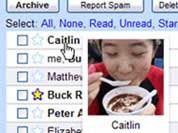
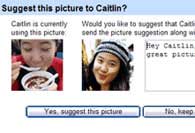
The avatar will appear when you point your mouse at the sender's name.(Google)
Change the sender's avatar.(Google)
When the user points to the sender's name in Inbox, Contacts and Quick Contacts, that person's image will immediately pop up. People can change the avatar of their friends in their inbox and inform them. This new feature will be randomly tested with certain users before being widely used. Gmail Pictures can also be configured to allow all friends to see that you are online or limited to a specific group of people. In addition, the Google Talk service is equipped with audio and will make a "ping" sound whenever a message arrives. PT
FAQ
What is Mail in Gmail Also Has an Avatar?
Google is preparing to equip their e-mail service with a unique feature.
Why is Mail in Gmail Also Has an Avatar important?
A clear understanding of Mail in Gmail Also Has an Avatar helps you make informed decisions, avoid common mistakes, and use the relevant tools or techniques more effectively.
How should beginners approach Mail in Gmail Also Has an Avatar?
Start with the fundamental concepts, follow the examples step by step, and test each change in a safe environment before applying it to important systems or data.
Related Articles
 How to Add Gmail to the Windows 10 Mail App7 minutes read
 Gmail or Proton Mail Is Better?11 minutes read
 6 Tips Little Known Gmail6 minutes read
 Proton Mail Review: A Private Gmail Alternative10 minutes read
 Reasons to Use Spark Mail Instead of Gmail5 minutes read
 How to Send Mail with Gmail: Step-by-Step Guide6 minutes read
Reader Comments 0
Sign in with email or Google to join the discussion.