Table of Contents
This guide covers lg out 15. 6 inch ultrabook with optical drive with practical context and easy-to-follow details. Use it to understand the subject and apply the information confidently.
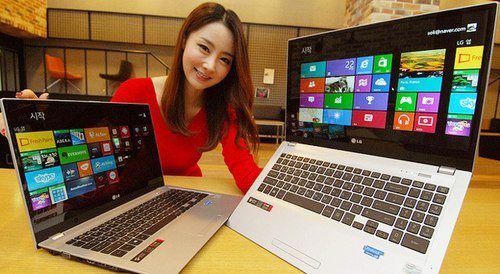 LG U560 is currently only sold in Korea.
LG's new Ultrabook weighs 1. 95 kg and is 20. 9 mm thick. The device is equipped with 15. 6-inch IPS screen, Ivy Bridge Core i5-3337U chip with 1. 8 GHz speed, discrete graphics NVIDIA GeForce and both regular hard drives and SSD. The product supports connections such as USB, HDMI, LAN and runs on 64-bit Windows 8 operating system.
However, LG U560 is currently only sold in Korea. Information such as selling price as well as release date in other markets has not been announced by LG.
Promotional video of LG's new 15. 6-inch ultrabook:
FAQ
What should I check before following these steps?
Confirm device and software compatibility, save important data, and make sure you have the required permissions, files, and account access.
Why might the process not work?
Common causes include outdated software, missing permissions, incompatible hardware, an unstable connection, or completing a step in the wrong order.
Can I undo the changes if necessary?
That depends on the tool or setting. Use built-in restore options when available, keep a backup, and record the original configuration first.
Related Articles
 HP, Dell, Asus Produce Ultrabook Without Optical Drive3 minutes read
 Acer Released the First 15-inch Ultrabook3 minutes read
 Acer Is Coming Out with a 15-inch Ultrabook for $$ 6993 minutes read
 The Eee PC with the First Optical Drive Was Released in April3 minutes read
 Learn About 2. 5 Inch, 3. 5 Inch, 1. 8 Inch Hard Drive Sizes. ..11 minutes read
 Ultrabook 11. 6-inch Screen of Asus Priced from 800 USD3 minutes read
Reader Comments 0
Sign in with email or Google to join the discussion.