Table of Contents
This guide covers ultrabook uses gigabyte's hybrid drive with practical context and easy-to-follow details. Use it to understand the subject and apply the information confidently.
Gigabyte calls its new ultra-thin laptop " Extreme Ultrabook" Because it is equipped with the Intel HM77 Express chipset and runs on 64-bit Windows 8 Pro operating system. This model owns a 14 inch screen with a resolution of 1, 600 x 900 pixels and a 1. 3 megapixel camera.
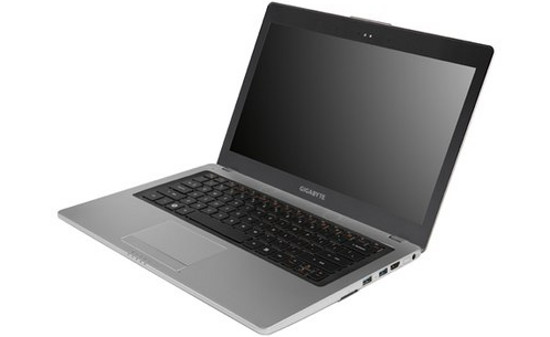 U2442F is considered an upgrade of U2442 launched earlier this year (Photo: Notebookcheck).
Besides, the Gigabyte U2442F also uses Intel Ivy Bridge Core i7-3537U dual-core processor with 2 GHz speed with low voltage and 16 GB RAM. The manufacturer has integrated NVIDIA's Optimus Technology technology to make it flexible to switch between Intel HD Graphics 4000 integrated graphics chip and a GeForce GT 650M discrete card with 2 GB VRAM. Users can choose an SSD with 128/256 GB capacity or 750GB / 1TB hard drive with 5400 rpm per minute with 128 GB mSATA SSD.
In terms of connectivity, Gigabyte's new Ultrabook supports standards like USB 2. 0, USB 3. 0, HDMI, SD card reader, 802. 11 Wi-Fi, b / g / n and Bluetooth 4. 0. At the same time, it also comes with two external speakers and Kensington lock.
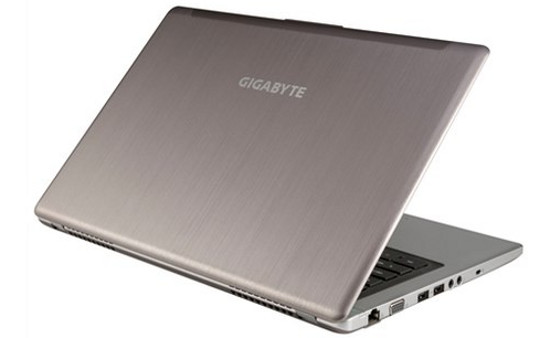 The back of the Gigabyte U2442F (Photo: Notebookcheck).
Manufacturer said, U2442F weighs 1. 59 kg. For the version using SSD and HDD, the machine weighs 1. 69 kg. It uses sound technology THX TruStudio Pro and a keyboard that supports backlight automatically.
Currently, the price and release date of the Gigabyte U2442F has not been announced yet.
FAQ
What should I check before following these steps?
Confirm device and software compatibility, save important data, and make sure you have the required permissions, files, and account access.
Why might the process not work?
Common causes include outdated software, missing permissions, incompatible hardware, an unstable connection, or completing a step in the wrong order.
Can I undo the changes if necessary?
That depends on the tool or setting. Use built-in restore options when available, keep a backup, and record the original configuration first.
Related Articles
 The Strengths of the Acer Aspire P3 Hybrid Computer6 minutes read
 5 Most Outstanding Hybrid Ultrabooks in Vietnam5 minutes read
 Lenovo Ultrabook Transforms into Tablets3 minutes read
 Ultrabook Hybrid Samsung's Removable Keyboard Tablet3 minutes read
 The World's First Hybrid Hard Drive Netbook3 minutes read
 Spotify Is Recording Hundreds of Gigabytes of Garbage Data into the User's Hard Drive3 minutes read
Reader Comments 0
Sign in with email or Google to join the discussion.