Table of Contents
Bootstrap 5 alerts display contextual feedback after an action or explain a condition that needs attention. They can contain short text, links, headings, icons, and an optional close button.
Use alerts for messages that should remain visible in the page. For brief non-blocking feedback that can disappear automatically, a toast may be more appropriate.
Create a basic alert
Combine alert with one contextual variant and provide text that explains the meaning without relying on color.
<div class="alert alert-success" role="alert">
  Your profile was saved successfully.
</div>

<div class="alert alert-info" role="alert">
  Scheduled maintenance begins at 10:00 PM.
</div>

<div class="alert alert-warning" role="alert">
  Review the highlighted fields before continuing.
</div>

<div class="alert alert-danger" role="alert">
  The file could not be uploaded.
</div>
Bootstrap also provides alert-primary, alert-secondary, alert-light, and alert-dark.
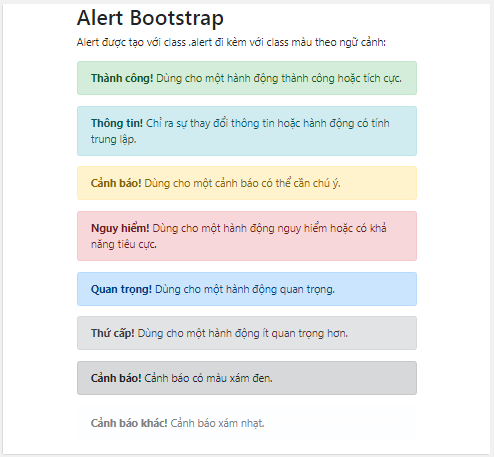
Use role="alert" for a newly inserted message that requires immediate attention. Static informational content present when the page loads may not need an assertive role; excessive alert announcements can interrupt screen-reader users.
Add a link to an alert
Use alert-link to give an anchor a color that works with the alert variant. The destination and link text still need to be specific.
<div class="alert alert-warning" role="alert">
  Your session will expire soon.
  <a class="alert-link" href="/account/security/">
    Review security settings
  </a>.
</div>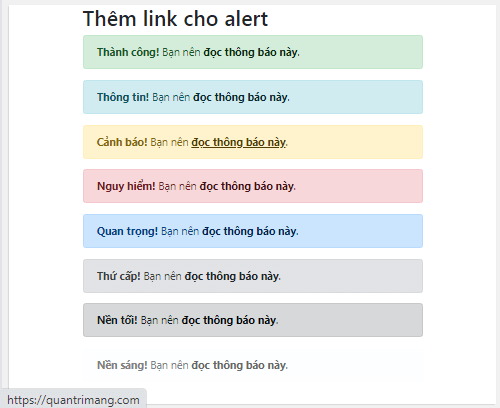
Avoid vague text such as “click here.” Readers should understand the destination from the link label alone.
Add a heading and supporting content
Longer alerts can use alert-heading, paragraphs, and a divider:
<div class="alert alert-success" role="status">
  <h2 class="alert-heading h4">Import complete</h2>
  <p>
    24 records were added and 2 records need review.
  </p>
  <hr>
  <p class="mb-0">
    <a class="alert-link" href="/imports/last/">Review the import report</a>.
  </p>
</div>
Use a heading level that fits the page's hierarchy. If the message becomes a long set of instructions, a dedicated content section may be easier to scan.
Create a dismissible alert
Add alert-dismissible to the alert and place a labeled btn-close button inside it. Bootstrap 5 uses data-bs-dismiss="alert".
<div class="alert alert-info alert-dismissible"
     role="alert">
  A new version of the report is available.
  <button type="button"
          class="btn-close"
          data-bs-dismiss="alert"
          aria-label="Close"></button>
</div>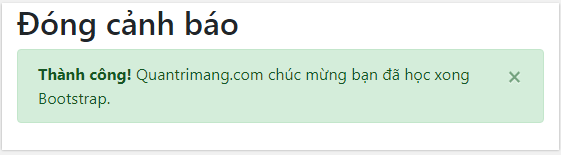
Load bootstrap.bundle.min.js for dismissal behavior. Closing an alert removes it from the document, so do not put information there that users must retrieve later without another path.
Add a fade transition
Include both fade and show:
<div class="alert alert-success alert-dismissible fade show"
     role="alert">
  Your changes were saved.
  <button type="button"
          class="btn-close"
          data-bs-dismiss="alert"
          aria-label="Close"></button>
</div>
The Bootstrap 4 pattern used close and data-dismiss. In Bootstrap 5, use btn-close and the data-bs-* attribute prefix.
Add an icon
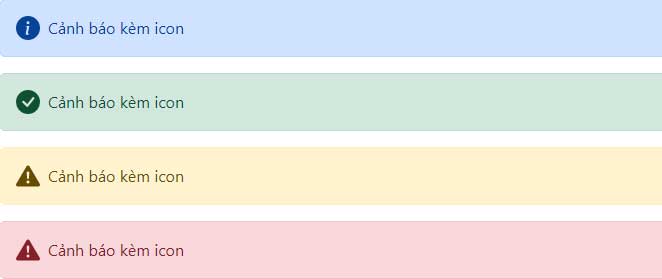
Use flex utilities to align an icon and message. If the icon repeats information already present in text, hide it from assistive technology.
<div class="alert alert-success d-flex align-items-center"
     role="status">
  <svg class="flex-shrink-0 me-2"
       width="20"
       height="20"
       viewBox="0 0 20 20"
       aria-hidden="true"
       focusable="false">
    <circle cx="10" cy="10" r="9" fill="currentColor"></circle>
    <path d="M6 10l3 3 5-6"
          fill="none"
          stroke="white"
          stroke-width="2"></path>
  </svg>
  <div>The backup completed successfully.</div>
</div>
If the icon communicates information that the text does not, give it an accessible label. Usually the clearer approach is to put the meaning in visible text and treat the icon as decorative.
Create an alert dynamically
Add an empty placeholder to the page, then create the alert after an event. When inserting user-controlled content, set textContent rather than building unsanitized HTML.
<div id="alertPlaceholder" aria-live="polite"></div>function showAlert(message, type = 'info') {
const allowedTypes = ['success', 'info', 'warning', 'danger'];
const safeType = allowedTypes.includes(type) ? type : 'info';
const placeholder = document.getElementById('alertPlaceholder');
const alert = document.createElement('div');
alert.className =
'alert alert-' + safeType + ' alert-dismissible fade show';
alert.setAttribute('role', 'status');
const text = document.createElement('span');
text.textContent = message;
const closeButton = document.createElement('button');
closeButton.type = 'button';
closeButton.className = 'btn-close';
closeButton.setAttribute('data-bs-dismiss', 'alert');
closeButton.setAttribute('aria-label', 'Close');
alert.append(text, closeButton);
placeholder.append(alert);
}A live region should exist before the message is inserted so assistive technology can announce the change reliably.
Close an alert with JavaScript
const alertElement = document.getElementById('saveAlert');
const alertInstance =
  bootstrap.Alert.getOrCreateInstance(alertElement);

alertInstance.close();
Listen for closed.bs.alert when focus needs to move after removal. For example, return focus to the control that created the alert or to the next relevant error summary.
Alert accessibility checklist
- Explain the message in text instead of relying on the contextual color or icon.
- Use
role="alert"only for urgent dynamic feedback; use a polite status for routine updates. - Give links descriptive text and valid destinations.
- Label every close button.
- Keep critical information available after a dismissible alert is removed.
- Move focus deliberately if closing an alert would otherwise leave it in an unclear location.
- Use safe DOM APIs or sanitized content for dynamic messages.
You can test the examples in one of these free HTML editors or compare Bootstrap with other popular CSS frameworks. See the official Bootstrap alerts documentation for the full API and event reference.
Related Articles
 Lesson 42: Large Grid in Bootstrap 54 minutes read
 Lesson 38: Grid Systems from Stacked to Horizontal in Bootstrap 54 minutes read
 Lesson 30: Flexing in Bootstrap 59 minutes read
 Lesson 15: Pagination in Bootstrap 54 minutes read
 Lesson 4: Typography in Bootstrap 512 minutes read
 Lesson 29: Utilities in Bootstrap 59 minutes read
Reader Comments 0
Sign in with email or Google to join the discussion.