Table of Contents
Bootstrap 5 Collapse shows and hides a section of content from a button or link. It is useful for optional details, compact mobile controls, and expandable panels. The Accordion component builds on the same plugin to organize several related collapsible sections.
Load bootstrap.bundle.min.js before testing the examples. The trigger and panel must also use matching IDs and accessibility attributes.
Create a basic collapsible panel
Add data-bs-toggle="collapse" to the trigger, point data-bs-target to the panel ID, and add collapse to the panel.
<button class="btn btn-primary"
        type="button"
        data-bs-toggle="collapse"
        data-bs-target="#shippingDetails"
        aria-expanded="false"
        aria-controls="shippingDetails">
  Show shipping details
</button>

<div class="collapse mt-3" id="shippingDetails">
  <div class="card card-body">
    Standard delivery usually appears here with the available options.
  </div>
</div>
Bootstrap changes the trigger's aria-expanded value when the panel opens or closes. aria-controls identifies the element controlled by the button.
An anchor can use href="#shippingDetails" instead of data-bs-target, but a button is usually the clearer choice when the action only changes page state and does not navigate.
Show the content by default
Add show to the panel and initialize the trigger's aria-expanded as true:
<button class="btn btn-primary"
        type="button"
        data-bs-toggle="collapse"
        data-bs-target="#openDetails"
        aria-expanded="true"
        aria-controls="openDetails">
  Toggle details
</button>

<div class="collapse show mt-3" id="openDetails">
  <div class="card card-body">
    This content is visible when the page loads.
  </div>
</div>
Do not add padding directly to the element carrying collapse. Bootstrap animates that wrapper's height, so put padding on a child such as card-body.
Create a horizontal collapse
Add collapse-horizontal to animate width instead of height. Set a width on the immediate child.
<button class="btn btn-primary"
        type="button"
        data-bs-toggle="collapse"
        data-bs-target="#filterPanel"
        aria-expanded="false"
        aria-controls="filterPanel">
  Toggle filters
</button>

<div class="mt-3" style="min-height: 140px;">
  <div class="collapse collapse-horizontal" id="filterPanel">
    <div class="card card-body" style="width: 300px;">
      Add filter controls here.
    </div>
  </div>
</div>
Check narrow viewports so the fixed child width does not overflow the available screen.
Toggle more than one panel
A selector in data-bs-target can match several elements. This button toggles all panels with the multi-collapse class:
<button class="btn btn-secondary"
        type="button"
        data-bs-toggle="collapse"
        data-bs-target=".multi-collapse"
        aria-expanded="false"
        aria-controls="firstPanel secondPanel">
  Toggle both panels
</button>

<div class="collapse multi-collapse" id="firstPanel">...</div>
<div class="collapse multi-collapse" id="secondPanel">...</div>
List each controlled ID in aria-controls. If multiple triggers control the same panel, every trigger should reference the same ID accurately.
Build an accordion
An accordion groups related collapse panels. Adding data-bs-parent="#helpAccordion" to each collapsible panel makes Bootstrap close the currently open item when another opens.
<div class="accordion" id="helpAccordion">
  <div class="accordion-item">
    <h2 class="accordion-header">
      <button class="accordion-button"
              type="button"
              data-bs-toggle="collapse"
              data-bs-target="#accountAnswer"
              aria-expanded="true"
              aria-controls="accountAnswer">
        How do I update my account?
      </button>
    </h2>
    <div id="accountAnswer"
         class="accordion-collapse collapse show"
         data-bs-parent="#helpAccordion">
      <div class="accordion-body">
        Open Profile, edit the required fields, and save your changes.
      </div>
    </div>
  </div>

  <div class="accordion-item">
    <h2 class="accordion-header">
      <button class="accordion-button collapsed"
              type="button"
              data-bs-toggle="collapse"
              data-bs-target="#passwordAnswer"
              aria-expanded="false"
              aria-controls="passwordAnswer">
        How do I change my password?
      </button>
    </h2>
    <div id="passwordAnswer"
         class="accordion-collapse collapse"
         data-bs-parent="#helpAccordion">
      <div class="accordion-body">
        Open Security and choose Change password.
      </div>
    </div>
  </div>
</div>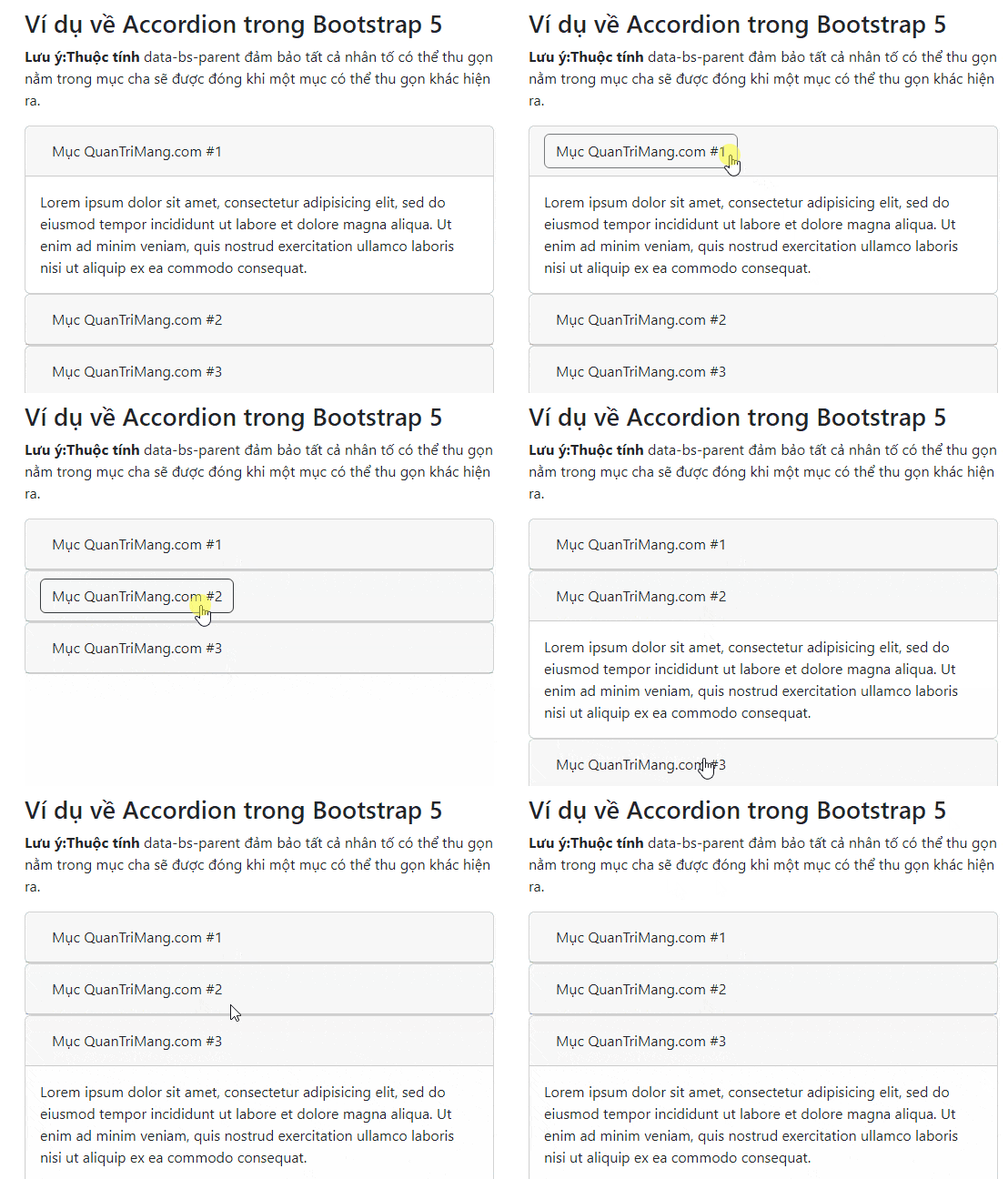
For an accordion with several panels open at once, omit data-bs-parent. Add accordion-flush to the outer wrapper only when the component should sit edge-to-edge without its usual outer borders and rounded corners.
Control Collapse with JavaScript
const panelElement = document.getElementById('shippingDetails');

const panel = bootstrap.Collapse.getOrCreateInstance(panelElement, {
  toggle: false
});

panel.show();
panel.hide();
panel.toggle();
Setting toggle: false prevents the constructor from immediately changing the current state. Use the component events when other code must respond to a completed transition:
panelElement.addEventListener('shown.bs.collapse', () => {
  // The opening transition has finished.
});

panelElement.addEventListener('hidden.bs.collapse', () => {
  // The closing transition has finished.
});
Common problems
The button does nothing
Confirm that the Bootstrap JavaScript bundle is loaded and the target selector matches the panel's unique ID, including capitalization.
The panel appears open but the trigger says it is closed
Synchronize the initial state. A panel with show needs a trigger with aria-expanded="true"; a hidden panel starts with false.
The animation jumps
Keep padding on a child wrapper and avoid forcing a changing height on the collapsing element. Large media that loads after the transition may also change the panel's dimensions unexpectedly.
Accessibility and content guidance
- Use a real button for show and hide actions.
- Give every panel a unique ID and connect it with
aria-controls. - Keep the initial
aria-expandedvalue accurate. - Write a trigger label that describes the hidden content.
- Do not hide information that users must read before completing a task.
- Use headings in accordions that match the surrounding document hierarchy.
You can test these components in one of these free HTML editors or compare Bootstrap with other popular CSS frameworks. See the official references for Bootstrap Collapse and Bootstrap Accordion for the complete APIs.
Related Articles
 Lesson 42: Large Grid in Bootstrap 54 minutes read
 Lesson 38: Grid Systems from Stacked to Horizontal in Bootstrap 54 minutes read
 Lesson 30: Flexing in Bootstrap 59 minutes read
 Lesson 15: Pagination in Bootstrap 54 minutes read
 Lesson 4: Typography in Bootstrap 512 minutes read
 Lesson 29: Utilities in Bootstrap 59 minutes read
Reader Comments 0
Sign in with email or Google to join the discussion.