Table of Contents
Real-life testing shows that the iPhone Air only lasts for more than 12 hours, far less than the iPhone 17 Pro Max with nearly 18 hours of use.
Apple's new iPhone 17 series continues to be the center of discussion this past week, not only in terms of design or performance, but also in terms of battery life - an increasingly important factor for today's users. In particular, The iPhone Air Is the most compared when the actual battery life is quite inferior to The iPhone 17 Pro Max .
Ultra-thin design trades off battery life
According to the battery test conducted by Tom's Guide , the iPhone 17 models were tested by continuous web surfing on a 5G network with the screen brightness set to 150 nits. The results were as follows:
- IPhone 17 Air: 12 hours 2 minutes
- IPhone 17: 12 hours 47 minutes
- IPhone 17 Pro: 15 hours 32 minutes
- IPhone 17 Pro Max: 17 hours 54 minutes
In practice, the iPhone 17 Pro Max can last up to 1.5 times longer than the iPhone Air, or about 48% longer. This is understandable: the iPhone Air's ultra-thin and lightweight design limits battery capacity, while the iPhone 17 Pro Max has more space to accommodate a larger battery, allowing for significantly longer battery life.
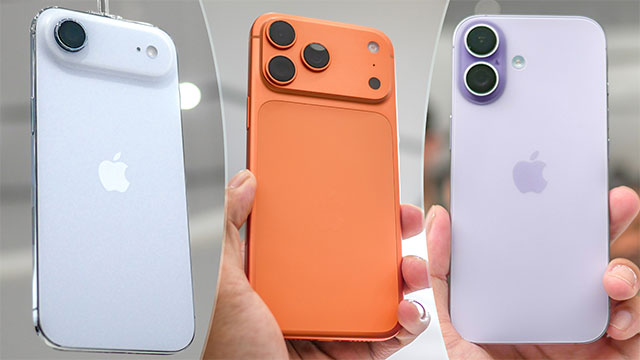
Apple's official estimate for offline video playback time is also consistent with the above test results:
- IPhone Air: 27 hours
- IPhone 17: 30 hours
- IPhone 17 Pro: 33 hours
- IPhone 17 Pro Max: 39 hours
The above results once again solidify the Pro Max's leading position in this year's entire iPhone lineup.
That said, for normal usage such as calling, texting or surfing the web, the iPhone Air can still last all day. However, for those who often play games, watch online videos or work for many hours, the iPhone 17 Pro Max is definitely a more suitable choice. In case you still want to own the super thin design of the Air, users should consider buying an additional backup battery for peace of mind.
FAQ
What should you know about iPhone air is disappointing in terms of battery?
In practical terms, real-life testing shows that the iPhone Air only lasts for more than 12 hours, far less than the iPhone 17 Pro Max with nearly 18 hours of use.
Why does iPhone air is disappointing in terms of battery matter?
The article highlights that in particular, The iPhone Air is the most compared when the actual battery life is quite inferior to The iPhone 17 Pro Max .
What is the main takeaway?
The main takeaway is that ultra-thin design trades off battery life According to the battery test conducted by Tom's Guide , the iPhone 17 models were tested by continuous web surfing on a 5G network with the screen brightness set to 150 nits.
Related Articles
 Galaxy S10 + Surpasses iPhone XS Max, Mate 20 Pro in Terms of Battery Life3 minutes read
 The First Test on the Battery of iPhone X, Relatively Good4 minutes read
 8 Ways to Save iPhone Battery, Increase Battery Life When Using9 minutes read
 How to Share a Wi-Fi Password from iPhone to Another iOS 11 Device12 minutes read
 8 Tips to Help Your iPhone Battery Last Longer When Traveling9 minutes read
 Some Ways to Use iPhone Battery Effectively5 minutes read
Reader Comments 0
Sign in with email or Google to join the discussion.