Table of Contents
To redeem a code in Lữ Khách Đại Lục: Idle RPG, open your character profile, select Giftcode, enter the code, and choose the receive or confirm button. Read the result and check your mailbox or inventory if the reward does not appear immediately.
The game is the Vietnamese release associated with Realms of Pixel. A code advertised for another regional version is not automatically valid in your edition, so check the game's name and publisher in your app listing.
Reported codes to check in your game
The following entries have appeared in published code lists. Their current eligibility, expiry, and exact rewards are not confirmed here; they should not be described as newly verified active codes. Preserve the spelling shown rather than assuming capitalization is interchangeable.
| Previously reported codes — current validity unconfirmed | ||
|---|---|---|
VIP111 | VIP222 | VIP333 |
CMELAN666 | CMPUWAN888 | 10000ROLLS |
vip666 | vip777 | vip888 |
rop666 | rop777 | rop888 |
welcome | ||
For comparison, BlueStacks' Vietnamese beginner guide describes the profile-to-Gift Code workflow and lists several of these codes. A third-party list is a starting point, not proof of an active promotion or a particular reward bundle.
How to redeem a code
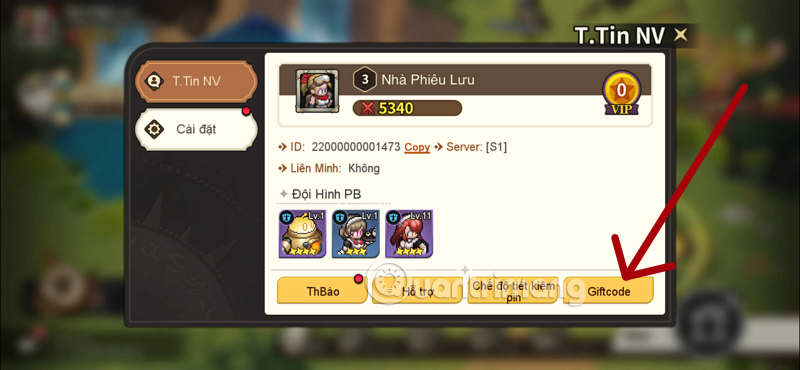
1. Open your profile and Giftcode
Launch the game, reach the main screen, and tap your character avatar in the upper-left corner. Select Giftcode or the equivalent label in your language.
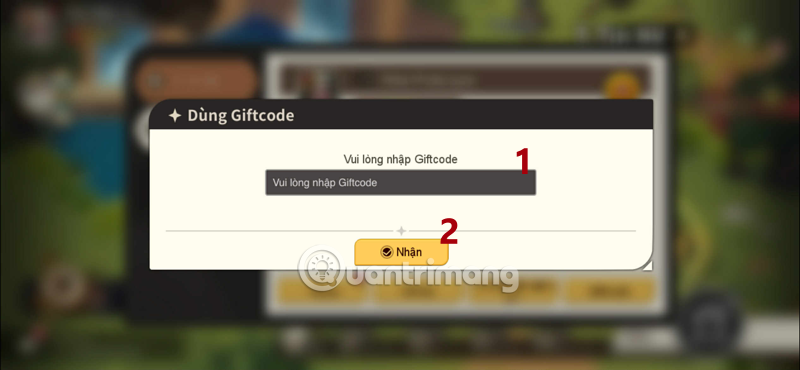
2. Enter the code and receive the result
Paste one code into the entry box. Remove spaces before or after it, then choose Receive, Nhận, or the confirm control shown by your version.
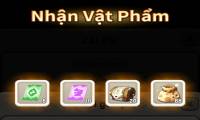
Wait for the response. If the game says redemption succeeded, check the reward message, mailbox, and inventory as appropriate. Do not repeatedly submit a successful code simply because its items were delivered by mail.
What to check if redemption fails
- Spelling: Compare every character with the announcement, including letters that resemble numbers.
- Edition and server: Confirm that the code applies to your regional release and server.
- Deadline or limit: A code may expire, reach a redemption limit, or work only once per account.
- Eligibility: Some promotions may require a particular account state or progress level; read the offer rather than assuming all accounts qualify.
- Connection: Retry after resolving a network error, using the game's message to guide the next step.
Find reliable code announcements
Start with the publisher links provided in the game's official store listing or in-game notices. Check the date and any server or regional restrictions. Community reposts can be useful, but should point back to an identifiable announcement.
Keep your account credentials out of code-sharing sites. Use the supported in-game redemption process, and do not install an unrelated “code generator” to unlock rewards. Code claims should be judged by the publisher's terms and the in-game result, not by a page's “latest” heading.
Related Articles
 Latest Ulala: Idle Adventure Codes
 Code Digital Girls: Idle RPG Latest 4/2023
 Latest Magic Hero Hyper Idle Wars code and how to enter the code
 Summary of the latest Idle Heroes: Heroic Era codes
 Chiến Hỏa Tam Giới Gift Codes and How to Redeem Them
 Full giftcode Huyen Anh Vo Lam latest and how to exchange code for reward
Reader Comments 0
Sign in with email or Google to join the discussion.