Table of Contents
This guide covers hp's spectre ultrabook appears with practical context and easy-to-follow details. Use it to understand the subject and apply the information confidently.
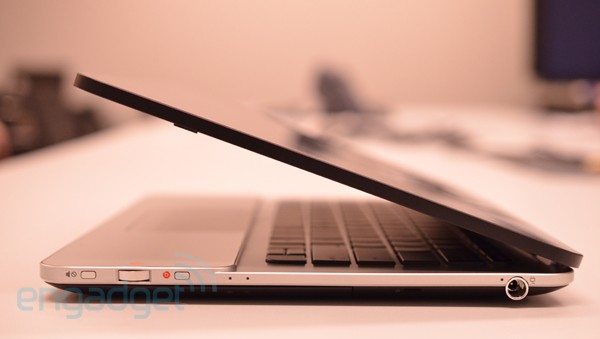 The Envy 14 Specter is HP's latest ultrabook Photo: Engadget.
HP has just announced an ultrabook called Envy 14 Specter. This product has been revealed in a promotional video of the company before. The starting price of this laptop is $ 1, 400. The machine weighs about 1. 71 kg and is 20 mm thin.
Envy 14 Specter uses Intel Core i5-2467M processor, Radiance Display screen size 14 inch resolution of 1, 600 x 900 pixels and 4GB RAM. HP's new Ultrabook has a battery life of 9 hours, a backlit keyboard, case and integrated NFC (Near Field Communication). In addition, Specter also incorporates some technologies such as Intel Wireless Display, CoolSense of HP, Beats, HP Wireless Audio.
The manufacturer also preinstalled some software for users such as Photoshop and Premier Elements full version and Norton Internet Security for two years. Users can choose to upgrade the machine with a 256GB SSD or increase 4GB of RAM. Envy 14 Specter will be sold in the US on February 8. After that, the product appears in Canada, England, Switzerland, Germany, Australia, Japan, Singapore, Chile and Mexico in March.
Photo of HP Envy 14 Specter
FAQ
What should I check before following these steps?
Confirm device and software compatibility, save important data, and make sure you have the required permissions, files, and account access.
Why might the process not work?
Common causes include outdated software, missing permissions, incompatible hardware, an unstable connection, or completing a step in the wrong order.
Can I undo the changes if necessary?
That depends on the tool or setting. Use built-in restore options when available, keep a backup, and record the original configuration first.
Related Articles
 How the Laptop Is Called Ultrabook5 minutes read
 Ultrabook Will Cost 699 USD in 20133 minutes read
 Chip: Complete Guide: Appears to Attack Intel, Arm Cpus, AMD Chips Are4 minutes read
 Ultrabook Touch Running Sony's Windows 8 Appears4 minutes read
 6 Things to Note When Buying Ultrabook7 minutes read
 Series of Cheap Ultrabook Coming Soon in 20133 minutes read
Reader Comments 0
Sign in with email or Google to join the discussion.