Table of Contents
This guide covers the envy specter xt has many similarities to the MacBook air with practical context and easy-to-follow details. Use it to understand the subject and apply the information confidently.
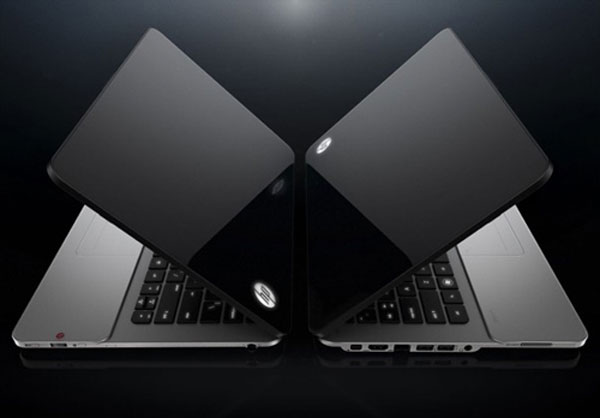 Specter XT is said to copy the MacBook Air model (Photo: Engadget).
With the new series, HP is trying to gain market share in the ultrabook race. However, many analysts believe that HP is imitating Apple's style and style of the MacBook Air, especially the Envy Specter XT.
When asked about the similarities between the two devices, answered on Engadget, HP's chief designer, Stacy Wolff, despite the similarities between Specter XT and MacBook Air, the difference between These 2 computer models are also many. And that is "reflecting the development of technology".
Stacy points out a number of different points, such as the XT's rubber bottom pad with a magnesium-coated frame, while Apple uses CNC aluminum alloy. Even the current "chiclet-style" keyboard Is used by HP a long time ago, since the 1980s.
As for the similarities between the two products, such as the V-shaped design or the silver case, according to Stacy, this is not worth mentioning, because it is quite popular designs, and Apple is not owned by either. These characteristics.
These comments came when HP computer makers promoted the development of ultrabook. HP's new devices are all equipped with the latest Intel processor generation, with different screen sizes (11 inches to 13 inches), equipped with SSDs and no optical drive.
Below Is a Technical Comparison Chart of Specter XT and MacBook Air.
Specter XTMacBook AirDate ofReleaseJune 6, 2012 20/7/2011 Factory price of 1, 000 USD 1, 300 USD Hardware Size 32. 7 x 22. 1 x 14. 4 mm 35 x 22. 7 x 17. 2 mm Weight 1. 38 kg 1. 33 kg Color Silver / Black, Black / Red Silver Software Windows 7 operating system Mac OS X App Premiere Elements 10, Adobe Photoshop OS X 10. 7 Lion Screen Size 13. 3 inch 13. 3 inch LCD LCD Technology Resolution of 1, 366 x 768 px 1, 440 x 900 px Keyboard, Chiclet Chiclet Mouse Non- Mouse touchpad Trackpad Trackpad, 4-point tap Chipset Processor Intel Ivy Bridge
Intel Ivy Bridge, Core i5-2557M, 1. 7 GHz dual core
Intel Ivy Bridge, Core i7-2677M, 1. 8 GHz dual core
DDR3 RAM ; 4 GB; speed 1600 MHz DDR3; 4 GB; speed1333 MHz Flash (SSD) storage unit; 128/256 GB Flash (SSD); 128/256 GB, support SD card slot Audio Beats Audio Speaker , 4 speakers 2 speakers 1 port Ethernet Port, 10/100/1000 (Gigabit) type Thunderbolt 1 HDMI 1 Wi-Fi 802. 11n, 802. 11g, 802. 11a 802. 11n, 802. 11g, 802. 11b, 802. 11a Bluetooth Yes Yes 8-hour Battery Continuously 7 hours continuously
FAQ
What should I check before following these steps?
Confirm device and software compatibility, save important data, and make sure you have the required permissions, files, and account access.
Why might the process not work?
Common causes include outdated software, missing permissions, incompatible hardware, an unstable connection, or completing a step in the wrong order.
Can I undo the changes if necessary?
That depends on the tool or setting. Use built-in restore options when available, keep a backup, and record the original configuration first.
Related Articles
 The Most Outstanding Ultrabook in Early 2012 Is Priced at $$ 1, 4003 minutes read
 HP Introduced Specter 13x2 and Specter 13 Laptops4 minutes read
 HP's Spectre Ultrabook Appears3 minutes read
 HP Envy 13 Challenges MacBook Pro8 minutes read
 Review Hp Envy 13: Good Performance, Reasonable Price15 minutes read
 Compare the HP Envy 13 and Apple MacBook Pro4 minutes read
Reader Comments 0
Sign in with email or Google to join the discussion.