Table of Contents
Strava is one of the most popular apps for runners and cyclists. From tracking runs to complimenting friends on their marathon efforts, Strava is like social media for fitness enthusiasts.
But if you're downloading the Strava app for the first time and own an Apple Watch, keep reading to learn how to use Strava on your Apple Watch, allowing you to sync your activities with Strava.
Download Strava for Android Download Strava for iOS
Apple Watch is compatible with Strava
If you want to download the Strava Apple Watch app to record your runs and bike rides without your phone, you first need to check if your Apple Watch is compatible. Strava is available on most Apple Watches that support watchOS 8 and later, meaning Apple Watch 3 and later.
How to set up Strava on Apple Watch
- To set up Strava on your Apple Watch, download the Strava app on your iPhone if you haven't already, and make sure the app is updated to the latest version.
- Next, refer to the Strava Account Creation Guide to register and log in to your account.
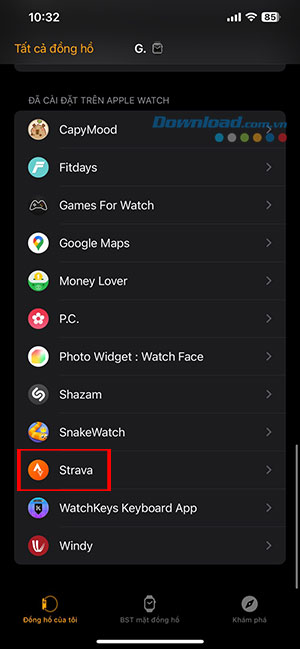
- Open the My Watch section in the Watch app on your phone.
- Find the Strava app and install it on your Apple Watch.
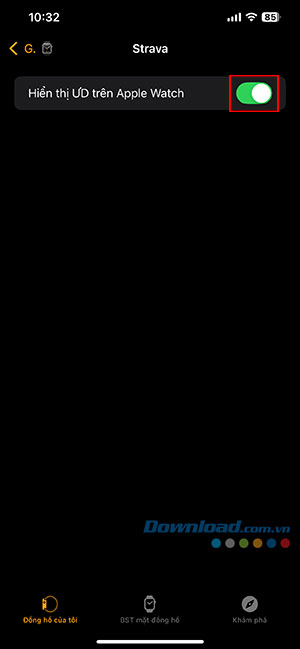
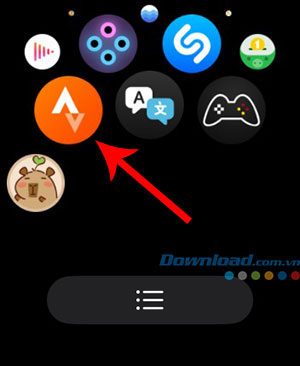
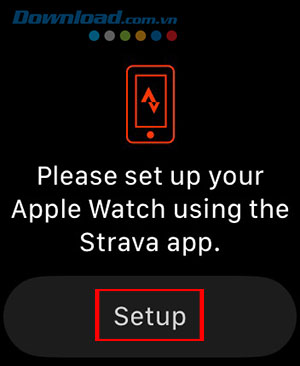
- Open the Strava app on your watch. You'll receive a prompt on your phone to authorize Strava to run on your Apple Watch; tap the Set up button.
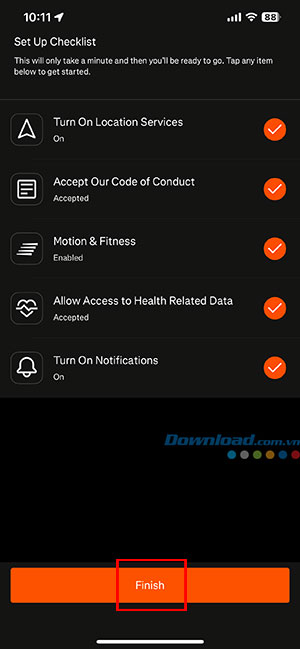
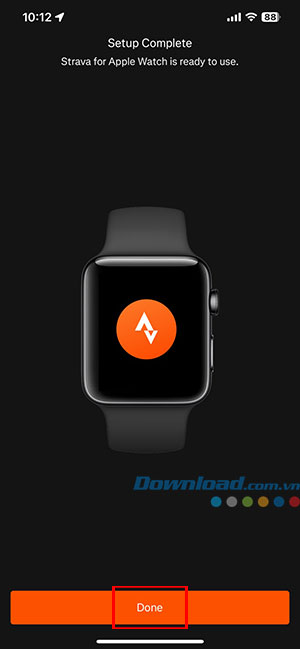
- Open the Strava app on your phone, tap each item to grant permission, and tap Finish. Finally, tap Done to complete the Strava setup on your Apple Watch.
How to record activity using the Strava app on Apple Watch
To record activity from your Apple Watch using the Strava Apple Watch app, simply open the app and select the activity. The first time you use the app on your watch, you will be asked to accept permission to share your location and health data.
Then, people will be able to record their runs, bike rides, and workouts directly from their watch, and these will automatically sync with their Strava account. People don't need to carry their phones when using the Strava app because the app will use the Apple Watch's GPS.
Set up automatic pause on Strava
One thing people might consider changing if they're running or cycling in the city is the auto-pause setting. To do this, simply swipe right while in activity mode and select Settings. Here, you can add auto-pause for running or cycling, meaning your Apple Watch will automatically pause when you stop moving.
You can also set audio signals to start, pause, resume, and stop their activity. Users will receive feedback on total distance and, if running, the speed of the last split and the average split speed.
Once the workout is complete, users will need to swipe right on the workout screen and tap the Finish flag. Then, select Save so the workout is automatically uploaded to Strava when the phone is within range. After the upload, everyone will receive a notification on their phone.
Related Articles
 How to Unpair Your Apple Watch5 minutes read
 Ways to Fix Apple Watch Not Receiving Notifications5 minutes read
 How to Take Screenshots on Apple Watch2 minutes read
 Apple Accidentally Removed the Ability to Update on Some Older Apple3 minutes read
 Basic Apple Watch Operations Users Need to Know5 minutes read
 Comparing Apple Watch Series 11 and Ultra 3: Which Model Should: Key Facts6 minutes read
Reader Comments 0
Sign in with email or Google to join the discussion.