Table of Contents
Choose the Apple Watch Series 11 if you want a lighter everyday watch for notifications, workouts and sleep tracking. The Apple Watch Ultra 3 earns its higher price mainly through longer battery life, a larger titanium case and extra outdoor features. Both use the S10 chip, so paying more does not buy a different processor.
Size and comfort: try the Ultra before buying
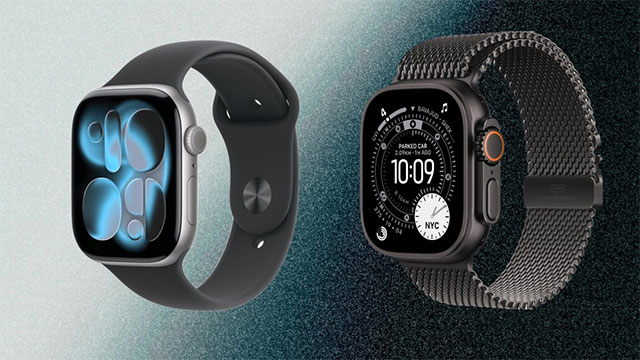
The Series 11 comes in 42mm and 46mm sizes, with aluminum or titanium cases. The Ultra 3 has a single 49mm titanium case in natural or black. Its protective bezel and prominent controls suit outdoor use, but the larger case can feel bulky under sleeves or while sleeping.
Weight depends on the exact configuration: the 42mm aluminum GPS Series 11 weighs 30.3g without a band, compared with 61.6g for the natural titanium Ultra 3. Try both with a properly fitted band if overnight comfort matters to you.
What is similar, and what the Ultra adds
Both watches have an always-on OLED display, the S10 chip, Siri, workout tracking and a broad set of health features. The Ultra 3 reaches up to 3,000 nits of peak brightness versus 2,000 nits for the Series 11, which can help with outdoor visibility.
The Ultra 3 adds dual-frequency GPS, a customizable Action button, a siren and Ultra-specific watch faces with Night Mode. These matter more for navigation and outdoor activities than for checking messages or recording a typical gym session.
Health feature availability depends on country, software and the specific watch. Check local support for ECG, blood oxygen and health notifications before buying; do not assume that every advertised feature is available everywhere.
Battery life: the clearest reason to upgrade
| Apple battery rating | Series 11 | Ultra 3 |
|---|---|---|
| Normal use, up to | 24 hours | 42 hours |
| Low Power Mode, up to | 38 hours | 72 hours |
These are manufacturer test figures, not guaranteed runtimes. Cellular use, GPS workouts, display settings and battery age affect results. The Ultra gives you more room between charges, while the Series 11 is easier to fit into a daily charging routine.
Low Power Mode reduces some display, background measurement and connectivity functions. If sleep tracking is a priority, plan charging around your day rather than relying on the maximum low-power figure. See our Apple Watch usage tips for ways to manage everyday use.
Water activities and satellite features need context
The Series 11 has a 50-meter water-resistance rating and a depth gauge to 6 meters. Ultra 3 has a 100-meter rating and a depth gauge to 40 meters. A water-resistance rating is not permission to dive to that depth: follow Apple's activity limits and care instructions, and remember that resistance can decline over time.
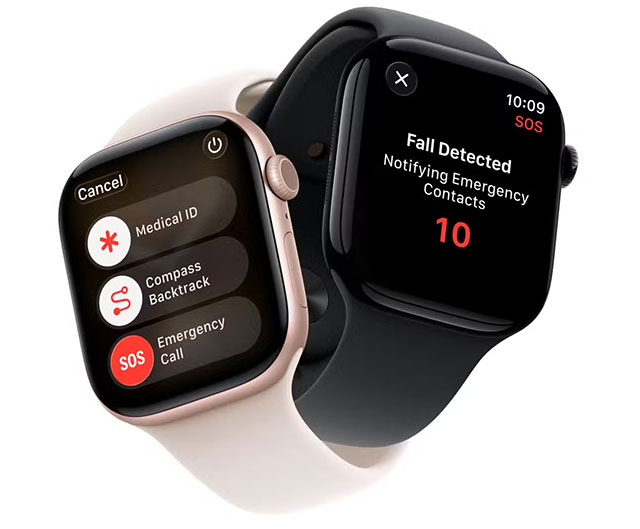
Ultra 3 also supports satellite connectivity for supported emergency and communication features. Availability, eligibility and conditions vary by region and service; check support for the places you actually travel before treating this as a buying reason.
Price and the best fit for your needs
Compare current prices for the exact case, band and connectivity you want. An aluminum GPS Series 11 generally costs less than Ultra 3, while a titanium cellular Series 11 narrows the gap. Cellular service may add a recurring carrier charge.
- Pick Series 11 for a smaller, lighter watch and everyday fitness, communication and sleep features.
- Pick Ultra 3 if longer battery life, outdoor controls, dual-frequency GPS or its more rugged case justify the extra size and cost.
If you already own an Apple Watch, check its battery health before deciding whether you need a replacement. For model details and regional limitations, consult Apple's comparison page.
Related Articles
 How to unpair your Apple Watch
 5 reasons why many people prefer Apple Watch Ultra over Series 10
 Differences between Apple Watch Series 4 Cellular and GPS
 Apple Watch Series 10 will have a thinner chassis, larger screen close to Ultra screen size
 Apple Watch Series 5: Reinforce kingship
 Apple Watch Ultra 3 could be the first smartwatch to feature satellite connectivity
Reader Comments 0
Sign in with email or Google to join the discussion.