Table of Contents
This guide explains how to transform into a superhero in avengers: endgame using a clear, step-by-step process. It also highlights the settings and checks that can help you avoid common errors.
Avengers blockbuster: Endgame as soon as the movie world is released as well as fans of the Avengers series have received the popularity of the masses. And you can also turn yourself into one of the Avengers superheroes with AvengeThem.
AvengeThem is a face transplant website of Morphin completely free to use. Once you open the AvengeThem interface, you will see famous superhero characters such as Iron Man, Captain America, Hawkeye, Black Widow,. You can choose any character you like and pair the mold. My own face on that character. Photos are downloaded in GIF format or mp4 video. Thus, we can install into avatar Facebook from the downloaded video. The steps below explain how to use Avenge.
- Face transplant, face swap on iPhone
- Microsoft Face Swap: Very funny face transplant application for smartphones
- TalkingPhotos, the app that helps your stills talk like a real person
- How to use Jigsaw FaceArt with celebrities
Face transplant tutorial on AvengeThem
Step 1:
Users access the AvengeThem homepage according to the link below.
- Https://avengethem. com/
Step 2:
Select the character you want to transform into. Each character appears in the action's small scene.
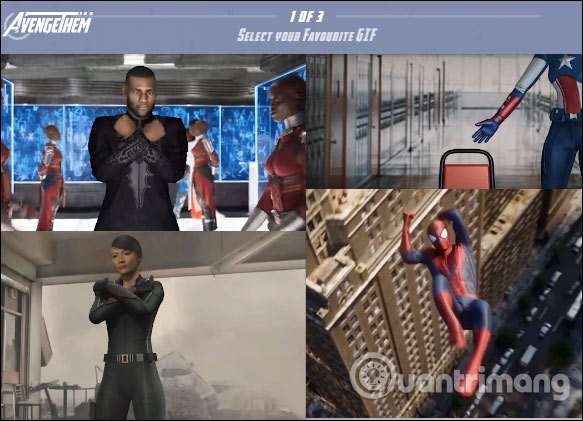
Step 3 :
Display the Select Your Picture interface to download images. Users can choose their own images at the Upload Pictures section, or use the Avengers actors to change into other characters. Items Recent are the images that we have uploaded.
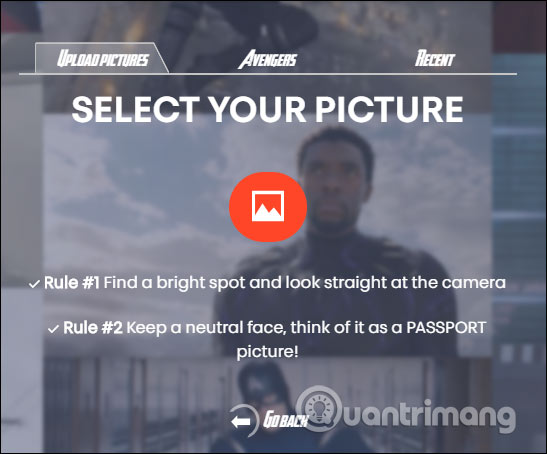
Users should choose the right snapshot for AvengeThem to easily match the face.
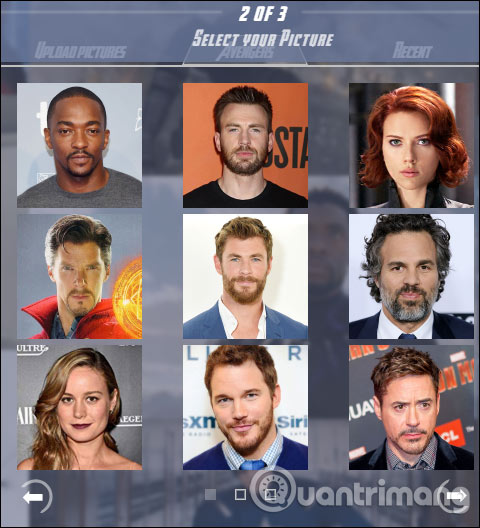
Step 4:
Then AvengeThem processed the image and merged your face into the face of the selected character. When completed, users have many different options.
- Download GIF: Save as animated GIF.
- Download Insta Story: Save as video upload to Instagram Stories.
- Text a friend: Send photos via SMS to friends.
- Twitter: Post to Twitter.
- Copy: Copy the image page link to the image.
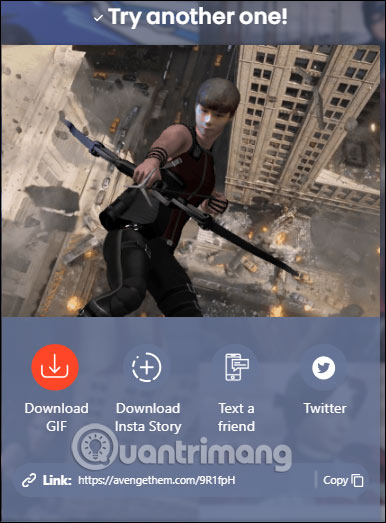
That's quite interesting?! You can become any famous superhero character with powerful powers. Photos are downloaded in GIF format or as mp4 videos for you to use for a variety of needs.
I wish you all success!
FAQ
What should I prepare before I transform into a superhero in avengers?
Review the requirements in the guide, confirm that your device or software is compatible, and save important work before changing settings related to transform into a superhero in avengers.
Why might transform into a superhero in avengers not work as expected?
The most common causes are incompatible versions, missing permissions, incorrect settings, or an interrupted internet connection. Recheck each step and restart the app or device when appropriate.
Can beginners follow these transform into a superhero in avengers steps?
Yes. Follow the steps in order, avoid skipping confirmation screens, and compare your interface with the screenshots because labels may differ slightly between versions.
Related Articles
 Combine More Than 50+ Avengers: Endgame Wallpapers for Computers3 minutes read
 The Painter Spent 45 Hours Drawing the Huge Giant Endgame6 minutes read
 Conceptual Artwork Showing Thanos Single-handedly Breaking5 minutes read
 Avengers Endgame: Game Synthesis Is in Thanos6 minutes read
 Thanos Has Come to Life and Is Snapping His Fingers 'Flying Color' Here and Here3 minutes read
 What Is Spoil?3 minutes read
Reader Comments 0
Sign in with email or Google to join the discussion.