Table of Contents
This practical guide explains how to Stay Safe from 'Spyloan' Android Apps That Use Your Data through clear, ordered steps. It also covers useful settings, common mistakes, and checks that can improve the final result.
The Google Play Store is the safest place to download Android apps, but it's not without its share of scams. There are a lot of shady apps on the service, and while Google does its best to remove them as they appear, it's not possible to get rid of them all. A case in point is the 'SpyLoan' app, which tricks users into promising low-interest loans but instead collects personal data and blackmails victims with it.
Malicious Android Lending Apps Are Collecting User Information
According to a report by McAfee, these malicious data-harvesting lending apps (dubbed 'SpyLoan') are spreading on the Google Play Store. They start with an attractive deal, offering victims loans with high approval rates, fast processing times, and low interest rates. The scammers will also mimic real financial institutions to make the app look professional.
Once you download the app, it starts collecting data. First, the app requests excessive permissions from your Android phone, such as access to the microphone, camera, call logs, SMS messages, and contacts.
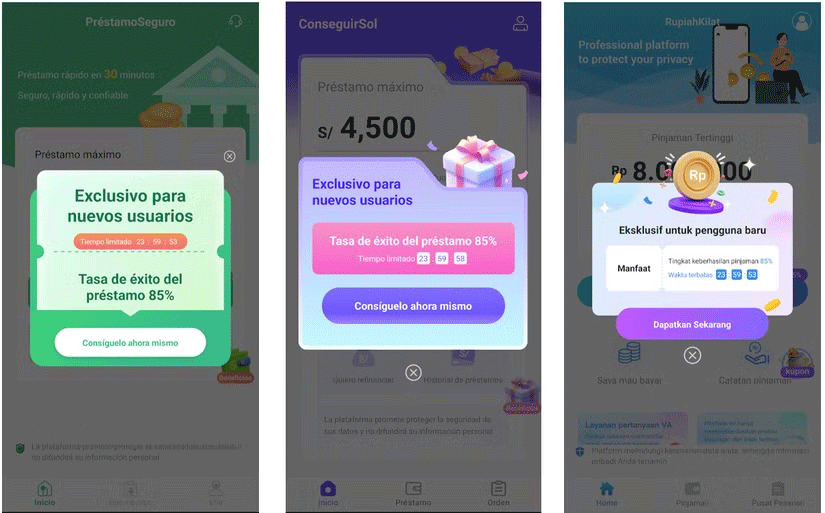
If you accept these terms, the app will offer you a very good loan with minimal repayment requirements. It will also add a countdown to the offer's expiration date to make you panic and efficiently apply so you don't miss out on the offer. If you go through with the loan process, the app will ask you to provide a lot of personal information, such as your legal identification and your bank account information.

Once the scammers have lured you in with their initial offer, they will lend you less than you asked for and at a higher interest rate than advertised. Since the scammers now have your personal information, they can harass you to demand payment, even if the payment date hasn't come yet.
Victims of this scam reported that the scammers threatened to kill or create AI-generated pornographic images using the victim's likeness and claimed that they would send the images to their acquaintances, if they did not pay.
How to Avoid Spyloan Attacks
If you're worried about being attacked by SpyLoan, here are some ways to avoid it:
- If a deal seems 'too good to be true,' be wary, especially if there is a countdown timer attached.
- Please review to identify scams before downloading.
- If an app asks for permissions outside its scope, don't accept them.
- Download. These apps can detect known scam apps and warn you before you install them.
If you keep these tips in mind, you will be able to spot SpyLoan apps before downloading them.
FAQ
How do I Stay Safe from 'Spyloan' Android Apps That Use Your Data?
Follow the steps in this guide in order, verify each setting before continuing, and check the result after every major change.
What should I prepare before I Stay Safe from 'Spyloan' Android Apps That Use Your Data?
Confirm compatibility, install current updates, save important work, and back up data before changing system or application settings.
What can I do if stay Safe from 'Spyloan' Android Apps That Use Your Data does not work?
Review permissions and requirements, restart the relevant device or app, repeat the steps carefully, and use official support resources when the issue continues.
Related Articles
 23 Malicious Apps That Steal Facebook and Instagram Accounts3 minutes read
 How to Back Up and Storing Data on Your Android Device Securely12 minutes read
 The Reformatted Android Device Can Still Recover Data Easily4 minutes read
 Ways Technology Can Keep You Safe and Healthy on the Go4 minutes read
 How to Safely and Effectively Recovery Data on Android8 minutes read
 How to Stay Safe Online: Clear Instructions17 minutes read
Reader Comments 0
Sign in with email or Google to join the discussion.