Table of Contents
To show hidden files in Windows 11 or 10, open File Explorer and enable Hidden items from the View menu. Hidden files then appear slightly faded. You can also use Folder Options to show filename extensions or protected operating-system files.
Windows hides some items to reduce clutter and prevent accidental changes. A file can also be hidden by an application, a user, or malware. Simply revealing a file does not prove that it is safe or malicious.
Show hidden files in Windows 11
- Open File Explorer with Windows + E.
- Select View > Show.
- Enable Hidden items.
Repeat the steps and clear Hidden items when you want to hide them again. This setting applies across File Explorer rather than only to the open folder.
Show hidden files in Windows 10 or 8
Open File Explorer and select the View tab on the ribbon. Check Hidden items in the Show/hide group.

If the simple checkbox is unavailable or you need more control, open View > Options in File Explorer.
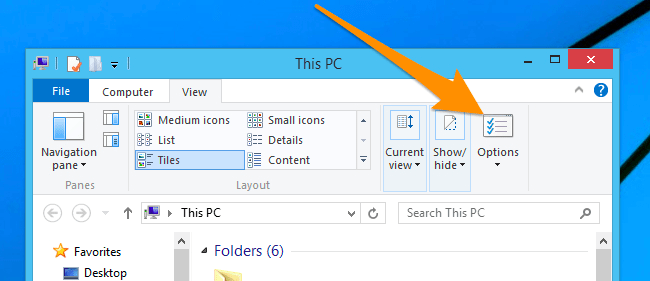
In the Folder Options window, select the View tab. Under Advanced settings, choose Show hidden files, folders, and drives, then select Apply.
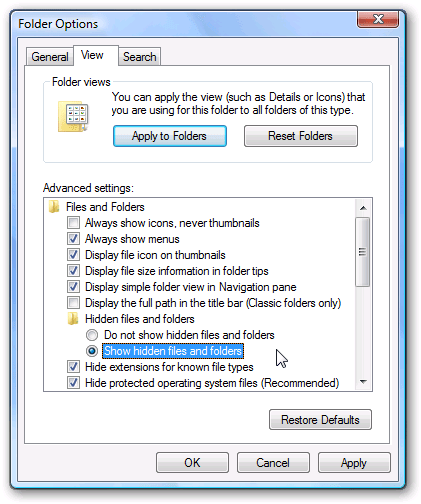
Show filename extensions
Visible extensions make it easier to distinguish files such as invoice.pdf from invoice.pdf.exe. In Windows 11, open View > Show and enable File name extensions. In Windows 10 or 8, use the View tab and check File name extensions.
You can also open Folder Options, select View, and clear Hide extensions for known file types. If you need to rename an extension, first read how changing a file extension works; changing the letters does not convert the file's actual format.
Show hidden files in Windows 7 or Vista
- Open a folder or Windows Explorer.
- Select Organize > Folder and search options.
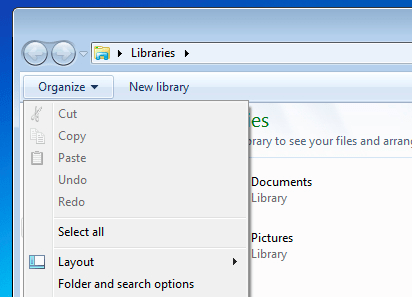
- Open the View tab.
- Select Show hidden files, folders, and drives.
- Select OK.
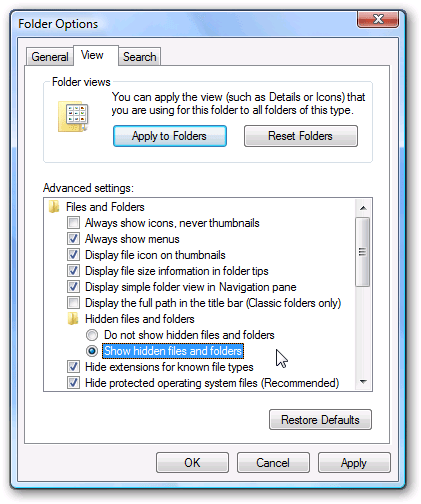
For a version-specific walkthrough, see how to show hidden files in Windows 7.
About protected operating-system files
Folder Options also contains Hide protected operating system files (Recommended). Clearing it reveals additional system files after a warning. Leave this option enabled unless you have a specific troubleshooting reason to change it.
Deleting, renaming, or moving protected files can prevent Windows or an application from working. When troubleshooting is complete, re-enable the setting.
If hidden files still do not appear
- Refresh File Explorer or close and reopen the folder.
- Confirm that you changed the setting in the same Windows account.
- Check whether the files are on a disconnected, encrypted, or inaccessible drive.
- Run a trusted security scan if files unexpectedly disappeared or changed attributes.
- Do not install a “hidden-file viewer” merely to change this standard File Explorer setting.
USB drives can require additional troubleshooting when malware changes file attributes. The guide to opening hidden files on a USB drive covers that situation separately.
Related Articles
 How to Show Hidden Files, Hidden Folders in Windows 10, Windows 73 minutes read
 Click: How to Show Hidden Files in Windows 74 minutes read
 Restore Hidden Folders in Windows When Infected4 minutes read
 How to Display Protected Operating System Files in Windows5 minutes read
 How to Show Hidden Files and Folders on a Mac3 minutes read
 How to Hide Files, Show Hidden Files, View Hidden Folders and5 minutes read
Reader Comments 0
Sign in with email or Google to join the discussion.