Table of Contents
This practical guide explains how to recover deleted password on iPhone. Follow the steps in order, review the requirements first, and use the troubleshooting notes when a setting or option does not work as expected.
Instructions to recover deleted password on iPhone
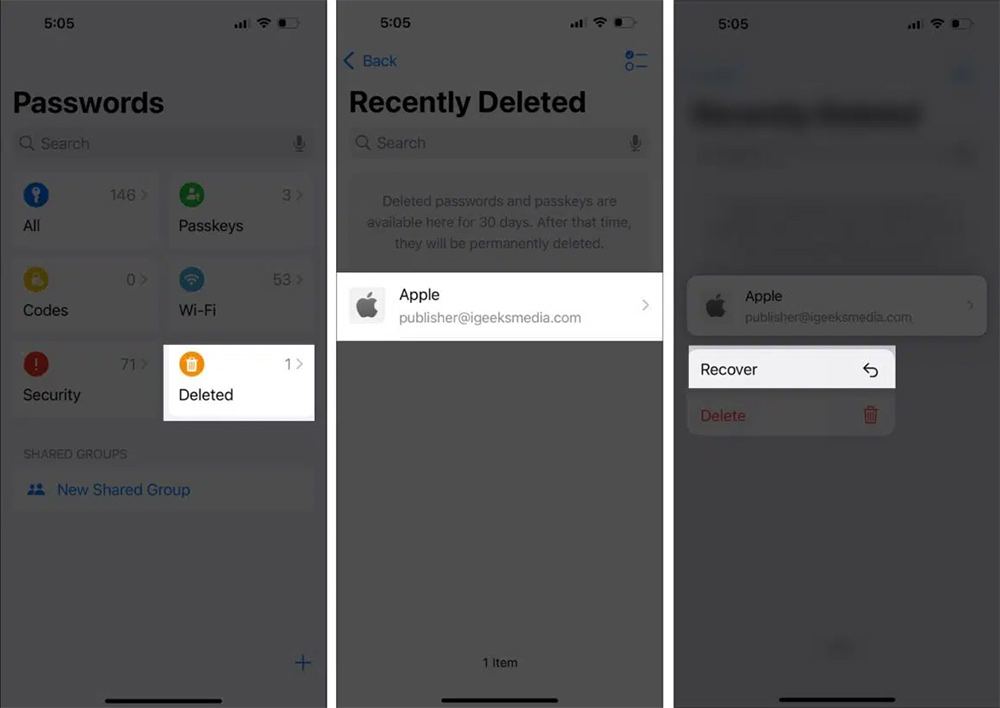
You access the Password application on iPhone and then enter the security method to access the application. In the application interface, select Delete. At the account information you want to recover the password, we click Recover to perform.
Note to recover password on iPhone
Limited-time recovery : Recently deleted passwords are only stored for 30 days before being permanently deleted. After that time, you won't be able to recover them.
iCloud Keychain Sync : Password recovery only works if iCloud Keychain is enabled on your device. If iCloud Keychain was disabled before deletion, the password may not be recoverable.
No manual backups : Unlike photos or documents, passwords don't have their own manual backup system unless you use a third-party password manager.
Sync Mac and iPhone/iPad : If you delete a password on one Apple device, it will be deleted from all devices using the same iCloud account. However, you can recover that password from any Apple device connected to Keychain.
Security and privacy : Apple encrypts all saved passwords for safety. Password recovery requires authentication using Face ID, Touch ID, or your device passcode.
FAQ
What should you know about instructions to recover deleted password on iPhone?
You access the Password application on iPhone and then enter the security method to access the application. In the application interface, select Delete. At the account information you want to recover the password, we click Recover to perform.
What should you know about note to recover password on iPhone?
Limited-time recovery: Recently deleted passwords are only stored for 30 days before being permanently deleted. After that time, you won't be able to recover them.
What does this guide cover?
This guide explains recover deleted password on iPhone, including the main steps, important details, and practical considerations.
Related Articles
 How to Recover Deleted Messages on iPhone: Step-by-Step Guide12 minutes read
 How to Recover Deleted Messages on iPhone5 minutes read
 How to Recover Deleted Apps on iPhone: Step-by-Step Guide3 minutes read
 Hackers Successfully Compromised Data on iPhone X Running iOS 12.1 to Recover Deleted Photos3 minutes read
 How to Recover Deleted Photos on Windows, Mac, Android, and iPhone8 minutes read
 How to Recover Deleted Data or Secure Format11 minutes read
Reader Comments 0
Sign in with email or Google to join the discussion.