Table of Contents
Battery Health Management is basically similar to the Optimized Charging feature on iPhones and iPads but is designed for a different use case: only on MacBooks with USB-C Thunderbolt 3 ports (everything including MacBook Pro 216 and MacBook Air 2018 or later).
With Battery Health Management, the MacBook will not always be fully charged, thus reducing the full charge cycle and extending the battery life of the device. This is handy if you have a habit of going out with your MacBook and charging it multiple times a day, because a fully charged MacBook battery will shorten its life.
However, many people want their MacBook to be fully charged to use longer for each charge, so the best way is to turn off Battery Health Management on the computer. How to do it simple through several steps as below.
- Click the Apple icon in the top left corner of the menu bar and then select System Preferences.
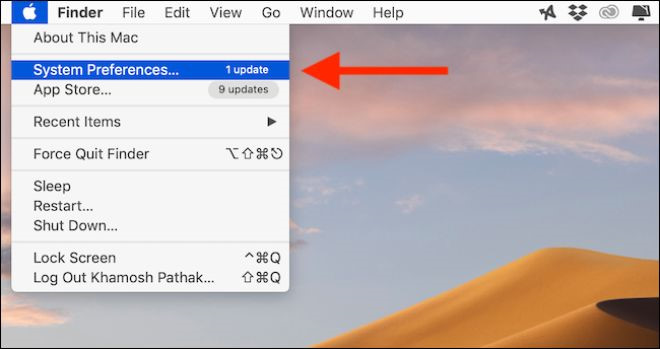
This guide explains how to master Battery Management Features on Mac, with clear steps, practical tips, and important checks before you begin.
- Here, click the Energy Saver button.
- Now, click the Battery Health button found in the bottom toolbar. Here, deselect the Battery Health Management option.

Uncheck Battery Health Management first
- From the confirmation box, select the Turn Off button to confirm that Battery Health Management is turned off.

Click the Turn Off button to confirm the off
Now the Battery Health Management feature has been disabled on the user's Mac and it will now charge as it normally does.
Begin Dable In_article Widget / For inquiries, visit http://dable. io End Dable In_article Widget / For inquiries, visit http://dable. ioFAQ
What should I know about Master Battery Management Features on Mac?
Focus on the key features, requirements, limitations, and practical use cases explained in this guide.
How do I get the best results with Master Battery Management Features on Mac?
Follow the recommended steps, use current software or information, confirm compatibility, and review settings before major changes.
Are there any risks or limitations?
Potential limitations depend on compatibility, data quality, cost, privacy, support, and how the product or method is used.
Related Articles
 The Most Prominent New Features in iOS 11. 37 minutes read
 How to Turn Off Battery Management on Mac?4 minutes read
 (Giveaway) Copyright Free EaseUS Partition Master Professional Edition Best5 minutes read
 How to Use Clean Master to Clean up, Speed up Windows6 minutes read
 Link to Download Typing Master 10.1.1.8497 minutes read
 AMD Ryzen Master -- Hardware Support6 minutes read
Reader Comments 0
Sign in with email or Google to join the discussion.