Table of Contents
To access the teacher-training system at taphuan.csdl.edu.vn, use the account already created for you on the platform. The login guide identifies the account field as your email address and the password field as your training-system password.
Sign in to the training system
- Open taphuan.csdl.edu.vn and confirm the address before entering credentials.
- In Tài khoản (Account), enter the email address associated with your training account.
- In Mật khẩu (Password), enter that account's password.
- Select Đăng nhập (Log in).
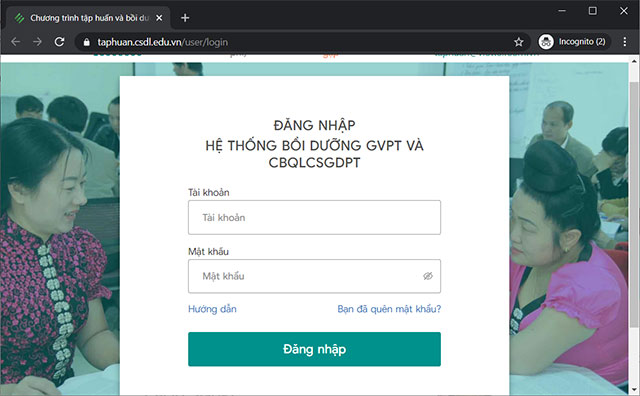
The screenshot shows the login interface used in the original guide. The eye icon reveals the entered password; use it only when others cannot see your screen.
If the account or password is rejected
Check for extra spaces, Caps Lock, and the selected keyboard language. Use the email assigned to the training account, which may differ from another personal email you regularly use.
If you have forgotten the password, select Bạn đã quên mật khẩu? (Forgot password?) on the official sign-in page and follow its current recovery instructions. Check the associated inbox and spam folder for any recovery message.
If you cannot access that email or do not know which account your school registered, contact the school or training administrator. Do not create a duplicate account unless instructed, because course assignments and records may be associated with the existing one.
After signing in
Open the course or training area assigned to your account. Available courses depend on your role, institution, and current training arrangements. If the expected course is missing, ask the administrator to check enrollment rather than repeatedly changing your password.
Use the system's login guide for additional interface instructions. Course counts, subjects, and module schedules can change, so confirm them through the platform or your institution instead of relying on an older article.
On a shared computer
Avoid saving the password in a shared browser, sign out when finished, and close the session. When requesting support, describe the error and account email through the official support process; do not send your password or recovery codes.
Related Articles
 How to Develop Training Materials
 Top 15 most fun and interesting mouse training games of 2023
 How to Reduce the Cost of Developing Online Training
 How to Opt Out of AI Model Training on Popular Platforms
 Features in the Rules of Survival Training Manual
 Latest Dragon Pow Dragon Trainer Code and how to redeem code
Reader Comments 0
Sign in with email or Google to join the discussion.