Table of Contents
Many consumer AI services let you limit whether your content is used to improve generative models, but the controls are not equivalent. Turning off model training may leave chat history, personalization, advertising, abuse monitoring, legal retention, or previously completed training unchanged.
The practical response is to identify each purpose separately: what is saved to your account, what can train a model, what informs personalization or ads, what is retained for safety, and what can be deleted. This guide summarizes the current consumer controls for six widely used platforms. Settings and policies were last checked in August 2026; verify the provider’s linked documentation before relying on a control for sensitive work.
For a broader privacy comparison, see Meta AI vs. ChatGPT. If you prefer an assistant designed around a different privacy model, TipsMake also reviews Proton Lumo.

Quick comparison
| Service | Main consumer control | Important limit |
|---|---|---|
| Data for Generative AI Improvement | Applies going forward and does not undo completed training; separate AI uses and advertising have separate controls | |
| Meta products | Privacy choices, public-content settings, and any regional objection process | There is no single global switch with identical effect in every country or product |
| Google Gemini | Keep Activity off or Temporary Chat | Future chats can still be retained briefly for service and safety; feedback has separate consequences |
| Claude consumer accounts | Help Improve our AI models | Turning it off cannot remove data from models already trained or runs already in progress |
| ChatGPT consumer accounts | Improve the model for everyone | Chat history, memories, and Temporary Chat are separate controls |
| Microsoft Copilot consumer | Training on conversation activity and voice conversations | Other product, safety, compliance, advertising, history, and personalization processing can continue |
Consumer, business, education, enterprise, developer-platform, and employer-managed accounts can have different terms. Never assume that a control described for a personal chatbot applies to an API or workplace account—or vice versa.
Why opt-out controls feel harder than one switch
A service can process the same interaction for several purposes. The response must be generated, the conversation may be saved in history, safety systems may inspect it, personalization may use it in later chats, and a provider may seek permission to use it for model improvement. Advertising, diagnostics, and product analytics add further layers.
This is why a label such as “training off” should not be read as “the provider stores nothing.” It is also why deleting a visible conversation is not necessarily identical to opting out of future training. A useful privacy screen should explain the purpose, time scope, data types, and exceptions; when it does not, open the linked policy before deciding.
LinkedIn: turn off Data for Generative AI Improvement
- Open LinkedIn Settings & Privacy.
- Open Data privacy.
- Find Data for Generative AI Improvement.
- Turn the setting off and confirm that the saved state remains off after reloading the page.
LinkedIn says this prevents LinkedIn and its affiliates, including Microsoft, from using the member’s LinkedIn data and created content to improve content-generating AI models going forward. It does not affect training that already occurred. The switch also does not cover every non-generative model used for purposes such as personalization, security, trust, or anti-abuse; LinkedIn provides a separate data-processing objection process for some uses.
Feedback is another exception to check. LinkedIn says information submitted with generative-AI feedback may be used for training even when the main setting is off. Its official generative-AI control page describes the current scope.
Do not confuse this with LinkedIn’s advertising settings. Model improvement, personalized ads, data shared with affiliates for ads, and data received from others for ads are distinct choices.
Meta: distinguish public content, private messages, and AI interactions
Meta’s approach cannot be reduced to “all Facebook and Instagram messages train Llama.” Meta says it uses public information, including public profile information, posts, and comments, to develop generative AI. Availability of notices, objection forms, and legal bases varies by location.
Ordinary private person-to-person messages should not be described as public training data. However, content can be shared with an AI feature when a user invokes Meta AI inside a chat, asks it to summarize messages, or deliberately forwards material to it. For example, a Messenger summary action can send a limited set of recent messages to Meta AI to create the result.
Use this checklist:
- Open the Meta Privacy Center’s generative-AI section while signed in and read the information for your product and region.
- Review who can see future Facebook and Instagram posts; publish privately when content is not intended for the public.
- If Meta offers an objection or rights form in your region, read its scope and submit accurate information.
- Review and delete AI chats or reset an AI where the product offers that control.
- Do not invoke Meta AI in a private conversation unless every participant understands what content will be sent to the feature.
Changing a post from public to private can limit future exposure, but do not assume it retracts data from a model already trained. Keep a record of any objection confirmation and the policy version you relied on.
Google Gemini: turn off Keep Activity or use Temporary Chat
- Open Gemini and go to Settings & help > Activity, or open the Gemini Apps Activity control in your Google Account.
- Choose Turn off for Keep Activity. If offered, decide separately whether to turn off and delete existing activity.
- For a one-off conversation, start a Temporary Chat instead of a normal saved chat.
Google’s current Gemini Apps Privacy Hub says Temporary Chats are not used to train Google’s AI models. When Keep Activity is off and the user does not submit feedback, future chats are also not used to improve those models. Google still retains those recent interactions with the account for 72 hours to provide the service and protect users and the public.
Turning off Keep Activity can disable or limit connected features that depend on saved activity. Feedback is a separate decision: if you submit it, associated content can be collected and used for improvement under the feedback terms. Do not include confidential information merely because activity is off.
Claude: turn off Help Improve our AI models
- Open Claude and select your profile or name.
- Choose Settings > Privacy.
- Turn off Help Improve our AI models.
- Use an Incognito chat for a conversation that should not appear in normal history or model improvement, while still observing the stated retention exceptions.
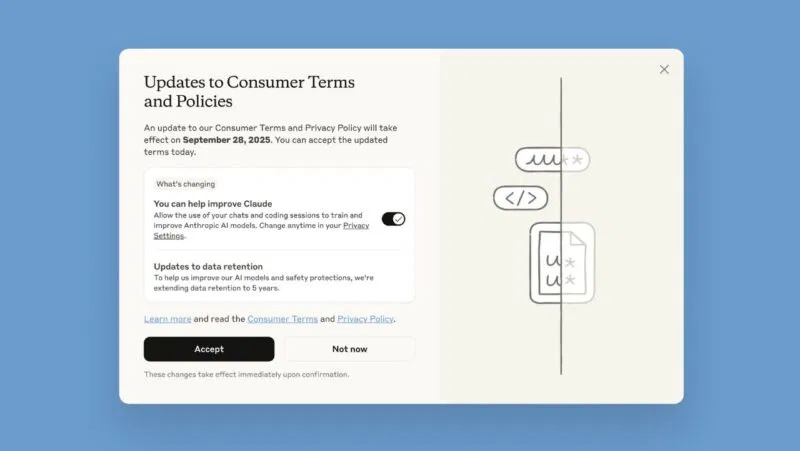
Anthropic says that after the consumer model-improvement setting is turned off, new chats and coding sessions will not be used for future model training. It also says previously stored chats will stop being used in future training runs, while data already included in a training run or a trained model cannot be pulled back. Safety-classifier exceptions may still apply.
If a consumer chooses to enable improvement, Anthropic says eligible de-identified data can be retained in training pipelines for up to five years. Deleting a normal chat removes it from history immediately and, under the stated standard process, from back-end storage within 30 days, subject to safety, legal, and other exceptions. See Anthropic’s model-improvement settings and consumer retention explanation.
Claude for Work and the Anthropic API are commercial offerings with different defaults. Anthropic states that commercial inputs and outputs are not used for model training by default, except when customers explicitly submit feedback or otherwise agree.
ChatGPT: turn off Improve the model for everyone
- Open your ChatGPT profile menu.
- Select Settings > Data Controls.
- Turn off Improve the model for everyone.
- Use Temporary Chat when you also do not want the conversation in history or memories.
For signed-in consumer accounts, the model-improvement choice applies across devices. Normal chats can remain in history when model improvement is off; that is a separate storage choice. Temporary Chats are not used to train models, do not create memories, and are removed under the stated temporary-chat retention process, with limited safety review possible.
Do not treat a model instruction such as “keep this private” as a substitute for the account control. A model cannot change the provider’s retention or training settings through ordinary conversation. Feature availability and workspace protections can vary; consult the current official ChatGPT documentation and the Data Controls shown in your account.
ChatGPT Business, Enterprise, Edu, and OpenAI API data are covered by different product terms and controls. Verify the exact workspace rather than assuming a personal setting governs organizational data.
Microsoft Copilot: separate training, personalization, and ads
For consumer Copilot, Microsoft exposes separate controls for text/conversation activity and voice conversations:
- On copilot.com: profile icon > profile name > Privacy > Training.
- On Windows or macOS: profile icon > Settings > Privacy.
- On mobile: menu > profile icon > Account > Privacy.
Turn off both training controls if you do not want future text or voice conversation activity used for generative-model training. Microsoft’s Copilot privacy-controls page says the opt-out applies to future conversation activity.
The same page also states that this choice does not exclude conversations from every other product or system-improvement use, advertising, digital safety, security, or compliance purpose. Personalization and memory can remain on while training is off, and personalized advertising has a separate control. Conversation history is also separate and can be deleted independently.
Microsoft 365 Copilot Chat for work or school is not the same as the consumer Copilot app. Organizational prompts and responses may be logged and available to administrators under workplace compliance tools, even when they are not used to train the underlying foundation models.

A five-minute privacy audit for any AI service
- Identify the account type. Personal, employer-managed, school, enterprise, and API use may follow different terms.
- Find every data-purpose control. Search settings for training, model improvement, history, memory, personalization, ads, voice, connected apps, feedback, and deletion.
- Read the time scope. Look for “future,” “going forward,” “previously stored,” “already trained,” and retention periods.
- Check exceptions. Safety, abuse prevention, legal holds, feedback, connected services, and administrator logging often have separate rules.
- Save evidence. Record the date, setting state, policy link, and confirmation when the choice matters.
- Recheck after major updates. Product labels and defaults can change.
Opting out is not a substitute for data minimization
The safest sensitive prompt is often the one you do not send. Remove names, account numbers, credentials, unpublished source code, medical records, client files, and confidential business material unless the organization has approved the exact tool and data flow. Use placeholders or a locally controlled system when possible.
Deleting old conversations can reduce account history, but deletion and training opt-out solve different problems. Likewise, a “temporary” or “incognito” mode usually has a limited safety or service-retention window rather than literal zero processing.
What meaningful consent should look like
A useful choice is specific, understandable, reversible, and no more difficult to reject than to accept. It should state what data is involved, which model or purpose receives it, whether the choice is retroactive, how long the data remains, and what product function changes after refusal.
When a platform falls short, users can still use available settings, limit public content, submit applicable rights requests, and choose a different service. Legal rights differ by jurisdiction, and this guide is not legal advice; for a disputed request or regulated data, consult the relevant data-protection authority or qualified counsel.
Related Articles
 Big Tech Corporations Prioritize Investing in AI Startups: Complete Overview6 minutes read
 Reflexology Helps Remove Fatigue After Treating Breast Cancer4 minutes read
 Revealing Income at Microsoft: from Trainee Engineer to Senior Expert3 minutes read
 Apple, Nvidia, and Many Large Companies Are Caught Up in AI4 minutes read
 10 Tips to Help Reduce Stress Fatigue for Office Workers Can Be12 minutes read
 Cheap Hi-tech: Great Times to Buy Hi-tech7 minutes read
Reader Comments 0
Sign in with email or Google to join the discussion.