Table of Contents
Dota Auto Chess runs inside Dota 2, so its interface language depends partly on the Dota 2 and Steam language settings. The supported first method is to select Vietnamese in the game's Steam properties. If that option is unavailable or does not change the interface, the legacy -language vietnamese launch option shown in this guide may still be used for testing.
Custom-game text is controlled by the mod's own localization files. Changing Dota 2 to Vietnamese does not guarantee that every Auto Chess label or newly added line has a translation. After changing the language, use the Dota Auto Chess strategy guide and economy guide for gameplay help.
Method 1: use Steam's Language setting
- Open the Steam Library.
- Right-click Dota 2 and choose Properties.
- Open the Language tab or language drop-down shown in the current Steam interface.
- Select Vietnamese if it is available.
- Close Properties and allow Steam to download any required language files.
- Restart Dota 2 and open Dota Auto Chess.
Steam documents this process in its official game-language settings guide. Menu placement can vary between Steam client versions.
Method 2: use the Vietnamese launch option
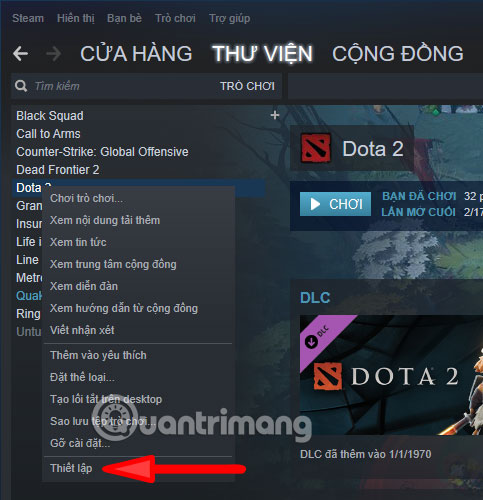
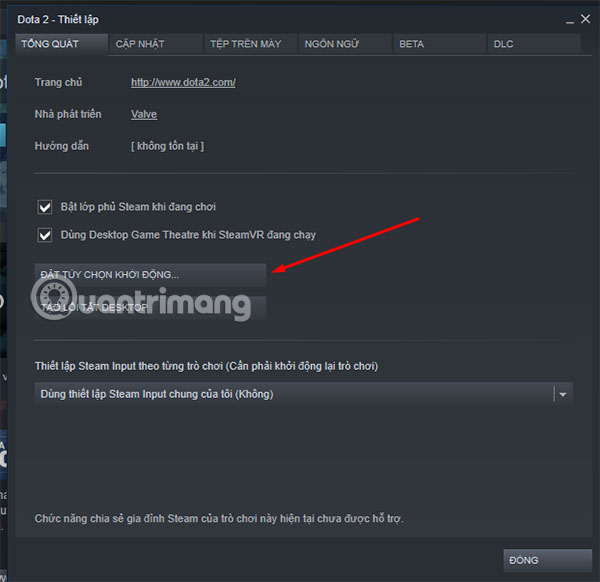
The screenshots below show an older Steam layout. The current client places the launch-options field directly under Properties > General, but the command itself is entered in the same way.
1. Open Dota 2 Properties
In the Steam Library, right-click Dota 2 and select Properties.
2. Find Launch Options
Open the General section. In the older client, the control was labeled Set Launch Options; in the current client it is normally a text field.
3. Enter the language command
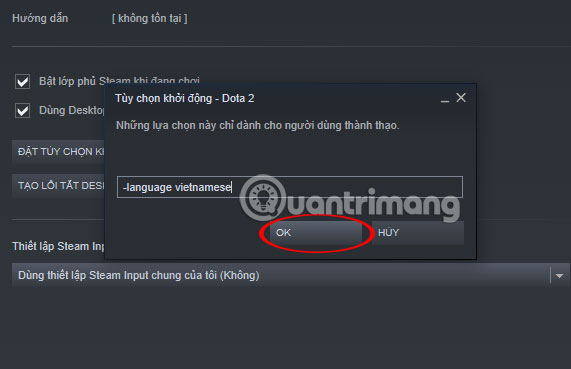
Enter:
-language vietnameseDo not add unrelated commands copied from untrusted guides. Steam explains where to enter parameters in its official launch-options guide.
4. Launch Dota 2 and check Auto Chess
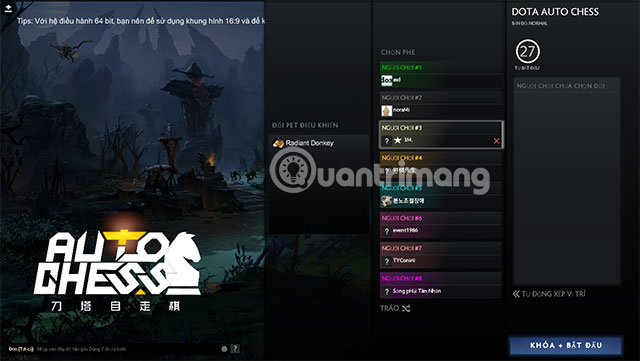
Start Dota 2, open the custom game and review the main interface, unit descriptions and settings. The game may display a mix of Vietnamese and English if the mod does not provide translations for every string.
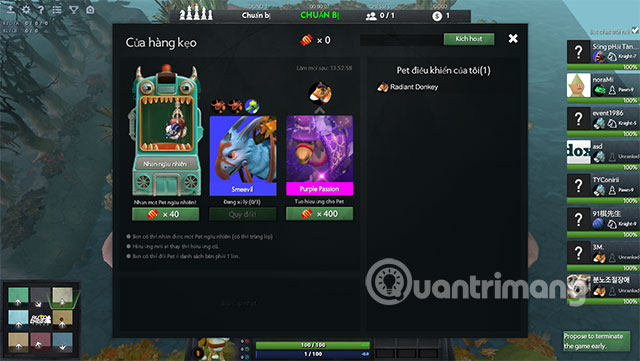
If the language does not change
- Exit Dota 2 completely and restart Steam.
- Confirm that the launch option is spelled exactly and contains a leading hyphen.
- Check whether Steam is downloading language or workshop files.
- Verify the integrity of Dota 2 files if the interface is missing text or assets.
- Remove the launch option, use Steam's Language setting, and test again.
If Dota 2 changes language but Auto Chess does not, the custom game may not include the required Vietnamese strings. That cannot be repaired by repeatedly reinstalling Steam.
How to switch back
Return to Dota 2 Properties and remove -language vietnamese from Launch Options. Then select the preferred language in Steam's Language setting and restart the game.
Language settings improve readability, but old screenshots may not match current ability names or balance values. Treat the current in-game tooltip as authoritative for mechanics.
Related Articles
 Dota Auto Chess: Synthesize Assassins to Be Strengthened in This Update4 minutes read
 5 Mistakes to Avoid When Playing Dota Auto Chess If You Want to Win TOP 17 minutes read
 Dota Auto Chess: Rank the up Line Combo Currently the Most Meta6 minutes read
 Dota Auto Chess: How to Build Teams According to Each Stage of the Most Effective7 minutes read
 How to Installing and Playing Dota Auto Chess for Newbies7 minutes read
 Dota Auto Chess: Combine More Than 10 Tactics to Help You Get into the Top 38 minutes read
Reader Comments 0
Sign in with email or Google to join the discussion.