Table of Contents
This practical guide explains how to get Crystals in Viking Rise 2024 Latest Update in a clear sequence, including preparation, key settings, common mistakes, and troubleshooting steps.
What This Guide Covers
- How to get free Red Crystals in Viking Rise game
Viking Rise is no exception, the game also has a premium currency called Crystals, this precious red crystal can be used to purchase items, complete upgrades, increase development speed and many other tasks.
How to get free Red Crystals in Viking Rise game
1. Redeem gift codes Similar to many other games, exchanging the latest codes is a way for players to get Crystals, and at the same time users also receive a few other support items to speed up construction and development. Empire.
==> Collect new Viking Rise codes here
2. Complete the beginner's guide, do the main quest Doing the main quest is the simplest and fastest step to get Crystals in Viking Rise, the guide includes a series of small quests to explain the the basics of the game, such as building, gathering resources, conquering lands and attacking enemies.
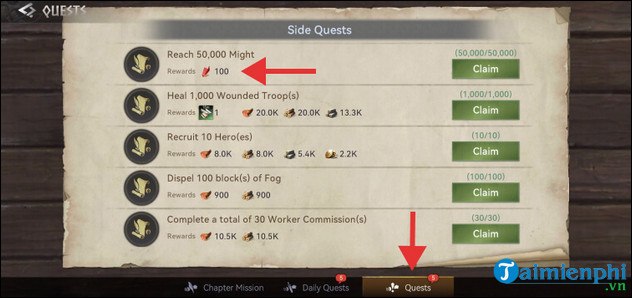
3. Complete side quests Some side quests give you 100 Crystals if you complete them, as you can see in the screenshot below, the goal of that quest is to reach 500K power. Once completed, press the Get button and the reward will be collected.
4. Play event quests Events in Viking Rise offer great rewards, with some events also offering Crystals as rewards. For example, the two events Harvest Festival and Island Capture
- Harvest Festival event: Includes a series of quests and various rewards. Crystals are available in the 4th treasure chest after completing 10 missions.
- Island Capture Event: Lasts 8 days with daily missions. Complete the mission to receive rewards, including 2x100 Crystals.
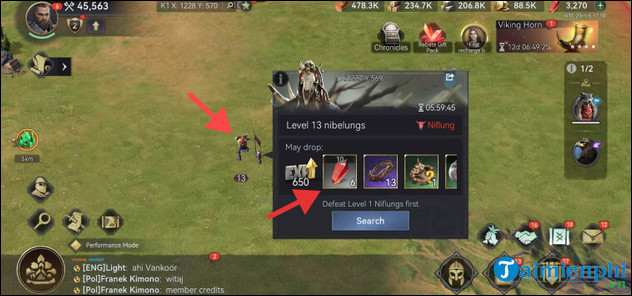
5. Defeat Niflungs and Niflungs leaders who often roam around the maps, they have levels from 1 to 13 and the difficulty depends on each level, higher levels will be more difficult to fight but brings better rewards. Players will receive rewards when winning them including Crystals, Speed Boosts, Stone Wood resources and more.
6. Do the territory map mission This map allows players to rescue workers, soldiers, and Viking Rise heroes. Every time you complete a mission, you will receive 50 Crystals. But to be able to receive these rewards, you must first conquer enemy-occupied territory.
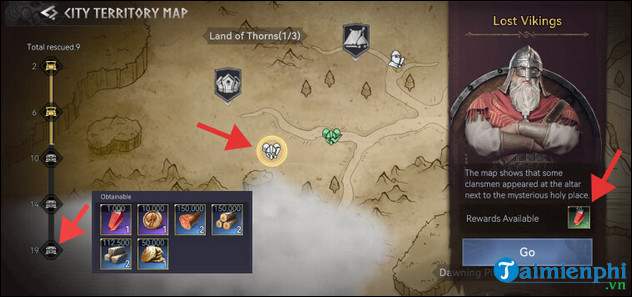
To do that, you can explore the map outside your village on your own or use the city territory map. To access, click on the map icon in the lower left corner of the screen.
7. Join or create a Tribe , also known as an Alliance. When you join or create a tribe, you will receive 500 Crystals for the first time. Once you become a Tribe member, go to your in-game collection box, click on the Tribe tab, and receive your 500 Gem reward from the system message sent to you.
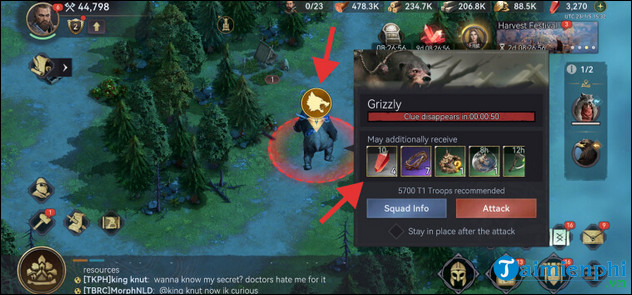
8. Defeat monsters Staging Post's bonus quest requires players to defeat giant beasts. Depending on the quality of the quest (uncommon, rare, epic.), you will have a chance. Guild to receive one of the displayed rewards, including Crystals.
9. Download Viking Rise game The methods to get free Crystals in Viking Rise that Free Download mentioned above are enough for most players. However, if you need more Crystals and are willing to spend some money on them, then the Shop is the best choice for you. To load, you need to do the following steps:
- Step 1: Go to Market (right corner of the screen) => select Crystal Store . - Step 2: Select the Crystal package to top up and make payment. - Step 3: After successful payment, the player checks the number of Crystals just purchased.
Crystals in Viking Rise are a valuable resource that can be used for a variety of purposes as well as significantly speed up your progress. So don't be afraid to spend some Crystals once you've collected enough because you'll collect even more by following the TipsMake methods mentioned above.
Final Thoughts
Use the instructions and checks above in order, verify the result after each major step, and keep a backup whenever the process changes important files or system settings.
FAQ
What should I check before starting?
Confirm that your device or software version matches the instructions, save important data, and note the original settings before making changes.
What should I do if the steps do not work?
Restart the app or device, install available updates, review any error message, and repeat the steps carefully in the same order.
Can I undo the changes?
Many changes can be reversed, but the exact method depends on the feature. A backup or restore point gives you the safest way to recover.
Related Articles
 Viking Rise Codes: Archived Redemption Guide3 minutes read
 Complete Set of Latest Viking Rise Codes 6/20244 minutes read
 Crystals Can Also Be Bent and Elastic, Causing People's Perception3 minutes read
 How to Get Ki Crystals in Anime Last Stand5 minutes read
 Latest MHA Rise of Heroes Code: Main Insights8 minutes read
 Instructions to Enter the Latest Rise of Kingdoms Code and Giftcode4 minutes read
Reader Comments 0
Sign in with email or Google to join the discussion.