Table of Contents
When you want to downgrade your Google One AI Pro plan, or cancel your Google One AI Pro subscription, you'll find this option on the Google One app homepage.
To downgrade your Google One AI Pro plan, or cancel your Google One AI Pro subscription, you will find this option on the Google One app homepage. After downgrading, the storage plan will take effect from the following month and you will receive an email notification about this. The process of downgrading your Google One AI Pro plan is simple and you can follow the instructions below.
Instructions for downgrading Google One AI Pro package
Step 1:
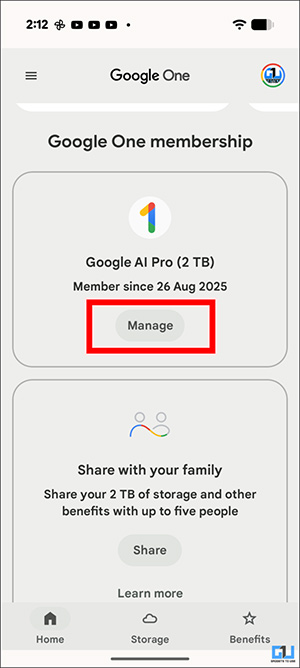
You Go to the Google One app And scroll down to The Google One membership section . Under your active plan, you Tap the Manage button .
Step 2:
Scroll down below and you will see the list of subscription packages, Click See more plans to expand The list. Now at the Google One AI Pro subscription package, we Click Downgrade . The user successfully downgrades his storage package from 2TB to 200GB.
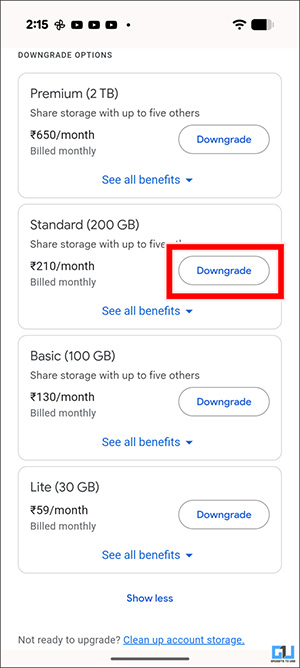
Then you confirm that you have downgraded your subscription plan. You will receive a confirmation email with more details about your current plan and your updated plan.
In case you don't want to use it anymore, you can also cancel your Google One AI Pro subscription.
FAQ
How do you downgrade Google one AI pro plan: step-by-step guide?
In practical terms, if you want to downgrade your Google One AI Pro plan, or cancel your Google One AI Pro subscription, you'll find this option on the Google One app homepage.
What should you check before getting started?
Review the requirements, compatible device or software version, and any warnings described in the guide before making changes.
What should you do if the steps do not work?
Repeat the steps in order, confirm that your app or system is up to date, and review the troubleshooting details provided above.
Related Articles
 Guide to Downgrade iOS 11.3 to 11.2.2, 11.2.56 minutes read
 How to Downgrade iOS 11 to iOS 10.3.3 for iPhone 6S5 minutes read
 Here's How to Uninstall Windows 10 to Return to Using Windows 74 minutes read
 New News: Apple Is Paving the Way for iOS 7, 8, 9, and 10 Downgrades for Most IPhones3 minutes read
 Downgrade from iOS 17 to iOS 16: Complete Guide7 minutes read
 How to Downgrade iOS 14, IPadOS 14 to iOS 133 minutes read
Reader Comments 0
Sign in with email or Google to join the discussion.