Table of Contents
This updated guide examines How to Compress Png Images Effectively with Tinypng and organizes the essential facts, background, and practical takeaways in clear American English.
Currently there are many image compression tools for high quality, without affecting the image, without breaking the image or blurring the image. The fastest, you should use tools such as online image size reduction TinyPNG for example. Tiny is an online website, supports PNG compression of as many as 20 images at a time with a capacity of up to 5MB. In particular, TinyPNG compresses PNG images extremely well, but the image quality is not affected. The following article will guide you how to compress photos on TinyPNG.
- How to use ILoveIMG to edit photos online
- Instructions to reduce the image size in Photoshop
- How to reduce the image size on Windows 10
- How to compress video size without software
Instructions to compress PNG images on TinyPNG
Step 1:
Users visit the link below to visit TinyPNG's homepage.
https://tinypng.com/Step 2:
At the interface of the page you click Drop your file here to download photos from the computer, or we have available folder containing PNG images on the computer and then drag into this interface. We should upload the photos to compress the size at the same time.

Step 3:
The PNG image compression process takes place right after that, the image that has been compressed will display the message Finished as shown so you know. In the capacity reduction interface will display the original PNG image size and image size after compression.
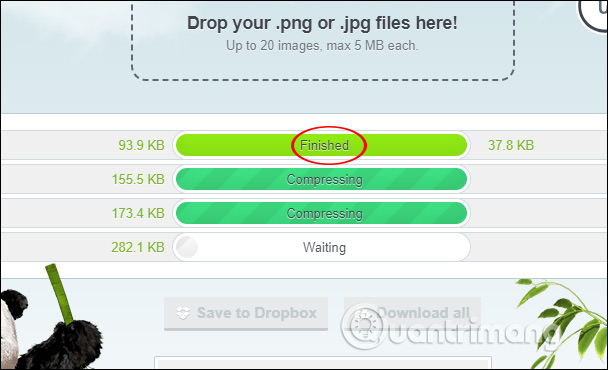
It is easy to see that the size of each image, TinyPNG, is reduced by more than half of the original image size. You can see the amount of% of photo space has been deducted. Below is the total% of file size that has been reduced in the total size of the original image uploaded.
The website offers three download options: download each image when clicking download, download the entire compressed image in zip file format by clicking Download All .
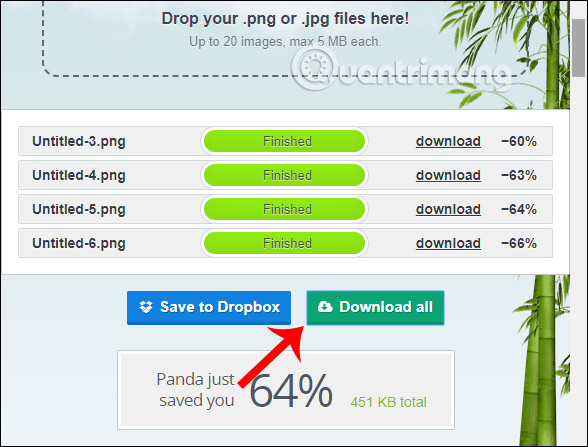
If you want to upload photos to Dropbox then click Save to Dropbox. Now users only need to sign in to their Dropbox account to upload photos.

We can see that TinyPNG greatly reduces the amount of images, most of them are 60% or more with large PNG images. However, the image quality has not been changed, retaining the sharpness of the details of the image.
I wish you successful implementation!
FAQ
What is How to Compress Png Images Effectively with Tinypng about?
It provides a structured overview of image compression on TinyPNG, explains the main context, and highlights practical takeaways for readers.
Why does this topic matter?
Understanding the main concepts helps readers evaluate the issue, avoid common mistakes, and make better-informed decisions.
How should readers use this information?
Use the guidance as a practical starting point, confirm details that may have changed, and follow current product, safety, or security recommendations.
Related Articles
 3 How to Compress Images, Reduce Image Size Effectively5 minutes read
 Reduce Image Size, How to Compress Images Online for Free8 minutes read
 How to Compress Images in PowerPoint3 minutes read
 How to Compress Images in Node.js Using Sharp: Clear Instructions8 minutes read
 Compress Photos, Reduce Image Size with Bzzt! Image Editor3 minutes read
 How to Use Photo Compress to Compress Android Images7 minutes read
Reader Comments 0
Sign in with email or Google to join the discussion.