Table of Contents
To change CorelDRAW's interface language in Windows, open Tools > Options, select Global, choose an installed language, and restart the application. If the language is not listed, its user-interface module was not installed or is not included with your license, so modify the CorelDRAW Graphics Suite installation first.

Change the CorelDRAW interface language
- Save your work and open CorelDRAW.
- Select Tools > Options. In some releases, the settings layout or search field may look different.
- In the category list, select Global.
- Open Select the language for the user interface and choose the desired installed language.
- Optional: enable Ask me the next time the software starts if you want CorelDRAW to show the language choice at startup.
- Close and restart CorelDRAW to apply the change.
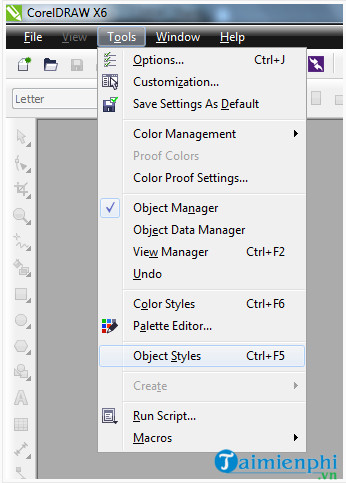
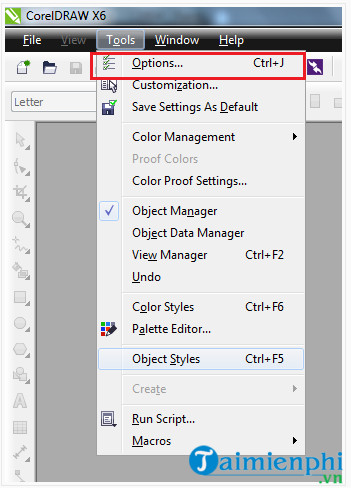
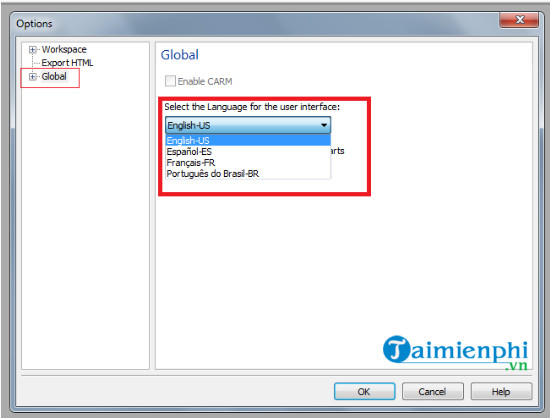
These steps match Corel's language-changing documentation. Menu names can vary slightly by release and by the language currently displayed.
If the language does not appear
A one-item language list means the additional interface module is not installed. First confirm that your CorelDRAW edition and license include the language you need; available language modules can vary.
- Close CorelDRAW, Corel PHOTO-PAINT and other Corel applications.
- Open Windows Settings > Apps > Installed apps, or Control Panel > Programs and Features on an older Windows setup.
- Find CorelDRAW Graphics Suite and choose Modify or Change. Do not select Uninstall.
- In the setup feature list, add the available language or interface component required by your version.
- Complete the installer, restart CorelDRAW, and repeat the language-selection steps above.
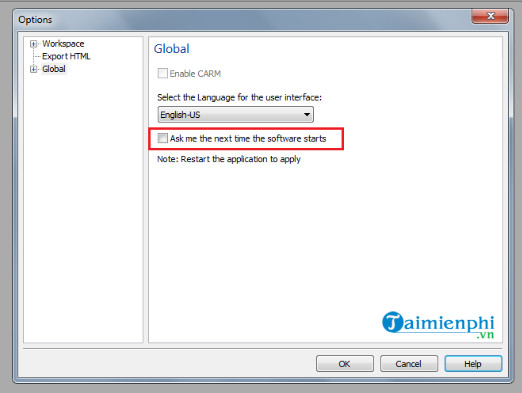
If the installed-app entry has no Modify option, use the original official installer or Corel's account/download system for that licensed version. Avoid third-party “language packs”; they may not match the build, can damage the installation and may contain modified files.
Interface language and writing tools are different
| Component | What it changes | Where it is managed |
|---|---|---|
| User-interface language | Menus, dialogs and application Help | Global options after the corresponding UI module is installed |
| Writing Tools language | Spell checking, hyphenation and language-specific text assistance | CorelDRAW setup features and text-language settings |
| Document font | The appearance and supported characters of text in the drawing | Text properties; the font must be installed and licensed |
| Text encoding | How legacy text data is interpreted | Import or encoding controls; not fixed by changing menus |
Adding a Vietnamese, French or German writing-tool dictionary does not necessarily translate the menus. Likewise, changing the interface language does not repair missing glyphs in a document. Install a font that supports the required characters and assign the correct proofing language to the text.
Troubleshooting
The language changes back after restart
Confirm that CorelDRAW closed normally and that your Windows profile can write its application preferences. Resetting a workspace can remove custom settings, so export important workspace customizations before repairing or resetting the program.
The selected language is only partly applied
Close every Corel application, restart Windows and check for updates to the same licensed release. Mixed component versions can occur after an incomplete update or repair. Use Corel's official repair or installer rather than copying files between installations.
There is no user-interface language list
Your edition may contain a single interface language, or the menu path may differ. Search the Options window for “language,” check the installed product documentation, and confirm the license region and edition with Corel Support.
Text is unreadable even after changing the interface
This is a document-font or encoding issue, not an interface setting. Identify the font used by the text object, install an authorized copy if missing, and review legacy text encoding when the file came from an older system.
Once the interface is comfortable to use, review CorelDRAW interface shortcuts, compare CorelDRAW with Illustrator, or explore other professional graphic design software. The safest language change uses components supplied for the exact licensed CorelDRAW release.
Related Articles
 What's New in CorelDRAW Graphics Suite 2018?6 minutes read
 Change Language on Ccleaner: Change Ccleaner Language to Vietnamese3 minutes read
 How to Change Language in Arena of Valor6 minutes read
 How to Change the Language on Google: Change Language on Google5 minutes read
 Coreldraw X6 Interface Overview, and Coreldraw X6 KEYS to11 minutes read
 How to Change Facebook Language on Computer3 minutes read
Reader Comments 0
Sign in with email or Google to join the discussion.