Table of Contents
Learning how to add podcasts manually to apple podcasts, pocket casts is easier when the steps are completed in the correct order. Use this guide to prepare, make the changes, and verify the result.
Apple is quite strict with the content available in its original applications. Besides, other podcast apps can skip certain podcasts. For that reason, iOS users may want to add their own favorite podcasts to these music applications.
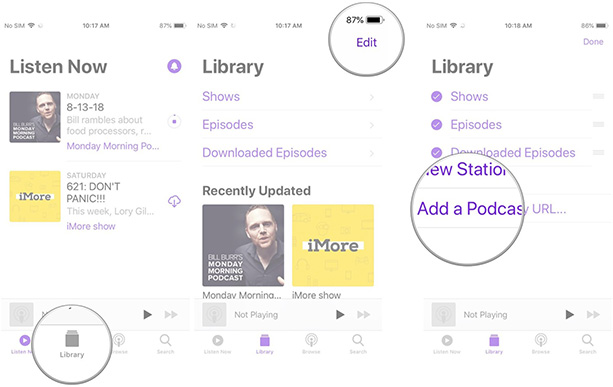
How to manually add podcasts to Apple Podcasts on iPhone, iPad
- Open the Podcast Application on the home screen.
- Click Library At the bottom of the screen.
- Select Edit At the top right of your screen.
- Click Add a Podcast by URL .
- Paste the URLInto the frame .
- Click Subscribe .
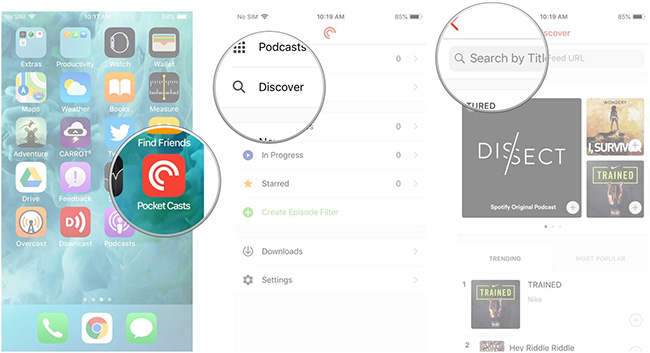
How to add manual podcasts to Pocket Casts on iPhone and iPad
- Open Pocket Casts App from the main screen.
- Click Discover .
- Enter the URL in The search bar .
- Click the Search Button.
- Click the Podcast .
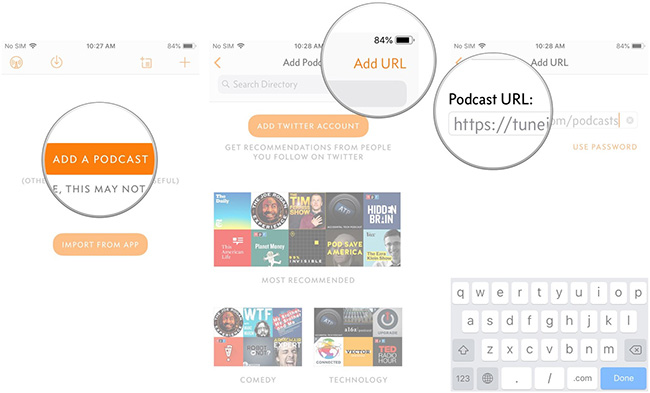
How to add manual podcasts to Overcast on iPhone, iPad
- Open the Overcast App from the main screen.
- Click Add Podcast .
- Click Add URL At the top right of the screen.
- Enter The Podcast URL You want to add.
- Click Done .
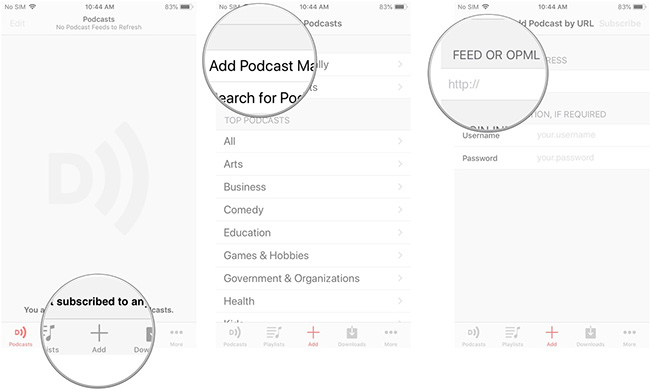
How to add manual podcasts to Downcast on iPhone, iPad
- Open the Downcast Application from the main screen.
- Click Add At the bottom of the screen.
- Select Add Podcast Manually .
- Enter the URL In the FEED OR OPML ADDRESS field .
- Click Done .
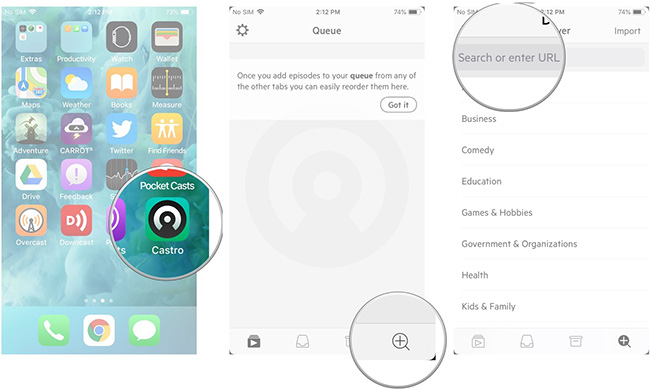
How to manually add podcasts to Castro on iPhone, iPad
- Open the Castro Application from the Home screen.
- Click The search button In the bottom right corner of the screen.
- Click The search bar .
- Paste The Podcast URL You want to add.
- Usage Podcasts Chapters share music tracks in songs on iPhone and iPad
- How to simply copy files from computer to iPhone / iPad
- How to share Wi-Fi on iPhone does not need a password
FAQ
What should I prepare before I add podcasts manually to apple podcasts, pocket casts?
Review the requirements in the guide, confirm that your device or software is compatible, and save important work before changing settings related to add podcasts manually to apple podcasts, pocket casts.
Why might add podcasts manually to apple podcasts, pocket casts not work as expected?
The most common causes are incompatible versions, missing permissions, incorrect settings, or an interrupted internet connection. Recheck each step and restart the app or device when appropriate.
Can beginners follow these add podcasts manually to apple podcasts, pocket casts steps?
Yes. Follow the steps in order, avoid skipping confirmation screens, and compare your interface with the screenshots because labels may differ slightly between versions.
Related Articles
 Everything You Need to Know to Enjoy Podcasts on Apple TV12 minutes read
 Listen to Apple Podcasts in the Browser: Step-by-Step Guide4 minutes read
 How to Directly Translate Apple Podcasts: Step-by-Step Guide3 minutes read
 How to Create a Personalized Podcast with Copilot Podcasts7 minutes read
 Apple Podcasts Launches Web Version: What You Need to Know4 minutes read
 What Is a Podcast: Learn About Podcasts9 minutes read
Reader Comments 0
Sign in with email or Google to join the discussion.