Table of Contents
Android phone only has one USB-C port? This article shows you how to expand your connection with dongles, PD charging hubs, and magnetic hubs to turn your phone into a mini workstation.
USB ports are obviously useful, but they're pretty limited on Android phones—simply because you only have one. For most people, that's enough, but if you need more connectivity, there are ways to expand.
Android phones are essentially miniature computers—equipped with gigabit modems and PC-level processors. The problem is that they're locked into a single USB-C port. The good news is that's limited by the native hardware, and thanks to the flexible USB-C standard, you can expand your connectivity with ease.
Simple upgrade with USB dongle

If you've ever used a modern laptop, you're probably used to the 'dongle' life. For Android phones, a USB-C hub is just as convenient. Many hubs designed for laptops work with phones, too, turning a single USB-C port into a multi-purpose 'docking station'.
What you're really buying here isn't just a few more ports, but a way to turn your phone into a more powerful device. Look for hubs that have all the necessary ports: a microSD card slot (which is great if you take many photos), and a few extra USB-C and USB-A ports for flash drives, mice, and keyboards.
That's right—you can use a mouse and keyboard with your phone! Combined with HDMI or DisplayPort output, many Android models can now function almost like a full-fledged desktop. If you go this route, you'll want to get a hub that supports Power Delivery (PD) Pass-through, so you can plug in a charger—powering your phone and all your peripherals at the same time.
Magnetic Hub – a convenient choice when traveling
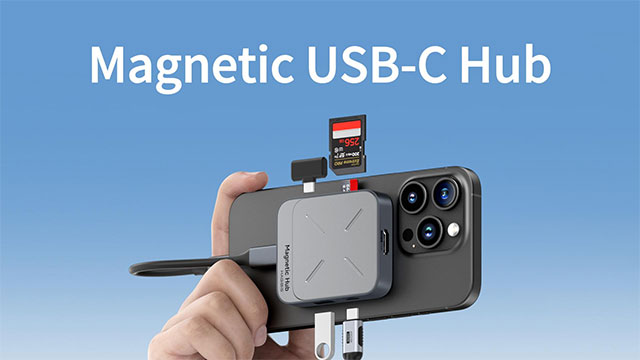
A compact USB-C dongle is great for carrying around, but if your phone supports magnetic charging (like the Pixel 10 series) or has a magnetic case, you might want to consider a magnetic hub. These hubs stick neatly to the back of your phone, rather than sticking out from the charging port.
They essentially work like traditional dongles: they attach to the back of your phone via a short or shortened USB-C cable, providing microSD, USB-C, USB-A, and even HDMI ports. The biggest plus is that they reduce the strain on the charging port, as the connection is 'released' via a flexible cable, not a hard block attached directly.
Phones are more versatile than you think
Your Android phone isn't limited by a single USB port — it's how you use it. In fact, you can Turn your phone into a 'modular' device With these solutions:
- Simple Dongle : Used to transfer photos, videos, or data from USB to phone.
- Powered Hub (PD) : For those who want to turn their phone into a mini desktop computer.
- Magnetic Hub : Compact, durable and convenient for travel.
With just a few small accessories, you can start Building Your own mobile 'workstation' tailored to your needs — making the most of the power your phone already has.
FAQ
How do you add more USB ports to your Android phone: step-by-step guide?
In practical terms, Android phone only has one USB-C port? This article shows you how to expand your connection with dongles, PD charging hubs, and magnetic hubs to turn your phone into a mini workstation.
What should you check before getting started?
Review the requirements, compatible device or software version, and any warnings described in the guide before making changes.
What should you do if the steps do not work?
Repeat the steps in order, confirm that your app or system is up to date, and review the troubleshooting details provided above.
Related Articles
 How to Program Arduino with an Android Phone5 minutes read
 16 Connection Ports Are Commonly Found on Computers and Their Functions20 minutes read
 How to Disable USB Ports: Step-by-Step Guide6 minutes read
 Instructions for Finding the Android Phone Model (Line) You Own6 minutes read
 6 Smart Ways to Use Your Old Android Phone: Practical Guide7 minutes read
 How to Tell If Your Computer Has USB 2.0 Ports3 minutes read
Reader Comments 0
Sign in with email or Google to join the discussion.