Table of Contents
This updated guide explains how to Access Blocked Websites with AnonymoX on Firefox through clear steps, practical examples, and important checks that help prevent common errors.
Here's how to use anonymoX to access blocked websites on Firefox.
Step 1 : Install anonymoX add-on for Firefox.
First, you need to open Firefox and access the link https://addons. mozilla. org/en/firefox/addon/anonymox/, then click Add to Firefox to add anonymoX add-on to Firefox.
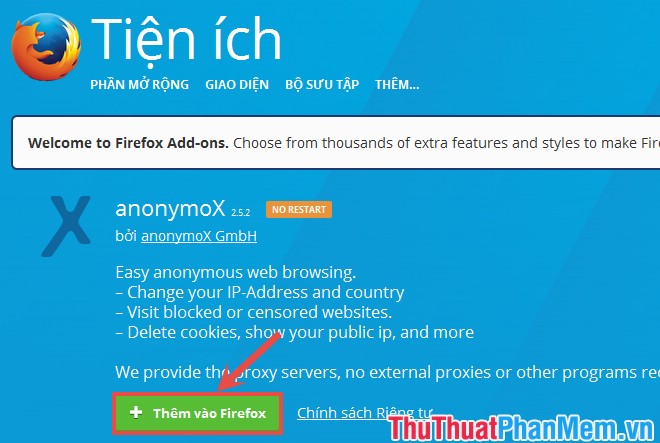
Click Install to install the add-on to Firefox.

Then you restart Firefox.
Step 2 : On the Firefox interface, anonymoX icon appears , click the X icon to set up anonymoX :
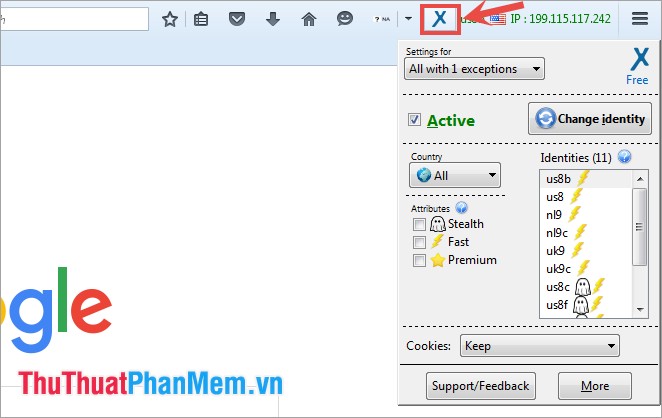
Settings for : use to select any website to set anonymoX on / off.
Change identity : change the IP address, click this button to change the IP between countries in the world. Or you can choose directly in the Indentities section.
Country : anonymoX provides IP from USA, Netherlands, Austria, UK and many other countries in the More section, you can choose all by leaving All .
Attributes : premium service with faster speed, if you use the anonymoX Premium then use this part, if you use the free version, you cannot use it.
In addition, you select More to use some other features of anonymoX such as: Clear Cookies (delete cookies of one or all currently visited websites), User Agent (browse the web on behalf of other web browsers),.
Step 3 : To access the blocked website, open the blocked website and click the anonymoX add-on icon , select Settings for the name of the blocked site and tick the Active box to add-on. Change other proxy address. This will allow you to access the blocked site.

So you can access the blocked websites with anonymoX on Firefox. Good luck!
FAQ
What is the easiest way to Access Blocked Websites with AnonymoX on Firefox?
Start with the requirements in this guide, then follow each step in order. Check the result after every major change so problems are easier to identify.
Can beginners follow these instructions?
Yes. The process is organized into practical steps, and you can repeat any step before moving forward.
What should I check if the method does not work?
Confirm your software or device version, permissions, settings, file format, and internet connection when the task depends on online services.
Related Articles
 The Latest Way to Access Blocked Websites7 minutes read
 Use Addon for Firefox - AnonymoX to Access Facebook7 minutes read
 China Banned VPN Services to Build the Great Wall4 minutes read
 How to Access Blocked Websites12 minutes read
 Summary of Several Ways to Access Blocked Websites9 minutes read
 10 How to Access Blocked Websites: Complete Guide7 minutes read
Reader Comments 0
Sign in with email or Google to join the discussion.