Table of Contents
This guide covers hardware in osi reference model: grade 7 with practical context and easy-to-follow details. Use it to understand the subject and apply the information confidently.
 Hardware in OSI reference model: Grade 1
  Hardware in OSI reference model: Layer 2
  Hardware in OSI reference model: Grade 3
  Hardware in OSI reference model: Grade 4
  Hardware in OSI reference model: Grade 5
  Hardware in OSI reference model: Grade 6
Russell Hitchcock
The seventh and final layer in the OSI reference model is the App layer. This class can be said to be the most important layer in the OSI reference model, because it is said that because of not caring about network apps, there is no need to have a network. All the ways we interact with the network are through apps. For example, web browsers, email programs, IM apps, Voice Over Internet Protocol (VoIP) and many other apps are all network apps that interact with lower layers in the OSI reference model. And users.
The three common functions provided by these app class implementations are:
1. Ensure all necessary system resources are available. 2. Match the app with the appropriate app protocol. 3. Synchronize data transmission from app to app protocol.
App layer protocols
App layer contains both network apps and app protocols. Basic app protocols are rules about how to communicate with the app. Many app layer protocols are widely publicized like Hyper Text Transfer Protocol (HTTP). This means that any website that uses the HTTP protocol can transfer files from a web server that executes the HTTP protocol. Web browsers, web servers, and HTTP protocols work together to create network apps. Some app layer protocols have proprietary rights and therefore are not available to the public; VoIP protocols are an example of this case. This is why you cannot use the same common interface to access your Skype account and you must use Skype's user interface.
Software and hardware
Most people think of app layer protocols like HTTP, SMTP or POP3, and think software apps are the interface of these apps. However, that is not always true. We can give an example where the interface for apps is hardware. For example, wireless phones are capable of connecting to VoIP accounts. In this phone system, the software in it makes it easy to assume that most of the work is done by hardware. In fact, however, your voice is captured by a microphone and the hardware handles it so that it is compatible with the VoIP app protocol by hardware next to the phone. This hardware might be the App Specific Integrated Circuit (ASIC) or Field Programmable Gate Array (FPGA). Another example of hardware implementation of the app layer protocol is inside Bluetooth. Bluetooth, in itself has many layers in the OSI reference model but we will focus on the app implementation layer. Inside Bluetooth devices, you can see many apps inside the app layer. One such app will be the app that will allow wireless headset devices, as shown in Figure 1, to communicate with a mobile phone in your pocket. In this case, the headset has a Bluetooth chip inside it, which converts the signal it receives from the phone into a headset in the headset through the hardware component. In contrast, the headset will receive an audio signal from the microphone and convert it into a form suitable for Bluetooth chips, which will then send signals to your phone. Here all are done through hardware. 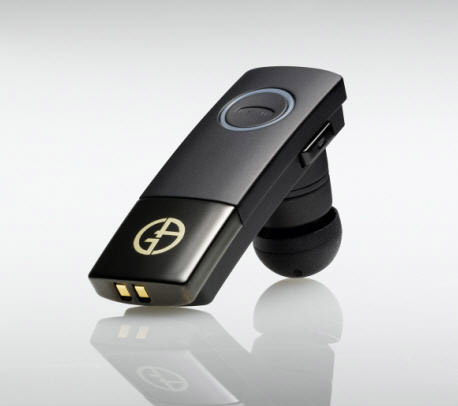
Figure 1: Bluetooth headset
Figure 2: Implementation of VoIP
In general, the OSI reference model is a fairly abstract model, this model should be used as a guide for understanding how the network works as well as deploying network apps. By dividing each part of a design into classes in the reference model, designers will increase the usability of the app as well as make the app easier to maintain and upgrade. By the time.
The components of a design do not necessarily have to adhere to the OSI reference model, but in fact there are still arguments about which class will belong. However, there is one thing in practice that no matter which class it is, it doesn't matter because these functions work between classes. Other functions provided by classes may not be necessary and sometimes will not be present in the design; Encryption is a concrete example of this problem.
FAQ
What should I check before following these steps?
Confirm device and software compatibility, save important data, and make sure you have the required permissions, files, and account access.
Why might the process not work?
Common causes include outdated software, missing permissions, incompatible hardware, an unstable connection, or completing a step in the wrong order.
Can I undo the changes if necessary?
That depends on the tool or setting. Use built-in restore options when available, keep a backup, and record the original configuration first.
Related Articles
 Hardware in OSI Reference Model: Grade 49 minutes read
 Hardware in OSI Reference Model: Grade 58 minutes read
 Hardware in OSI Reference Model: Grade 610 minutes read
 Hardware in OSI Reference Model: Grade 110 minutes read
 Hardware in OSI Reference Model: Grade 32 minutes read
 Hardware in OSI Reference Model: Layer 24 minutes read
Reader Comments 0
Sign in with email or Google to join the discussion.